
Typing can be surprisingly time-consuming. Whether you’re writing a blog post, replying to emails, creating an AI prompt, preparing a YouTube script, or working on a document, your keyboard can sometimes become the slowest part of the process.
What if you could simply say what you want to write instead?
That’s the idea behind Wispr.
Wispr is an AI-powered voice-to-text tool designed to turn natural speech into clean, polished writing. Instead of carefully dictating every punctuation mark, you can talk normally while the software handles things such as punctuation, filler words, corrections and formatting.
In this Whisper Flow 2026 review, we’ll look at its features, pricing, free plan, Windows version, login process, Chrome functionality, alternatives, pros and cons, and whether it’s worth trying.
What Is Wispr Flow?
Wispr is an AI voice-typing tool that lets you use your voice instead of your keyboard.
The concept is simple:
Speak naturally → Flow processes your speech → AI turns it into polished text.
The interesting part is that Flow isn’t designed to behave like basic speech recognition. Its AI can clean up spoken language and make the resulting text more readable.
For example, when you’re speaking, you might say:
“I want to publish this tomorrow… actually, make that Friday because I need more time.”
Instead of leaving both statements in the transcript, Flow is designed to understand the correction and produce the intended version.
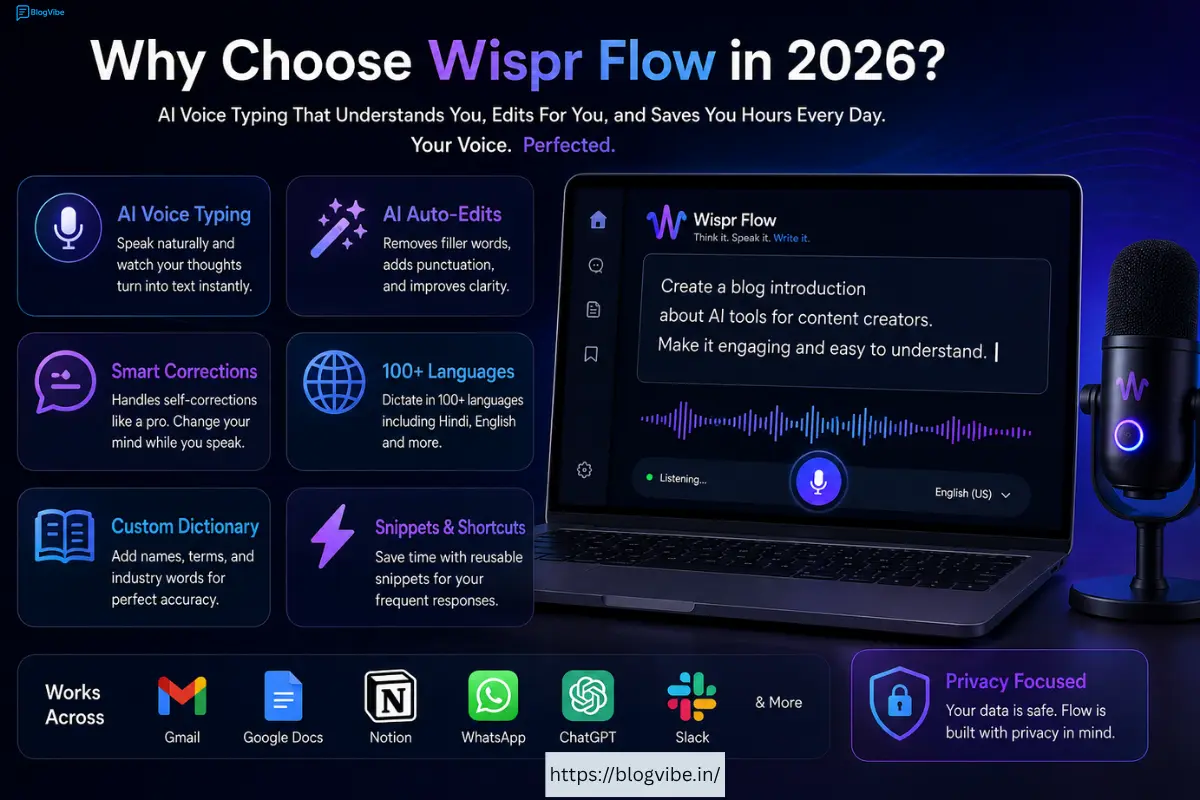
Wispr works across text fields in many applications and is available on Mac, Windows, iPhone and Android. The company says it can work in apps such as Google Docs, Gmail, WhatsApp, Notion, ChatGPT and developer tools. (Wispr)
Try Wispr Flow
If you want to test it yourself, you can use the BlogVibe referral link below:
How Does Wispr Flow Work?
Using Flow is much closer to having a conversation than traditional dictation.
You speak into your device, and the software converts your speech into text.
But instead of simply copying every word, Flow is designed to understand the context of what you’re saying.
It can handle things like:
- Natural speech
- Pauses
- Filler words
- Self-corrections
- Punctuation
- Lists
- Names and unusual words
- Technical terminology
For example, you could say:
“Create a list of three things I need today. One, write my blog post. Two, check my emails. Three, create a YouTube script.”
The software can format that speech into a structured list rather than leaving you with one long sentence.
This makes voice typing much more practical for everyday work.
My Experience With Wispr Flow
The biggest attraction of Wispr is the ability to think out loud and turn those thoughts into usable text.
When you’re typing, you often stop because you don’t know exactly how to phrase something.
With voice typing, you can simply start talking.
For example, if you’re writing an article, you might explain your thoughts for several minutes without worrying about perfect grammar. Once you’ve finished, you have a usable draft that can be edited.
This can be especially useful for bloggers and content creators.
Instead of typing:
“Today we’re going to discuss the best AI tools for content creators…”
you can simply explain the entire introduction verbally.
Flow’s AI editing is then designed to make the output cleaner and easier to read.
The software also supports more than 100 languages, including Hindi, which makes it particularly interesting for multilingual users. (Wispr ai)
Another benefit is that Flow works across different devices, so you don’t have to completely change your workflow when moving from a computer to a phone. (Wispr ai)
However, voice typing isn’t automatically better for everyone. If you’re already an extremely fast typist, the benefit may be smaller.
Who Is Wispr Flow For?
Wispr ai can be useful for many different types of users.
Bloggers and Writers
Bloggers can use Flow to create:
- Article drafts
- Blog introductions
- Outlines
- Research notes
- Product reviews
- Emails
- Content ideas
For people who struggle with writer’s block, speaking can feel much easier than staring at a blank page.
YouTubers and Content Creators
Content creators can dictate:
- Video scripts
- Shorts scripts
- YouTube descriptions
- Social media posts
- Video ideas
- Captions
You can explain your idea naturally and then edit the resulting text before publishing.
Students
Students can use voice typing for notes, brainstorming, assignments and other writing tasks.
Wispr ai also has a student offering, with the current student program providing a free option for eligible students under its latest plan structure. (Wispr ai Help Center)
Developers
Developers have a different problem with voice typing because programming contains unusual terminology, symbols and naming conventions.
Wispr ai is designed to work with developer terminology and workflows, making it useful for people who work with code as well as normal text. (Wispr ai)
Business Professionals
If you spend hours writing emails, reports, messages and documents, speaking may be considerably faster than typing everything manually.
Key Features of Wispr Flow
1. AI Voice Typing
Voice typing is the foundation of Flow.
You speak, and the software turns your speech into text inside the application you’re using.
The advantage is that you don’t have to constantly switch to a separate transcription application. Flow is designed to work directly inside supported text fields. (Wispr ai)
2. AI Auto-Edits
This is where Flow becomes more than basic dictation.
The AI can clean up spoken language by removing unnecessary filler words and improving the structure of your text.
Wispr ai describes its system as turning rambling speech into clear, polished writing. (Wispr ai)
That means you can focus more on your ideas and less on making every sentence perfect while speaking.
3. Automatic Punctuation
You don’t need to manually say “comma” after every phrase.
Flow can detect punctuation from your speech and pauses.
This makes the experience feel much more natural.
4. Self-Corrections
People constantly change their minds while talking.
You might say:
“Let’s meet at 5 PM… no, actually 6 PM.”
Flow is designed to understand this type of correction rather than treating both statements as separate pieces of text.
This is one of the features that makes AI dictation more practical than traditional speech-to-text.
5. 100+ Languages
Wispr ai supports 100+ languages, including Hindi, English, Spanish, Chinese, Korean and Arabic. (Wispr ai)
For users who regularly switch between languages, this can be a significant advantage.
6. Personal Dictionary
Names, brands and technical terms aren’t always easy for speech recognition software.
Flow includes a custom dictionary so you can add words that you frequently use.
This can make the system more useful over time.
7. Snippets
If you repeatedly type the same sentence or paragraph, Snippets can save you time.
For example, you could create reusable text for:
- Email introductions
- Customer responses
- Meeting information
- Social media bios
- Frequently used messages
Instead of repeatedly typing the same thing, you can use a shortcut.
8. Command Mode
Flow Pro includes Command Mode, which allows users to use AI commands for editing and modifying text. (Wispr ai)
This can be useful when you want to change something you’ve already dictated without manually editing every word.
9. Cross-Platform Support
Wispr ai is available on:
- Mac
- Windows
- iPhone
- Android
Your workflow can therefore move between your computer and phone instead of being tied to one device. (Wispr ai)
Is Wispr Flow Free?
Yes, Wispr ai has a free Basic plan.
However, the amount of dictation available depends on the device.
The current pricing information lists:
- Mac/Windows: 2,000 words per week
- iPhone: 1,000 words per week
- Android: Unlimited words currently listed as a limited-time offer
- 100+ languages
- Custom dictionary
- Snippets
- Privacy Mode (Wispr ai)
Wispr Flow also provides a 14-day Pro trial without requiring a credit card. (Wispr ai)
So if you only want to test the product, you don’t necessarily need to pay immediately.
Wispr Flow Download Windows
If you’re searching for Wispr ai download Windows, the software is available for Windows.
The important advantage is that you can use Flow while working inside your normal applications instead of constantly opening a separate transcription website.
Windows users can therefore use voice typing for documents, emails, AI prompts, messages and other supported text fields.
If you want to get started through BlogVibe, use:
Wispr ai Login
After installing Wispr ai, you’ll need to sign in to your account.
Once logged in, your Flow setup can be used across supported devices.
This is useful if you work on a laptop during the day but also use your phone for messages and notes.
Your personal dictionary and settings are part of the experience designed to follow you across devices. (Wispr Flow)
Wispr ai Chrome Extension
One common search is the Wispr ai Chrome extension.
The reason is obvious: many people spend most of their day inside a web browser.
Wispr ai is designed to work with web applications and text fields, allowing users to dictate inside browser-based workflows rather than copying their speech into a separate transcription tool.
This can be useful for Gmail, online documents, ChatGPT and other web-based applications.
The main idea is simple: wherever you normally type, Flow aims to let you speak instead.
Wispr ai Pricing
Wispr ai currently offers different plans for individual users, teams and larger organizations.
Flow Basic — Free
The Basic plan is designed for people who want to try voice typing or don’t need unlimited usage.
It includes limited weekly dictation, 100+ languages, custom dictionary, snippets and Privacy Mode. (Wispr Flow)
Flow Pro — $15/User/Month
The Pro plan provides unlimited dictation across supported devices.
It also includes features such as Command Mode, prioritized support, early access to features and team collaboration. (Wispr Flow)
Annual billing is currently around 20% cheaper than paying monthly for a full year. (Wispr Flow Help Center)
India Pricing
For users in India, Wispr Flow currently lists:
₹400/user/month — monthly
₹320/user/month — annual billing
The exact price displayed during checkout can depend on your billing details. (Wispr Flow)
Wispr Flow Free Alternative
If you are looking for a Wispr Flow free alternative, your first option may simply be the built-in voice typing available on your phone or computer.
These tools can work well when you only need basic speech-to-text.
The difference is that Wispr Flow focuses more heavily on AI-powered cleanup and natural dictation.
So the choice depends on your requirements.
Choose a basic free option if:
- You rarely use voice typing
- You only need simple transcription
- You don’t need advanced AI editing
Consider Wispr Flow if:
- You dictate every day
- You write long articles
- You create lots of AI prompts
- You want automatic cleanup
- You switch between devices
- You need multilingual support
Wispr Flow Alternatives
There are many speech-to-text and AI writing tools available, but they aren’t all designed for the same purpose.
Some focus on meeting transcription.
Others focus on AI writing.
Some are built into operating systems.
Wispr Flow is positioned more specifically around everyday voice typing across applications.
That makes it most interesting for users who want to replace a significant amount of keyboard typing with speech.
If you’re only looking for occasional dictation, a free built-in solution may be enough.
If voice becomes a major part of your workflow, a dedicated tool such as Flow can make more sense.
Wispr Flow Pros and Cons
Pros
- AI-powered voice typing
- Works across apps and text fields
- Supports 100+ languages
- Automatic punctuation
- AI-powered text cleanup
- Handles self-corrections
- Custom dictionary
- Snippets
- Command Mode
- Mac, Windows, iPhone and Android support
- Free plan available
- Pro trial available
- Team features
Cons
- Free plans have usage limits on some devices
- Pro requires a subscription
- Heavy users may need the paid plan
- Voice typing isn’t ideal for everyone
- Internet connectivity is required for the service
Frequently Asked Questions
Is Wispr Flow free?
Yes. Wispr Flow has a free Basic plan with usage limits depending on the platform. There is also a 14-day Pro trial. (Wispr Flow)
Does Wispr Flow work on Windows?
Yes. Wispr Flow supports Windows as well as Mac, iPhone and Android. (Wispr Flow)
Can I use Wispr Flow on my phone?
Yes. Wispr Flow is available for iPhone and Android. (Wispr Flow)
Does Wispr Flow support Hindi?
Yes. Wispr Flow supports more than 100 languages, including Hindi. (Wispr Flow)
Does Wispr Flow have a Chrome extension?
Flow is designed to work with web applications and browser-based text fields, allowing voice typing within supported web workflows.
What is the Wispr Flow free alternative?
For basic dictation, the built-in voice typing features on your phone or computer are free alternatives. However, Flow focuses more on AI cleanup, natural corrections and advanced voice workflows.
How much does Wispr Flow cost?
The current Pro plan is $15 per user/month, while annual billing provides about a 20% discount. India pricing currently starts at ₹400 per month or ₹320 per month when billed annually. (Wispr Flow)
Is Wispr Flow worth it?
If you regularly type long articles, emails, scripts, prompts or documents, it is definitely worth testing.
If you rarely type or already prefer traditional keyboards, the free plan may be enough.
Final Verdict
So, should you try Wispr Flow in 2026?
I think it’s worth trying if you spend a lot of time typing.
The biggest selling point isn’t simply voice-to-text. Phones and computers have had basic dictation for years.
The difference is the AI layer.
Wispr Flow attempts to understand the way people actually speak. It can clean up filler words, handle corrections, add punctuation and turn rough spoken thoughts into more polished writing.
Its support for 100+ languages, multiple platforms, custom vocabulary and AI editing makes it a strong option for people who want voice to become a serious part of their productivity workflow. (Wispr Flow)
For bloggers and creators, it can make brainstorming and first drafts easier.
For professionals, it can reduce repetitive typing.
For developers, voice-based workflows can make it easier to communicate with coding tools.
And because there’s a free plan, you don’t have to commit immediately.
My Verdict:
Best for: Bloggers, content creators, developers, students and professionals.
Best feature: Natural AI-powered voice typing.
Main drawback: Free usage limits and the ongoing Pro subscription for heavy users.
Ready to try it?
If you want to see whether speaking is faster than typing for your own workflow, you can start with Wispr Flow through the BlogVibe referral link:
👉 Try Wispr Flow with BlogVibe
Bottom line: If your ideas come faster than your fingers can type, Wispr Flow is a productivity tool worth putting to the test.

