
GitHub Copilot has changed significantly from the simple AI coding assistant it was a few years ago. In 2026, it is no longer just a tool that predicts the next line of code. GitHub has expanded Copilot into an AI-powered development platform with chat, coding agents, code review, cloud-based development workflows, command-line support, and access to multiple AI models.

For developers, the biggest question is no longer whether AI can help with coding. The real question is whether GitHub Copilot is worth paying for when there are many free and competing AI coding tools available.
In this GitHub Copilot review 2026, we will look at its features, pricing, latest news, advantages, disadvantages, and overall value for different types of developers.
What Is GitHub Copilot?
GitHub Copilot is an AI coding assistant developed by GitHub and Microsoft. It integrates directly into popular development environments and GitHub itself, helping developers write, understand, modify, debug, and review code.
Copilot can generate code from natural-language instructions, explain existing code, suggest improvements, help troubleshoot errors, and work on larger development tasks through agent-based features.
The biggest change in 2026 is the shift toward agentic development. Instead of simply asking Copilot to generate one function, developers can give it a larger task and allow it to inspect files, make changes, reason through problems, and work across a repository.
This makes Copilot much closer to an AI development partner than a traditional autocomplete tool.
GitHub Copilot News Today: August 2026
GitHub Copilot continues to receive frequent updates in 2026.
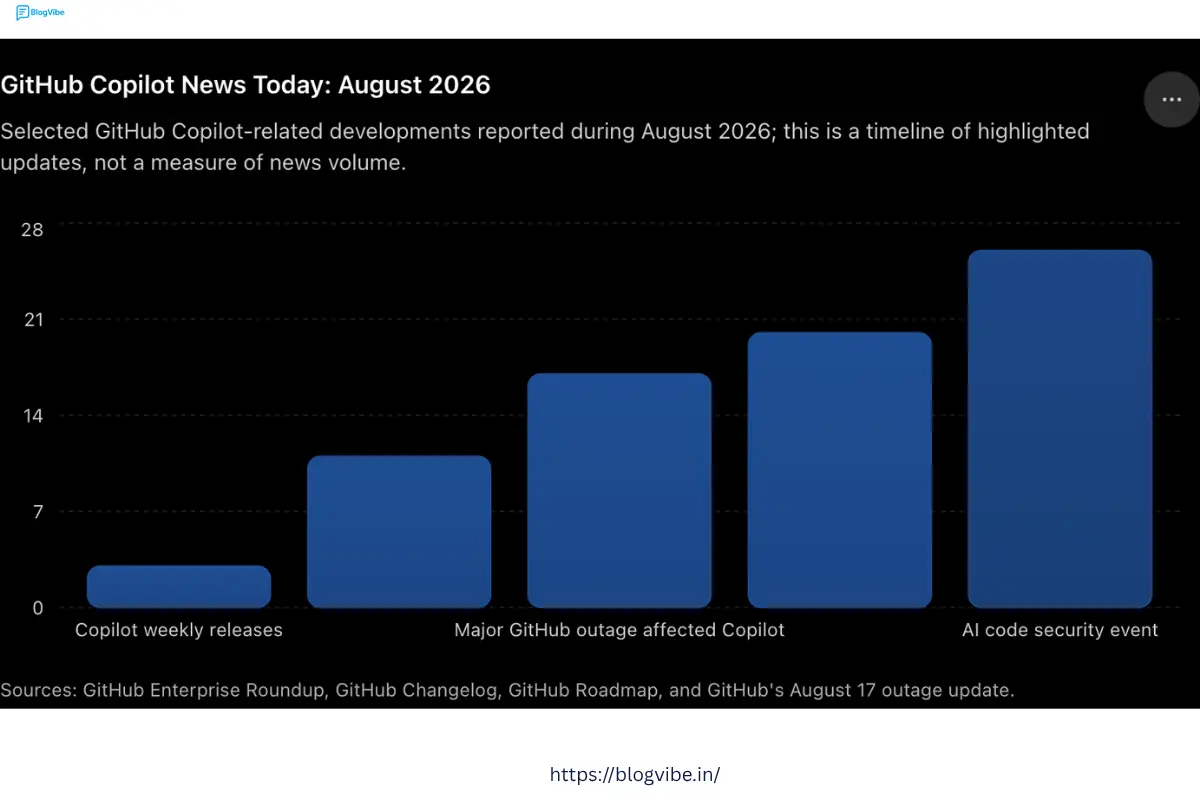
One of the most important recent developments is the expansion of Copilot into collaborative agent workflows. In August 2026, GitHub announced shared agentic work with GitHub Copilot in Microsoft Teams. Developers can start a Copilot cloud agent session from a Teams conversation, allowing participants to provide context, discuss the task, and guide the agent’s work. The work can then continue across other Copilot surfaces.
GitHub has also been focusing heavily on enterprise controls. For example, recent updates added enterprise-managed settings for Copilot in JetBrains IDEs. Administrators can control plugins, MCP server access, OpenTelemetry settings, and permission modes.
However, reliability has also been a major topic recently. On August 17, 2026, GitHub experienced a significant outage lasting 7 hours and 47 minutes that affected GitHub.com, authentication, GitHub Actions, APIs, pull requests, issues, and Copilot. GitHub subsequently published an update describing the incident and its plans to improve reliability.
For developers who depend on GitHub and Copilot for production work, reliability is an important consideration.
GitHub Copilot News December 2025
December 2025 was part of a period in which AI development tools were rapidly moving toward agent-based programming.
GitHub’s broader 2025 development direction showed that AI agents were becoming an increasingly important part of software development. GitHub’s 2025 Octoverse report highlighted major changes in developer workflows as AI, agents, and typed programming languages continued to influence the software ecosystem.
The significance of this period for Copilot is that GitHub was moving beyond the traditional autocomplete model.
Instead of only predicting code, Copilot increasingly became capable of understanding development tasks, interacting with repositories, assisting with pull requests, reviewing code, and performing multi-step operations.
This trend has continued into 2026 and is one of the biggest reasons Copilot feels substantially different from earlier versions.
GitHub Copilot Pricing 2026
GitHub Copilot now offers several individual plans, including Free, Pro, Pro+, and Max.
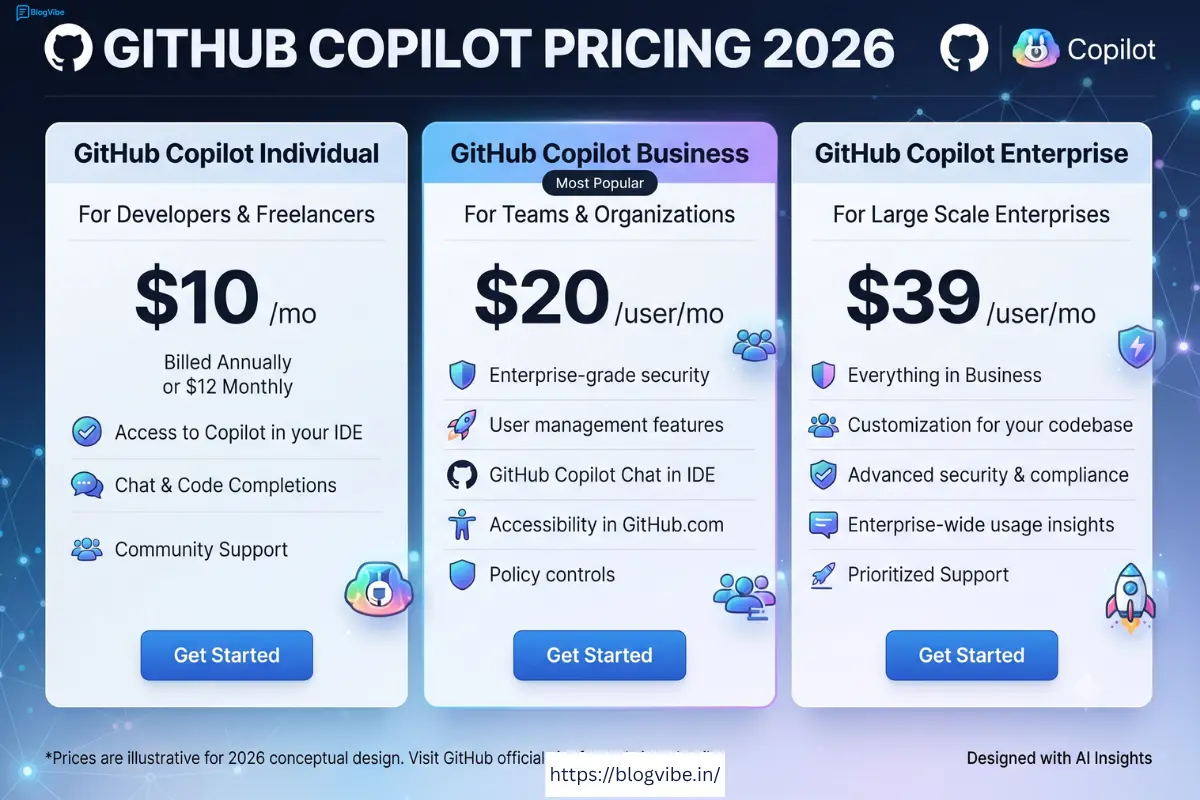
The Free plan costs $0 per month and provides limited Copilot usage. GitHub currently lists 2,000 code completions per month along with limited chat and agent usage.
Copilot Pro costs $10 per month. It is designed for everyday developers who want access to more advanced Copilot capabilities, including agents, code review, model selection, and unlimited code completion and next-edit suggestions.
Copilot Pro+ costs $39 per month and is designed for developers who require more access to premium models and higher AI usage.
GitHub also offers Copilot Max at $100 per month for developers who have sustained, high-volume agentic workloads.
For businesses, Copilot Business is priced at $19 per user per month, while Copilot Enterprise is $39 per user per month.
GitHub AI Credits Explained
One of the biggest changes developers need to understand in 2026 is GitHub AI Credits.
GitHub moved Copilot toward usage-based billing in June 2026. Instead of relying entirely on the previous premium-request system, Copilot usage is now measured through GitHub AI Credits.
One AI credit is equivalent to $0.01 in usage value. The number of credits consumed depends on the model and the amount of tokens used during an interaction.
This is particularly important for developers using powerful models or long-running agents.
A simple coding question may consume relatively little usage, while a large agent task involving many files and a sophisticated model can consume considerably more.
Code completions and next-edit suggestions remain unlimited on paid plans and do not consume AI Credits.
This new pricing structure makes Copilot more flexible, but it also means heavy users need to pay attention to their usage.
GitHub Copilot Features
1. AI Code Completion
The most recognizable Copilot feature is still code completion.
As you type, Copilot analyzes your code and suggests the next lines or blocks. This can save a significant amount of time when writing repetitive code, functions, configuration files, tests, and common programming patterns.
For experienced developers, this feature can reduce typing and help maintain momentum.
2. Copilot Chat
Copilot Chat allows developers to interact with AI using natural language.
You can ask questions such as:
How does this function work?
Why is this error happening?
Can you optimize this code?
Can you convert this JavaScript function to Python?
Can you write tests for this component?
This makes Copilot useful not only for generating code but also for understanding unfamiliar codebases.
3. Agent Mode
Agent-based development is one of the most important Copilot features in 2026.
Instead of generating a single answer, an agent can work through a larger development task.
For example, you could ask Copilot to investigate an error, identify the relevant files, modify the code, and help implement a solution.
This can be particularly useful when working on larger applications.
However, agent mode also requires more supervision. Developers should review the changes rather than blindly accepting everything the agent produces.
4. Cloud Agent
GitHub Copilot’s cloud agent extends the concept of AI-assisted development beyond the local editor.
A developer can assign work to Copilot and allow the agent to work in a cloud environment. This is useful for tasks that require more than a quick code suggestion.
For teams, this can potentially reduce the amount of time developers spend on repetitive investigation and implementation work.
5. Code Review
Copilot can also help review code and identify potential problems.
AI-powered code review can provide another layer of feedback before changes are merged.
This can be useful for individual developers who do not have another developer available for every small change.
For professional teams, however, AI code review should complement human review rather than completely replace it.
6. Multiple AI Models
Another major advantage of Copilot in 2026 is model choice.
GitHub provides access to multiple AI models and allows eligible users to select models depending on the task and plan.
This is important because different models can perform differently on coding, reasoning, debugging, documentation, and complex agent tasks.
The model-based pricing system also means that developers should consider both capability and usage cost when selecting models.
GitHub Copilot Supported Editors
Copilot works across many popular development environments.
Supported environments include Visual Studio Code, Visual Studio, JetBrains IDEs, Xcode, Neovim, Eclipse, Zed, and other supported development tools. It is also integrated into GitHub itself and provides command-line capabilities.
This wide compatibility is one of Copilot’s strongest advantages.
Developers do not necessarily need to change their entire workflow to use it.
GitHub Copilot Pros
There are several reasons developers continue to choose Copilot.
First, its integration with GitHub is excellent. GitHub already sits at the center of many software development workflows, so having AI capabilities connected to repositories, pull requests, issues, and development environments creates a convenient experience.
Second, Copilot supports multiple development environments.
Third, the transition toward agentic workflows makes Copilot much more powerful for complex tasks.
Fourth, developers can choose between different models depending on their needs.
Fifth, the Free plan gives new users an opportunity to test Copilot before paying.
Finally, Copilot is particularly attractive to developers who already use GitHub extensively.
GitHub Copilot Cons
Despite its advantages, Copilot is not perfect.
The first major disadvantage is cost for heavy users.
The introduction of AI Credits means that developers using agents and premium models need to monitor their usage. Heavy workloads can make the economics less predictable than traditional fixed-price software subscriptions.
The second problem is that AI-generated code can contain mistakes.
Copilot may produce code that looks correct but contains logical bugs, security weaknesses, inefficient implementations, or incorrect assumptions.
The third issue is overdependence.
New programmers may become too dependent on AI suggestions without learning the underlying programming concepts.
The fourth disadvantage is reliability. Recent GitHub incidents demonstrate that even a major cloud development platform can experience significant outages, and Copilot availability can be affected when GitHub services experience problems.
Is GitHub Copilot Worth Paying For?
For many developers, the answer is yes, but it depends on how you work.
If you are a professional developer who spends several hours every day writing code, Copilot Pro at $10 per month can provide strong value.
The ability to generate code, explain code, debug problems, create tests, use agents, and work directly inside your development environment can save substantial time.
For students and beginners, the Free plan may be enough to start.
If you are learning programming, paying immediately may not be necessary. It is better to first understand programming fundamentals and then use Copilot to increase productivity.
For developers who frequently use advanced AI models and large agent workflows, Pro+ or Max may make sense. However, the higher subscription cost means the additional usage should provide enough value to justify the expense.
Who Should Buy GitHub Copilot Pro?
Copilot Pro is a good option for:
Professional developers
Freelance programmers
Web developers
App developers
Software engineers
Developers working on large GitHub projects
Developers who frequently write repetitive code
Developers who want AI agents inside their coding workflow
If you spend many hours coding every week, $10 per month can be a relatively small expense compared with the amount of time Copilot may save.
Who Should Avoid Paying?
You probably do not need a paid Copilot plan if you only code occasionally.
Beginners who are still learning basic programming concepts may also want to use the Free plan first.
If you already have another AI coding assistant that meets your needs, paying for Copilot may not provide enough additional value.
You should also avoid paying for a higher-tier plan simply because it offers more AI credits. Choose the plan according to your actual usage.
GitHub Copilot vs Traditional Coding
Traditional programming requires developers to manually search documentation, write code, debug problems, create tests, and investigate errors.
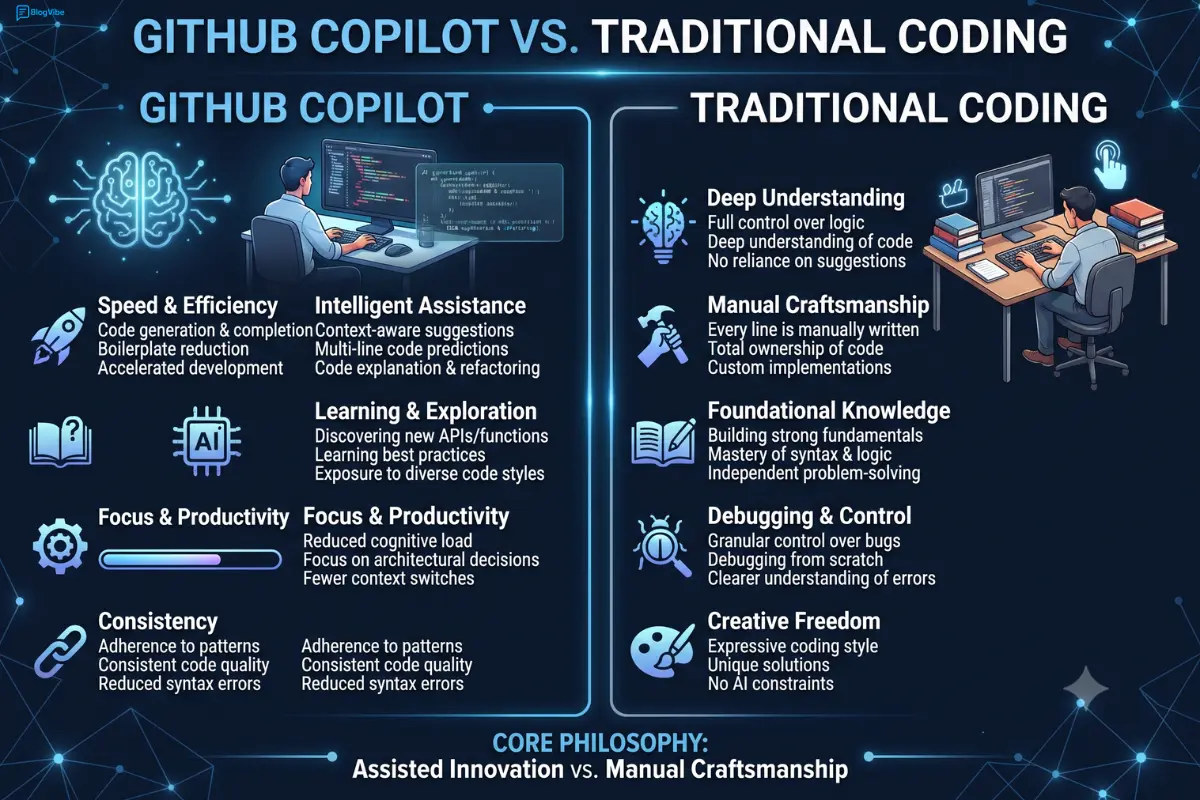
Copilot can automate or accelerate many of these steps.
However, it does not eliminate the need for programming knowledge.
A developer still needs to understand architecture, security, databases, APIs, debugging, testing, and deployment.
The best way to use Copilot is as a productivity tool rather than as a replacement for programming knowledge.
Is GitHub Copilot Good for Beginners?
Yes, but beginners should use it carefully.
A copilot can explain difficult concepts and provide examples, which makes it useful while learning.
The problem occurs when a beginner accepts generated code without understanding it.
For example, if Copilot writes a complete Python application, a new programmer might be able to run it without understanding how the application works.
A better approach is to ask Copilot to explain each important section and then modify the code yourself.
This turns Copilot into a learning assistant rather than a shortcut around learning.
Final Verdict: Is GitHub Copilot Worth Paying For in 2026?
GitHub Copilot has become much more than an AI autocomplete tool.
In 2026, its strongest features include AI code completion, chat, model selection, agent mode, cloud agents, code review, command-line support, and integration across popular development environments.
The biggest change is the move toward usage-based AI Credits. This gives developers more flexibility but makes usage monitoring more important, particularly for people who use advanced models and long-running agents.
For a professional developer, Copilot Pro is one of the more compelling AI coding subscriptions because its relatively low monthly price provides access to a broad collection of development features.
For beginners, the Free plan is a good starting point.
For heavy AI users, Pro+ and Max can provide considerably more capacity, but the higher prices need to be justified by actual productivity gains.
Overall, GitHub Copilot is worth paying for in 2026 if you regularly write software and use GitHub as part of your development workflow. It is less compelling for occasional programmers or users who already have a free AI coding solution that satisfies their needs.
The most important thing to remember is that Copilot should assist the developer, not replace the developer. The developers who get the most value from it are likely to be those who understand their code, review AI-generated changes, test everything properly, and use AI to accelerate their skills rather than avoid learning.
Frequently Asked Questions
Is GitHub Copilot free in 2026?
Yes. GitHub offers a Free plan with limited usage. GitHub currently lists 2,000 monthly code completions and limited chat and agent usage for the Free plan.
How much does GitHub Copilot Pro cost?
GitHub Copilot Pro costs $10 per user per month.
Is GitHub Copilot worth $10 a month?
For developers who code regularly, it can be. The value depends on how much time the tool saves and how frequently you use its AI features.
What are GitHub AI Credits?
GitHub AI Credits are the usage-based billing system used for many Copilot AI interactions. One AI credit represents $0.01 of usage value, and consumption depends on the model and token usage.
Can GitHub Copilot replace programmers?
No. Copilot can automate many coding tasks, but developers still need to make architectural decisions, review code, test applications, manage security, and understand the software they build.
Is GitHub Copilot good for Python?
Yes. Copilot can help with Python code generation, debugging, explanations, testing, refactoring, and project development. However, generated Python code should always be reviewed and tested.
Should beginners use GitHub Copilot?
Beginners can use Copilot, but they should avoid depending on it for everything. Learning programming fundamentals remains important.
What is the biggest change in GitHub Copilot in 2026?
One of the biggest changes is the transition toward agentic development and usage-based AI Credits. Copilot is increasingly capable of handling multi-step development tasks instead of only providing code suggestions.

