
What Is an IT Helpdesk?
An IT helpdesk is a support function that helps employees, customers, or users solve technical problems and get assistance with technology-related issues. It can handle everything from password resets and software problems to hardware issues, account access, network problems, and customer support requests.
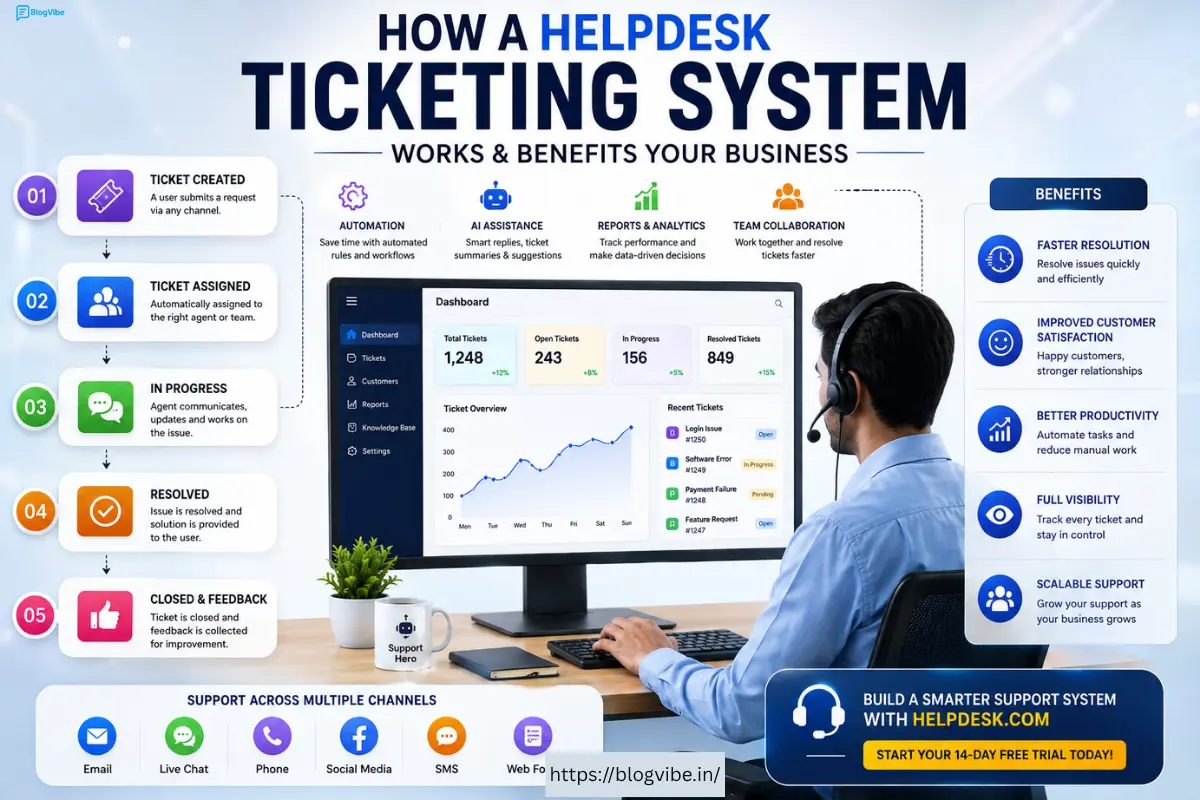
For a modern business, an IT helpdesk is much more than a phone number or email inbox. Companies increasingly use helpdesk software to organize support requests, assign tickets to the right person, automate repetitive tasks, track response times, and analyze support performance.
A good helpdesk ticketing system gives support teams one centralized place to manage incoming requests instead of relying on scattered emails, spreadsheets, and chat messages.
One solution worth considering is HelpDesk.com, which provides ticket management, automation, AI-powered assistance, reporting, and multiple communication channels. HelpDesk currently offers a 14-day free trial without requiring a credit card.
👉 Try HelpDesk.com:
https://www.helpdesk.com/?a=hpApFFsDg&utm_campaign=pp_helpdesk-default&utm_source=PP
Why Is an IT Helpdesk Important?
Businesses depend on technology for almost every part of their operations. When employees cannot access applications, customers cannot get answers, or systems stop working, productivity can quickly decline.
An effective IT helpdesk helps organizations:
- Resolve technical problems faster
- Organize support requests
- Prioritize urgent issues
- Assign tickets to appropriate agents
- Track support performance
- Reduce repetitive manual work
- Improve customer satisfaction
- Create a record of previous problems and solutions
- Identify recurring technical issues
- Improve communication between users and support teams
Without a structured support process, important requests can easily become lost in an inbox.
A ticket-based system solves this problem by giving every request a trackable workflow.
What Is a Helpdesk Ticketing System?
A helpdesk ticketing system is software used to collect, organize, assign, track, and resolve support requests.
When someone submits a problem, the system creates a ticket. That ticket can then be categorized, prioritized, assigned to an agent, updated, and eventually closed.
For example:
Customer: “I can’t log in to my account.”
The helpdesk system can create a ticket containing:
- Customer information
- Problem description
- Ticket number
- Priority
- Status
- Assigned support agent
- Previous communication
- Resolution details
This creates a structured process for handling support.
HelpDesk.com includes ticket statuses and priorities, custom fields, tags, automated assignment, ticketing rules, canned responses, and reporting features.
Key Features of a Modern Helpdesk Ticketing System
1. Ticket Management
The foundation of any helpdesk platform is ticket management.
Support agents should be able to create, assign, update, prioritize, and close tickets from a centralized dashboard.
This makes it easier to understand which problems are:
- New
- In progress
- Waiting for a response
- High priority
- Resolved
- Closed
2. Automated Ticket Assignment
Manually assigning every support request can consume a lot of time.
Automation can route incoming tickets to the appropriate person or team based on rules such as:
- Department
- Issue type
- Priority
- Customer
- Language
- Product
- Support category
HelpDesk.com provides automated assignment and ticketing rules designed to reduce repetitive work.
3. AI-Powered Support
Artificial intelligence is becoming an increasingly important part of helpdesk software.
AI can help support teams:
- Draft replies
- Summarize conversations
- Suggest tags
- Improve message wording
- Route tickets
- Automate repetitive responses
HelpDesk.com currently includes AI features such as AI Agents, AI reply suggestions, ticket summaries, tag suggestions, and AI text enhancements depending on the plan.
This can help agents spend less time performing repetitive tasks and more time solving complex customer problems.
4. Reporting and Analytics
A good helpdesk should not only manage tickets—it should also help managers understand support performance.
Important metrics can include:
- Number of tickets
- Response time
- Resolution time
- Ticket volume
- Agent workload
- Customer feedback
- Resolution trends
HelpDesk.com offers reporting capabilities that allow teams to analyze ticket volume, response times, resolution trends, and workload.
5. Multiple Communication Channels
Customers don’t always want to communicate through the same channel.
Modern support platforms can bring different conversations into a centralized workspace.
HelpDesk.com supports channels including email, website chat, Messenger, and SMS, with additional capabilities depending on the plan and configuration.
IT Helpdesk Services: What Do They Include?
IT helpdesk services can vary depending on the size and requirements of a company.
Common IT helpdesk services include:
Technical Troubleshooting
IT support teams help users troubleshoot software, hardware, operating system, and connectivity problems.
Password and Account Support
Helpdesk agents can assist with password resets, account access, permissions, and authentication problems.
Software Support
Users may need assistance installing, configuring, or troubleshooting business applications.
Hardware Support
IT helpdesk teams can handle issues involving computers, printers, monitors, mobile devices, and other equipment.
Network Support
Support teams may help diagnose connectivity problems, Wi-Fi issues, VPN access, and other network-related problems.
Customer Support
A helpdesk can also be used by customer-facing teams to answer product questions, resolve complaints, and manage service requests.
IT Helpdesk Jobs: What Does an IT Helpdesk Technician Do?
If you’re searching for IT helpdesk jobs, you’re looking at one of the common entry points into an IT career.
An IT helpdesk technician typically helps users solve technical problems.
Typical responsibilities may include:
- Answering technical support requests
- Troubleshooting computer problems
- Resetting passwords
- Installing software
- Supporting applications
- Diagnosing connectivity issues
- Managing support tickets
- Escalating complex problems
- Documenting solutions
- Communicating with users
Entry-level helpdesk roles can be useful for people who want to build experience before moving into areas such as system administration, networking, cybersecurity, cloud computing, or IT management.
Helpdesk Jobs: Skills You May Need
If you are looking for helpdesk jobs, technical knowledge is important—but communication skills are equally valuable.
Some useful skills include:
Technical Skills
Depending on the position, employers may look for knowledge of:
- Windows and macOS
- Microsoft 365
- Basic networking
- TCP/IP
- DNS
- VPNs
- Hardware troubleshooting
- Software installation
- Active Directory
- Cloud applications
- Ticketing systems
Communication Skills
Helpdesk professionals frequently work with people who may not have technical knowledge.
Being able to explain a technical problem in simple language can therefore be extremely valuable.
Problem-Solving
IT support involves identifying the cause of a problem and finding an appropriate solution.
A structured troubleshooting process can help technicians solve problems efficiently.
Documentation
Recording what happened and how an issue was solved helps other technicians handle similar problems in the future.
IT Helpdesk vs. Helpdesk: What’s the Difference?
The terms IT helpdesk and helpdesk are sometimes used interchangeably, but they can have slightly different meanings.
An IT help desk usually focuses specifically on technology-related problems.
Examples include:
- Computer problems
- Network issues
- Software errors
- Account access
- Hardware problems
A general helpdesk may handle a broader range of customer or internal support requests.
For example, a company could use a helpdesk for:
- Customer questions
- Product issues
- Billing requests
- Technical support
- Account questions
Modern helpdesk platforms can support multiple departments and workflows.
HelpDesk.com for Business Support
If your company needs a centralized platform for managing support tickets, HelpDesk.com is one option to evaluate.
Its current feature set includes ticketing, automation, AI capabilities, reporting, team collaboration, and multiple support channels.
The platform offers different plans designed for different business sizes.
As of 2026, HelpDesk.com’s pricing page lists:
| Plan | Annual Pricing | Best For |
| Essential | $19/user/month | Small support teams |
| Growth | $79/user/month | Growing teams |
| Enterprise | Custom | Larger organizations |
Monthly billing is listed at $25/user/month for Essential and $99/user/month for Growth. HelpDesk also offers a 14-day free trial.
Pricing and features can change, so it’s always a good idea to check the official pricing page before purchasing.
Benefits of Using HelpDesk.com
Centralized Support
Instead of managing support requests across different inboxes and spreadsheets, teams can organize tickets in one workspace.
Automation
Automation rules can reduce repetitive administrative tasks.
AI Assistance
AI-powered features can help agents draft replies, summarize tickets, and organize support requests.
Team Collaboration
Support teams can organize agents into teams and manage different roles and responsibilities.
Reporting
Managers can monitor support activity and analyze performance.
Scalability
Businesses can choose different plans depending on their support requirements.
Who Should Use a Helpdesk Ticketing System?
A helpdesk ticketing system can be useful for many organizations.
Small Businesses
Small companies can use ticketing software to organize customer questions without building a large IT department.
SaaS Companies
Software companies often receive technical questions, account problems, and feature requests from customers.
E-commerce Businesses
Online stores can use helpdesk software to manage order questions, returns, refunds, shipping requests, and product inquiries.
IT Departments
Internal IT teams can use tickets to manage employee technical issues.
Agencies
Digital agencies can organize client requests and support conversations.
Growing Enterprises
Larger companies can use automation, analytics, teams, and workflows to manage high support volumes.
How to Choose the Best IT Helpdesk Software
Before selecting a helpdesk platform, consider these factors:
1. Ticket Volume
How many support requests does your team receive each month?
2. Team Size
Choose a solution that fits the number of support agents who will actually use it.
3. Automation
Look for automated assignment, workflows, notifications, and repetitive-task management.
4. AI Features
If AI is important to your organization, evaluate exactly what AI functionality is included in each pricing tier.
5. Integrations
Check whether the platform integrates with the tools your business already uses.
6. Reporting
Make sure managers can access the metrics they need.
7. Security
For businesses handling sensitive information, review security and compliance requirements carefully.
HelpDesk.com states that its platform meets standards and frameworks including SOC 2, GDPR, CCPA, PCI DSS (SAQ A), and the Data Privacy Framework.
Is HelpDesk.com Worth Considering in 2026?
For businesses looking for a centralized support platform, HelpDesk.com is worth evaluating.
Its combination of ticket management, automation, AI features, reporting, and multiple communication channels makes it suitable for teams that want to organize their support operations in one place.
The Essential plan starts at $19 per user/month when billed annually, while the Growth plan starts at $79 per user/month annually. There is also a 14-day free trial with no credit card required.
However, the best option depends on your company’s ticket volume, team size, required integrations, budget, and support workflow.
Instead of choosing software solely based on price, test the platform and determine whether it actually improves your team’s workflow.
Final Verdict
An effective IT helpdesk can have a major impact on productivity and customer satisfaction. Whether you’re managing internal IT requests, customer support questions, or technical problems, a structured helpdesk ticketing system can make the entire process easier to organize.
For people searching for IT helpdesk jobs or helpdesk jobs, understanding ticketing systems, troubleshooting, communication, and support workflows can also provide valuable career knowledge.
For businesses looking for IT help desk services and support software, HelpDesk.com offers ticket management, automation, AI-powered tools, analytics, and team collaboration features.
If you’re interested, you can explore the platform and start its free trial here:
👉 Try HelpDesk.com:
https://www.helpdesk.com/?a=hpApFFsDg&utm_campaign=pp_helpdesk-default&utm_source=PP
Frequently Asked Questions
What is an IT helpdesk?
An IT helpdesk is a support function that helps users resolve technical issues involving hardware, software, accounts, networks, and other technology.
What are IT helpdesk jobs?
IT help desk jobs involve providing technical support to users, troubleshooting problems, managing tickets, documenting solutions, and escalating complex issues.
What are helpdesk jobs?
Helpdesk jobs involve assisting customers or employees with questions, technical issues, account problems, product issues, and other support requests.
What is a helpdesk ticketing system?
A helpdesk ticketing system is software that organizes support requests into trackable tickets so agents can assign, prioritize, communicate about, and resolve issues.
What are IT helpdesk services?
IT help desk services can include technical troubleshooting, software support, hardware support, account assistance, network troubleshooting, and general IT support.
Does HelpDesk.com offer a free trial?
Yes. HelpDesk.com currently offers a 14-day free trial without requiring a credit card.
How much does HelpDesk.com cost?
HelpDesk.com’s current pricing starts at $19 per user/month when billed annually for the Essential plan. Growth starts at $79 per user/month annually, while Enterprise pricing is customized.
Affiliate Disclosure: This article contains an affiliate link. If you sign up or purchase through the link, I may earn a commission at no additional cost to you. I only recommend products and services that I believe may be useful to readers.
READ THIS MORE:
APDB Research Service Review 2026: Is It Worth Buying for Affiliate Marketers?

