
AI Video Making: The AI world has changed once more. Google’s Gemini can now handle text, graphics, music, and video all at once, which opens up new opportunities for content creators all over the world. This change in AI video generating technology means that the way we make, edit, and use video material will alter in a big way in 2026 and beyond.
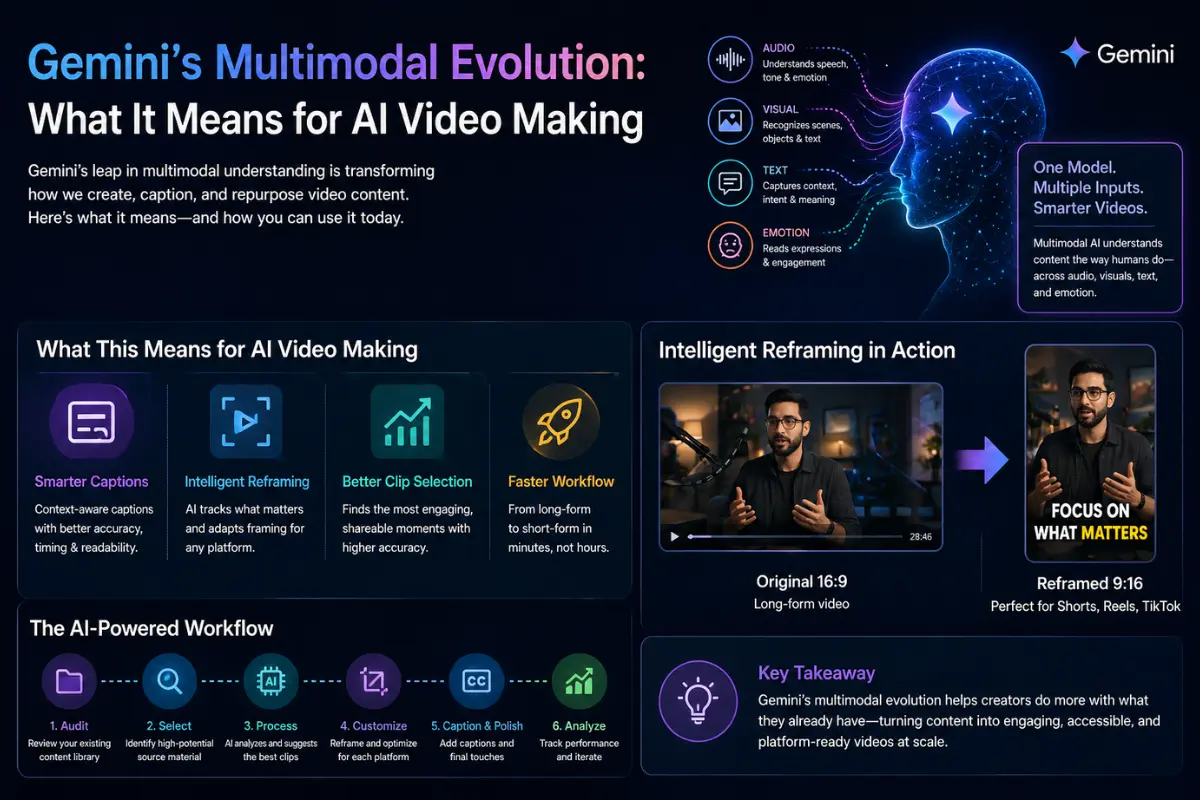
This is really important for content authors and marketers who are overwhelmed by requests. Working with more than one sort of media in a single AI framework makes it possible to have faster workflows, smarter automation, and more creative options. But to really take advantage of these breakthroughs, you need to cut through the hoopla and focus on how they can be used in real life.
What the Multimodal Upgrade for Gemini Really Changes
Multimodal AI isn’t new, but Gemini’s newest version is a big step forward in how these systems perceive context in diverse sorts of media. The model now sees text, graphics, and audio as parts of a single story instead of as distinct inputs.
The Change in Technology
Older AI models used different processing pipelines for different sorts of media. You’d put in text and get text out. Put in a picture and get a description back. Gemini’s method sees all inputs as part of a single knowledge, which means:
Sound cues help people understand what they see, and vice versa.
The model’s processing of supplementary media is influenced by the text context.
Temporal relationships in video are comprehended in conjunction with spoken and visual components.
Output generation can effortlessly combine different modalities.
What that means in the real world
For people who generate videos, this means that AI systems will be better at figuring out what makes content interesting. When an AI can tell that a speaker’s tone changes during a certain passage, along with their body language and the music in the background getting louder, it may make better choices about which parts to pay attention to.
This ability to understand the context is what makes some AI video products helpful and others just gimmicky. The technology is getting better at interpreting content like people do, not merely analyzing pictures and waveforms.
The Competitive Landscape: Buzzy and More
Gemini’s advancements come at the same time as other progress in AI video automation. Tools like Buzzy have come out that promise to make hundreds of films quickly. This is one way that many creators are trying to deal with the problem of too much material.
Trade-offs between Volume and Quality
It sounds great that you can make 500 or more videos in a matter of minutes, but what do those videos really do? Tools for bulk production often make content that:
Doesn’t have the nuance that gets people involved
Doesn’t take advantage of optimization options that are specific to each platform
Needs a lot of editing and inspection by hand
Might not fit with the brand’s voice or what the audience expects
The smarter way to go about it is to focus on quality changes instead of just quantity. Instead than making a lot of generic content, it’s best to use existing high-performing material and smartly adapt it for different platforms and demographics.
When Multi-Model Approaches Work
The best processes use a mix of specialized tools instead than just one AI system for everything. One model might be quite good at finding interesting parts in long-form content. Another one makes captions with better accuracy. A third one makes sure that aspect ratios and frame are right for each platform.
This multi-model theory says that no one AI system can accomplish everything correctly. By putting together many specialized skills, producers acquire better results than a single solution can give them.
How Multimodal AI Improves the Use of Video
For content developers, the most exciting part is when multimodal understanding and video repurposing come together. When AI can really grasp video information in all its dimensions, it becomes much smarter at repurposing.
Choosing Clips More Smartly
Basic metrics like audio levels, facial detection, and keyword matching in transcripts are very important for traditional clip selection. Multimodal AI adds levels of understanding:
Finding emotional resonance by using both sound and sight cues
Analysis of topic coherence that makes sure clips make sense on their own
Predicting engagement based on patterns learned from material that works
Brand alignment scoring that matches clips to your brand’s voice
Here’s a clean, engaging rewrite of your content with improved flow and clarity:
Context-Aware Captioning
Modern multimodal AI systems go beyond simple transcription—they understand context. When a speaker refers to something on screen, the AI recognizes that connection. If background noise interferes, it adjusts confidence, formatting, and clarity accordingly.
Tools like OpusClip use this intelligence to create captions that communicate meaning, not just words. This results in better viewer retention and stronger accessibility.
Intelligent Reframing
Turning horizontal videos into vertical formats used to be a compromise—either crop important visuals or accept awkward framing. Multimodal AI changes that.
It tracks key elements in each frame—faces, products, text—and dynamically adjusts the layout to keep what matters in focus.
Practical Workflow: Using AI in Video Content
Step 1: Audit Your Content Library
Start with what you already have. Review long-form videos, webinars, podcasts, and live streams. List them along with their topics and duration.
Step 2: Identify High-Value Content
Focus on material that includes:
- Clear audio and speech
- Engaging visuals or demonstrations
- Evergreen topics
- Emotional or memorable moments
Step 3: Use AI Tools
Upload content into an AI tool like OpusClip. It analyzes engagement potential, topic relevance, and platform fit. Review and select the best clips.
Step 4: Optimize for Each Platform
Different platforms require different styles. Adjust clips for TikTok, Instagram Reels, YouTube Shorts, and LinkedIn. Apply consistent branding.
Step 5: Add Captions and Polish
Generate captions automatically, then refine them. Adjust timing, highlight key phrases, and ensure they enhance the video.
Step 6: Analyze Performance
Track results across platforms. Identify what works best and refine your strategy accordingly.
Common Mistakes to Avoid
- Publishing without reviewing AI output
- Ignoring platform-specific optimization
- Prioritizing quantity over quality
- Losing your brand voice
- Skipping strategy
- Overlooking accessibility
Pro Tips for Better Results
- Batch process similar videos
- Create reusable templates
- Treat AI suggestions as a starting point
- Experiment with caption styles
- Build a clip library
- Post at optimal times based on data
What This Means for Content Strategy
Democratized Quality
High-quality content no longer requires large budgets or teams. AI enables individuals to compete at a professional level.
Faster Execution
React quickly to trends by repurposing existing content in hours instead of days.
Sustainable Content Creation
Repurposing reduces burnout and allows consistent publishing without sacrificing quality.
FAQs
How is multimodal AI better at selecting clips?
It analyzes audio, visuals, emotion, and context together, identifying truly engaging moments rather than just technically usable ones.
Can AI maintain brand consistency?
Yes, if you define brand elements like colors, fonts, and style upfront.
What content works best?
Long-form content with clear audio and natural engagement peaks—like podcasts, webinars, and interviews.
Does AI improve captions?
Yes, it uses context and visuals for more accurate timing and meaning.
Will AI replace creativity?
No. It handles repetitive tasks, freeing you to focus on strategy and creativity.
How fast can you see results?
Many creators see results within a week, with initial clips ready within hours.
Key Takeaways
- Multimodal AI understands video holistically
- Combining tools often works better than relying on one
- Quality repurposing beats mass production
- Existing content is your biggest asset
- Platform optimization is still essential
- Human creativity remains the differentiator
What to Do Next
Focus on building a smart workflow instead of chasing every new tool. Start by reviewing your existing content, identify high-potential clips, and use AI to scale efficiently—while keeping your unique voice intact.
AI Christmas Prompts

