
Introduction
Managing spreadsheets has always been an essential part of business, education, finance, and project management. However, creating formulas, organizing data, cleaning duplicate entries, and generating reports manually can consume hours every week. Thanks to recent advances in artificial intelligence, these repetitive tasks are becoming faster and easier than ever.
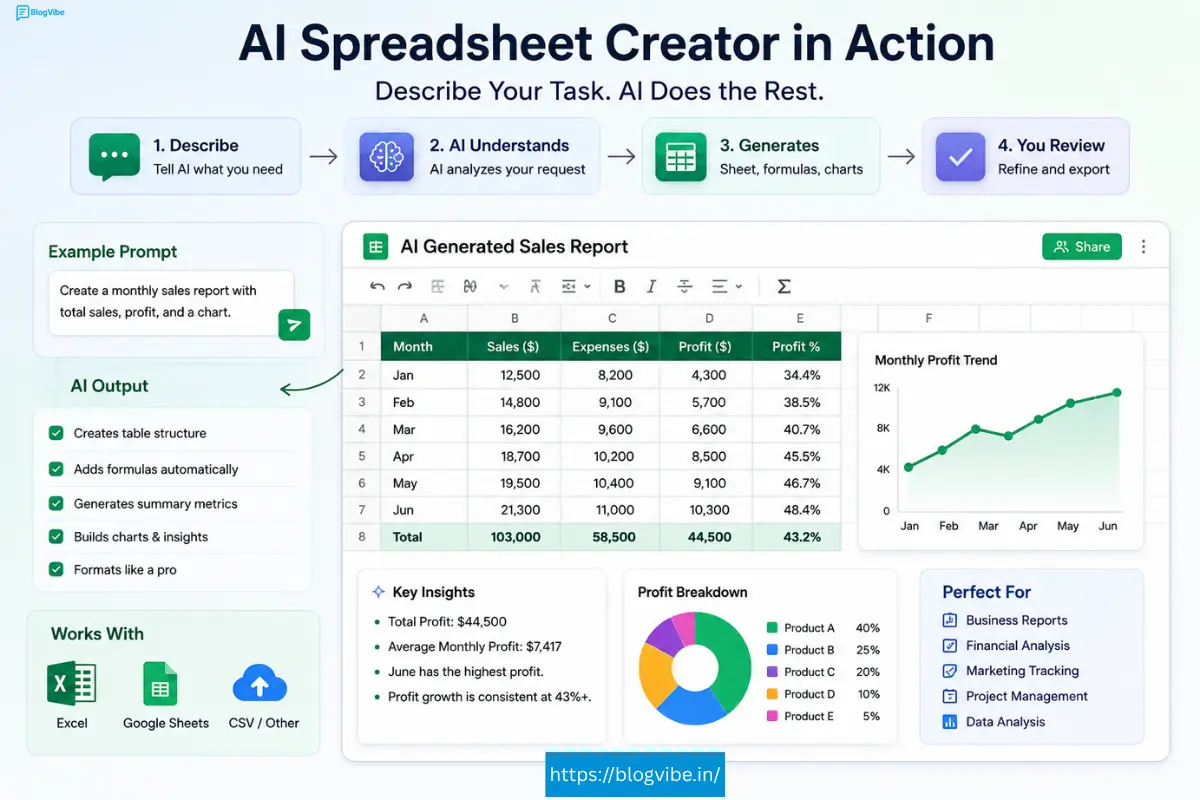
An AI spreadsheet creator helps users build spreadsheets, generate formulas, analyze datasets, create charts, automate workflows, and even answer questions about their data using simple natural language prompts. Instead of memorizing complex Excel functions, you can simply tell the AI what you need, and it creates the spreadsheet for you.
Whether you’re a business owner, student, accountant, marketer, data analyst, or freelancer, AI-powered spreadsheet software can dramatically improve productivity while reducing errors.
In this complete guide, you’ll learn how AI spreadsheet creators work, their key features, benefits, the best AI spreadsheet tools available in 2026, and how to choose the right solution for your needs.
What Is an AI Spreadsheet Creator?
An AI spreadsheet creator is software that uses artificial intelligence to create, edit, organize, analyze, and automate spreadsheets. Instead of manually entering formulas or formatting cells, users can give simple text instructions such as:
- Create a monthly sales tracker.
- Build a budget spreadsheet.
- Analyze customer revenue.
- Generate profit calculations.
- Create attendance sheets.
The AI automatically generates the spreadsheet structure, formulas, charts, tables, and formatting.
Modern AI spreadsheet tools integrate with Microsoft Excel, Google Sheets, cloud databases, CRMs, accounting software, and business intelligence platforms.
Why AI Spreadsheet Creators Are Becoming Popular
Businesses generate massive amounts of data every day. Manual spreadsheet management often leads to:
- Human errors
- Time-consuming calculations
- Incorrect formulas
- Duplicate records
- Poor reporting
AI removes much of this manual work through intelligent automation.
Some common uses include:
- Financial planning
- Budget management
- Inventory tracking
- Sales reporting
- Marketing analytics
- HR management
- Education
- Project management
- Customer databases
Key Features of an AI Spreadsheet Creator
1. AI Formula Generator
One of the biggest advantages is the AI formula generator. Instead of searching online for complicated formulas, simply describe your requirements.
Example:
Calculate total sales after tax.
The AI instantly generates the correct Excel formula.
2. Automatic Table Creation
An AI table generator builds organized tables within seconds.
Examples include:
- Employee databases
- Expense trackers
- Sales reports
- Inventory lists
- Customer records
This eliminates hours of manual formatting.
3. AI Data Analysis
Modern spreadsheet AI tools can instantly perform AI data analysis by identifying:
- Trends
- Growth patterns
- Revenue changes
- Outliers
- Forecasts
- Customer behavior
Instead of creating Pivot Tables manually, AI generates insights automatically.
4. Natural Language Commands
Users no longer need advanced Excel knowledge.
Instead of writing formulas like:
=SUM(B2:B100)
You simply type:
Sum all sales values.
The AI understands the request and performs the calculation.
5. Spreadsheet Automation
One of the biggest productivity improvements is spreadsheet automation.
Tasks that can be automated include:
- Monthly reports
- Invoice creation
- Budget tracking
- Payroll calculations
- Data cleaning
- Conditional formatting
- Duplicate removal
6. Google Sheets AI Integration
Many businesses prefer Google Sheets AI because of cloud collaboration.
AI assistants inside Google Sheets can:
- Generate formulas
- Summarize data
- Create charts
- Build dashboards
- Clean datasets
- Answer spreadsheet questions
Benefits of Using an AI Spreadsheet Creator
Saves Time
Tasks that once required hours can now be completed within minutes.
Reduces Human Errors
Incorrect formulas often lead to expensive business mistakes.
AI helps detect:
- Broken formulas
- Missing values
- Duplicate entries
- Formatting errors
- Calculation mistakes
Improves Productivity
Employees spend less time creating spreadsheets and more time making business decisions.
Makes Excel Easier
Even beginners can build professional spreadsheets without learning advanced Excel formulas.
Better Business Decisions
AI can analyze thousands of rows instantly, helping businesses identify opportunities and risks more quickly.
Best AI Spreadsheet Tools in 2026
1. Microsoft Copilot for Excel
Best for:
- Businesses
- Finance teams
- Data analysts
Features:
- AI Excel assistant
- Formula generation
- Chart creation
- Data analysis
- Forecasting
- Natural language commands
2. Google Sheets AI (Gemini)
Ideal for:
- Teams
- Students
- Remote collaboration
Features:
- AI spreadsheet generator
- Smart suggestions
- Automated formulas
- AI summaries
- Cloud collaboration
3. Rows AI
Rows combines spreadsheet functionality with built-in AI capabilities.
It offers:
- AI content generation
- Data enrichment
- Marketing reports
- SEO analysis
- API integrations
4. Airtable AI
Perfect for businesses managing databases and projects.
Features include:
- AI workflows
- Content generation
- CRM automation
- Task management
- Business reporting
5. SheetAI
A dedicated spreadsheet AI tool built specifically for Google Sheets users.
Capabilities include:
- AI formulas
- Text generation
- Email writing
- Content creation
- Data categorization
Comparison Table
| Tool | Best For | AI Features |
| Microsoft Copilot | Excel users | Formula generation, analysis |
| Google Sheets AI | Teams | Collaboration, AI assistance |
| Rows AI | Marketing | AI reports, automation |
| Airtable AI | Businesses | Database automation |
| SheetAI | Google Sheets | AI writing and formulas |
How an AI Spreadsheet Creator Works
The process is surprisingly simple.
Step 1
Upload or create a spreadsheet.
Step 2
Describe your task using natural language.
Step 3
The AI analyzes your request.
Step 4
It generates formulas, tables, charts, or reports.
Step 5
Review and customize the results.
Real-World Use Cases
Small Businesses
Track expenses, invoices, inventory, and monthly revenue.
Marketing Teams
Analyze campaigns, website traffic, conversions, and advertising performance.
Finance Departments
Generate financial reports, cash flow statements, and forecasting models.
Students
Create assignment trackers, attendance sheets, grade books, and research data tables.
HR Teams
Manage employee databases, payroll sheets, leave tracking, and recruitment reports.
Tips to Get Better Results
- Use clear instructions.
- Organize raw data before analysis.
- Double-check AI-generated formulas.
- Keep spreadsheets updated.
- Combine AI with manual review for critical financial data.
Pros and Cons
Pros
- Saves hours of manual work
- Easy for beginners
- Improves accuracy
- Automates repetitive tasks
- Generates formulas instantly
- Creates professional reports
Cons
- Advanced features may require paid plans.
- AI may occasionally misunderstand complex requests.
- Sensitive business data should be handled securely.
Future of AI Spreadsheet Creators
AI spreadsheet technology continues to evolve rapidly. Future tools are expected to provide predictive analytics, automated business forecasting, voice-controlled spreadsheet creation, and deeper integration with business software.
As artificial intelligence becomes more capable, spreadsheet management will shift from manual editing to intelligent collaboration, allowing professionals to focus on strategy instead of repetitive data entry.
Frequently Asked Questions
What is an AI spreadsheet creator?
An AI spreadsheet creator is software that uses artificial intelligence to generate spreadsheets, formulas, tables, charts, and reports based on natural language instructions.
Can AI create Excel spreadsheets automatically?
Yes. Many modern tools can build complete Excel spreadsheets, generate formulas, organize data, and automate repetitive tasks.
Is Google Sheets AI free?
Google offers AI features in some Workspace plans, while certain capabilities may require a paid subscription.
Which is the best AI spreadsheet tool?
The best option depends on your needs. Microsoft Copilot is excellent for Excel users, while Google Sheets AI is ideal for collaboration. Rows AI and Airtable AI are strong choices for businesses.
Can AI analyze spreadsheet data?
Yes. AI can identify trends, summarize information, generate charts, forecast results, and perform advanced data analysis in seconds.
Conclusion
An AI spreadsheet creator is transforming the way individuals and businesses manage data. From generating formulas and building tables to automating reports and performing advanced analytics, AI significantly reduces manual work while improving accuracy and productivity.
Whether you use Microsoft Excel, Google Sheets, or a dedicated spreadsheet AI tool, adopting AI-powered spreadsheet solutions can help you work smarter, make faster decisions, and unlock deeper insights from your data. As AI technology continues to evolve, spreadsheet creation will become even more intuitive, making it an essential tool for professionals across every industry.

