
Imagine hiring an employee who works 24/7, never takes a vacation, never forgets instructions, and costs less than a monthly software subscription. That’s exactly what modern AI Employees can do.
Unlike traditional chatbots, AI employees don’t simply answer questions. They can receive emails, access business tools, make decisions, complete tasks automatically, and report the results—all without constant human supervision.
The best part?
You don’t need programming or coding skills to build one.
In this guide, you’ll learn everything you need to know about creating AI employees for your business using no-code AI platforms.
What is an AI Employee?
An AI Employee is an autonomous AI agent designed to perform a specific business role.
Instead of waiting for instructions like ChatGPT, an AI employee can:
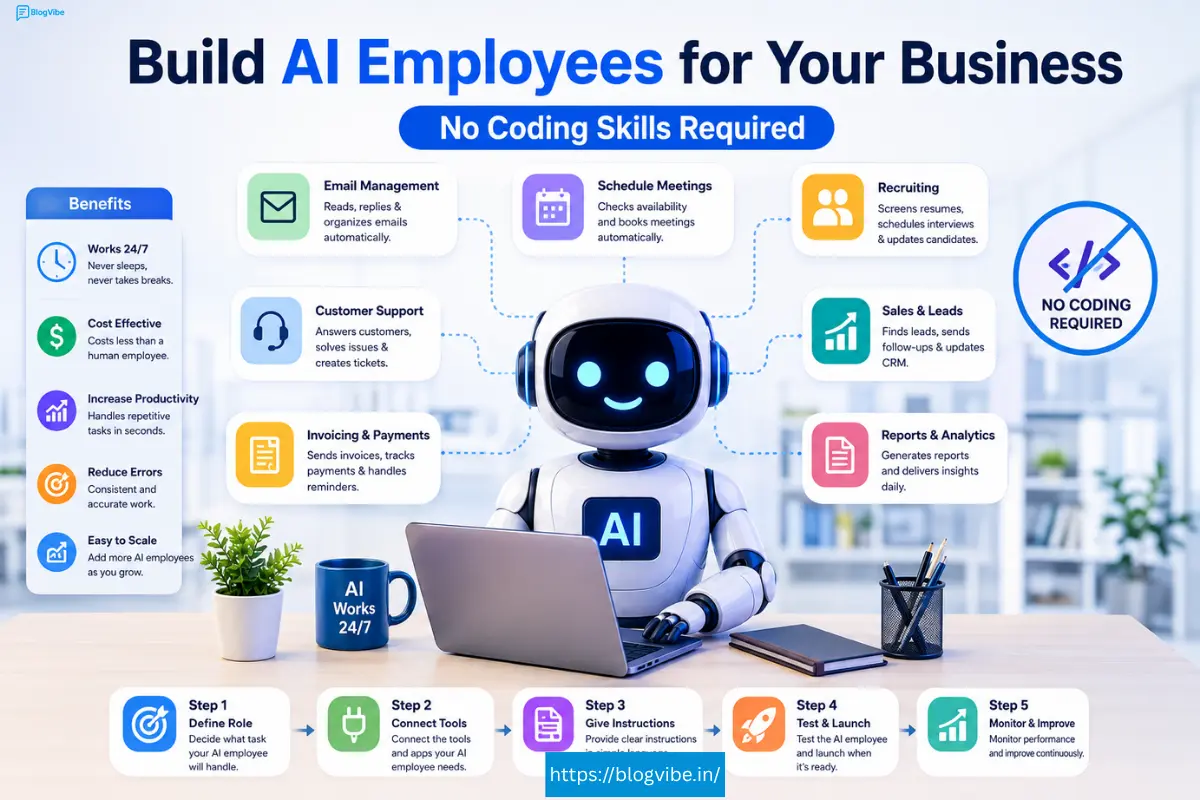
- Read emails
- Reply automatically
- Schedule meetings
- Update CRM records
- Process invoices
- Manage customer support
- Research information
- Generate reports
- Coordinate recruiting
- Handle repetitive business tasks
Think of it as hiring a digital team member rather than using an AI chatbot.
AI Employee vs AI Chatbot
| AI Chatbot | AI Employee |
| Answers questions | Completes tasks |
| Waits for prompts | Works automatically |
| No long-term memory | Learns from previous work |
| Limited actions | Uses multiple business tools |
| Temporary conversation | Persistent business role |
For example:
A chatbot can tell a customer how to book a demo.
An AI employee can:
- Check calendar availability
- Book the meeting
- Send confirmation emails
- Update CRM
- Notify your sales team
without human intervention.
Why Businesses Are Using AI Employees
Businesses of every size are adopting AI employees because they help reduce costs while improving productivity.
Benefits include:
- Available 24/7
- Faster customer response
- Lower operational costs
- Fewer repetitive tasks
- Better workflow automation
- Increased employee productivity
- Consistent performance
- Easy scalability
Small businesses can often automate work that previously required multiple employees.
What Can an AI Employee Do?
Modern AI employees can perform hundreds of business tasks.
Popular examples include:
1. AI Sales Employee
Responsibilities:
- Qualify leads
- Send follow-up emails
- Schedule demos
- Update CRM
- Research prospects
- Notify sales team
Perfect for:
- SaaS companies
- Agencies
- B2B businesses
2. Customer Support AI Employee
Tasks include:
- Answer customer emails
- Process refunds
- Check orders
- Handle billing questions
- Update support tickets
- Escalate difficult issues
This dramatically reduces customer response times.
3. Recruiting AI Employee
Recruiting becomes much easier.
The AI can:
- Review resumes
- Schedule interviews
- Email candidates
- Organize applications
- Coordinate hiring managers
- Send reminders
4. Accounting AI Employee
Accounting tasks include:
- Invoice reminders
- Payment tracking
- Receipt generation
- Expense categorization
- Financial reporting
Ideal for small businesses.
5. Operations AI Employee
Operations agents can:
- Prepare daily reports
- Organize documents
- Schedule meetings
- Create summaries
- Monitor projects
- Send internal updates
How AI Employees Work
Every AI employee follows a simple workflow.
Input → Decision → Action → Report
For example:
Customer sends an email
↓
AI understands the request
↓
Checks company knowledge base
↓
Responds to customer
↓
Updates CRM
↓
Notifies your team
Everything happens automatically.
Tools AI Employees Can Use
Modern AI employees integrate with dozens of business applications.
Common integrations include:
- Gmail
- Outlook
- Google Calendar
- Google Drive
- Slack
- Microsoft Teams
- HubSpot
- Salesforce
- Zoho CRM
- Shopify
- Stripe
- QuickBooks
- Google Docs
- Notion
- Airtable
- ClickUp
- Asana
- Monday.com
This allows them to perform real business work rather than simply generating text.
Step-by-Step: How to Make an AI Employee Without Coding
Step 1: Choose a No-Code AI Platform
Popular platforms include:
- Carly
- Lindy
- Gumloop
- n8n
- Zapier AI
- Make.com
- Flowise
Choose one based on your business needs.
Step 2: Define the Employee’s Role
Instead of creating a general assistant, assign one clear responsibility.
Examples:
- Sales Representative
- Customer Support Agent
- Recruiting Coordinator
- Operations Assistant
- Billing Assistant
Specialized AI employees perform much better.
Step 3: Give Clear Instructions
Write detailed instructions such as:
When a customer sends an email asking for pricing, check CRM, personalize the response, send pricing information, and notify the sales team if the customer requests a demo.
The clearer your instructions, the better the AI performs.
Step 4: Connect Business Tools
Grant access only to the necessary tools.
Examples:
Sales Employee:
- Gmail
- HubSpot
- Calendar
Support Employee:
- Shopify
- Stripe
- Gmail
Operations Employee:
- Google Drive
- Slack
- Calendar
Avoid giving unnecessary permissions.
Step 5: Test Your AI Employee
Before deploying:
- Send test emails
- Check responses
- Verify workflows
- Review decisions
- Improve instructions
Testing helps eliminate mistakes.
Step 6: Monitor Performance
Track metrics like:
- Response time
- Tasks completed
- Customer satisfaction
- Errors
- Time saved
Continuously improve instructions as your business grows.
Best Practices for Building AI Employees
Follow these tips:
- Start with one employee
- Automate repetitive tasks first
- Write detailed instructions
- Limit tool access
- Create escalation rules
- Review important decisions
- Test before production
- Improve continuously
Common Mistakes to Avoid
Being Too Vague
Bad:
Handle customer emails.
Better:
Reply to refund requests under $100 automatically. Escalate larger refunds.
Giving Too Many Permissions
Only connect required apps.
Expecting Perfection
AI employees improve through testing and refinement.
Automating Everything
Keep humans involved in sensitive decisions.
Who Should Use AI Employees?
AI employees are ideal for:
- Small businesses
- Freelancers
- Agencies
- Startups
- SaaS companies
- E-commerce stores
- Marketing teams
- HR departments
- Customer support teams
- Consultants
Even solo entrepreneurs can automate hours of work every week.
Future of AI Employees
AI employees are rapidly evolving beyond simple automation. Future AI workers will:
- Collaborate with each other
- Handle complex workflows
- Learn from business data
- Make smarter decisions
- Support multiple departments simultaneously
Businesses that adopt AI employees early will gain a significant competitive advantage through increased efficiency and reduced operational costs.
Frequently Asked Questions (FAQs)
What is an AI employee?
An AI employee is an autonomous AI agent that performs business tasks such as customer support, sales, scheduling, and workflow automation without constant human supervision.
Do I need coding skills?
No. Most modern AI platforms allow you to build AI employees using simple natural language instructions and visual interfaces.
Can AI employees replace human workers?
AI employees are best suited for repetitive and administrative tasks. They work alongside human teams rather than replacing roles that require creativity, empathy, or strategic decision-making.
Which businesses benefit the most?
Small businesses, startups, e-commerce stores, agencies, and service-based companies can save significant time and costs by automating routine operations.
What tools can AI employees connect to?
Depending on the platform, they can integrate with Gmail, Google Calendar, Slack, CRM systems, accounting software, project management tools, and many other business applications.
Conclusion
AI employees are transforming how businesses operate by automating repetitive tasks, improving response times, and helping teams focus on higher-value work. Thanks to no-code AI platforms, you no longer need programming experience to build these digital assistants.
Start with one clearly defined role—such as customer support or sales—and refine it over time. As your confidence grows, you can expand your AI workforce to handle more business functions, creating a scalable and efficient operation without increasing headcount.

