
Murf AI Review 2026: Discover Murf AI pricing, AI voice quality, features, languages, pros and cons, use cases, and whether Murf is worth it for YouTube creators, businesses, marketers, and educators.
Disclosure: This article contains affiliate links. If you purchase Murf AI through our link, we may earn a commission at no additional cost to you.
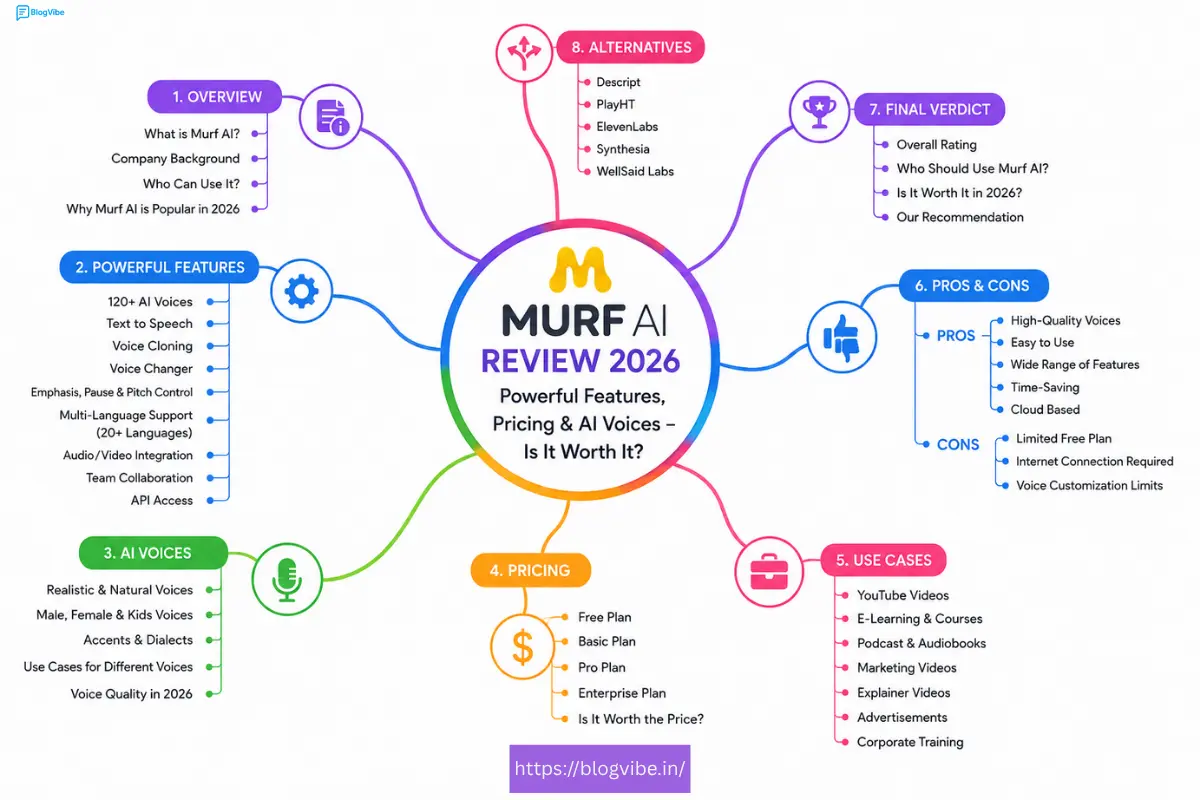
If you are looking for a realistic AI voice generator for YouTube videos, podcasts, online courses, advertisements, presentations, or business content, Murf AI is one of the platforms worth considering in 2026.
Murf Studio combines AI text-to-speech with voice customization, media editing, voiceover tools, AI dubbing, translation, and other content-creation features. Murf currently describes its platform as offering 300+ AI voices across 33+ languages and accents, while its voice generator page highlights 200+ voices across 35+ languages depending on the product/page being used.
But is Murf AI actually worth paying for?
In this detailed Murf AI review, we’ll look at its features, pricing, voice quality, languages, use cases, pros and cons, alternatives, and overall value.
Quick Verdict
Murf AI is a strong choice for creators and businesses that need professional AI voiceovers without recording everything manually.
Its biggest advantages are its large voice library, voice customization, multilingual support, editing tools, and integrations.
Our rating: 4.5/5
Best for: YouTube creators, marketers, educators, businesses, podcasters, and faceless-content creators.
What Is Murf AI?
Murf AI is a cloud-based AI voice and text-to-speech platform designed to convert written scripts into natural-sounding voiceovers.
Instead of hiring a voice actor or recording your own narration, you can write or paste your script, select an AI voice, adjust the delivery, preview the result, and export your audio.
Murf also goes beyond basic text-to-speech. Its platform includes features for voiceovers, video creation, voice cloning, AI translation, AI dubbing, and API integrations.
This makes it useful for:
- YouTube videos
- Faceless YouTube channels
- Podcasts
- E-learning
- Online courses
- Product demonstrations
- Marketing videos
- Advertisements
- Presentations
- Audiobooks
- Corporate training
- IVR and customer support
Murf AI Features
1. 300+ AI Voices
One of Murf’s biggest strengths is its large AI voice library.
Murf’s current help documentation says its Studio provides 300+ voices across 33 languages, with filters for language, accent, gender, age, use case, and narration style.
This makes it easier to find a voice that matches the type of content you are creating.
For example, you can look for voices suitable for:
- Promotional videos
- Documentaries
- YouTube narration
- Conversational content
- E-learning
- News-style videos
- Storytelling
2. Natural AI Voice Generation
Murf is designed to produce human-like speech rather than simple robotic text-to-speech.
Its Gen2 voice model focuses on natural pronunciation, intonation, pacing, and emotional delivery.
The quality will still depend on the selected voice, language, script, pronunciation, and settings, so you should always preview your final voiceover before publishing.
3. Voice Customization
Murf gives users detailed control over how the voice sounds.
Depending on the selected voice and model, you can adjust elements such as:
- Speed
- Pitch
- Emphasis
- Pauses
- Pronunciation
- Intonation
- Voice style
- Variability
Murf’s Gen2 system also includes features such as Emphasis, Say It My Way, and Variability for more expressive voiceovers.
This is particularly useful when a script needs different emotional delivery instead of a flat narration.
4. Multiple Languages and Accents
Multilingual content creators can also benefit from Murf.
Murf’s documentation lists support for languages including English, Hindi, Spanish, French, German, Japanese, Korean, Portuguese and others, with different accents available for some languages.
For Indian creators, the availability of Indian English and Hindi can be especially useful.
5. AI Voice Cloning
Murf also offers voice-cloning capabilities.
The feature can be useful for businesses and creators that want a consistent voice identity across different pieces of content.
However, voice cloning should always be used responsibly and only with appropriate rights and consent.
6. Voiceover Video Creation
Murf Studio isn’t limited to generating an audio file.
Its Studio environment allows users to work with scripts, voices, media, background music, and other elements within the same workflow.
This can reduce the need to move between multiple tools when creating narrated videos.
7. AI Dubbing and Translation
Murf also provides AI translation and dubbing capabilities.
According to Murf’s product documentation, its dubbing tools can help translate existing video or audio content into other languages while preserving elements such as timing and background audio.
This can be useful for creators and businesses trying to reach international audiences.
8. Canva, Google Slides and PowerPoint Integrations
Murf supports integrations with popular content and presentation tools, including:
- Canva
- Google Slides
- PowerPoint
These integrations can be useful when voiceovers need to be added to presentations, educational materials, or visual content.
Murf AI Pricing 2026
Murf offers different plans depending on whether you’re an individual creator, business, or enterprise user.
Because pricing and included credits can change, always check the official Murf pricing page before purchasing.
What to consider before choosing a plan
When comparing Murf plans, look at:
- Number of voice-generation minutes
- Available voices
- Download/export options
- Commercial usage rights
- Voice cloning availability
- AI dubbing/translation features
- Team features
- Support and integrations
👉 Check the Latest Murf AI Pricing
Important: Don’t choose a plan only because it has a lower monthly price. Consider how many minutes you actually need and whether the plan includes the features required for your workflow.
Is Murf AI Free?
Murf provides a free way to try its AI voice generator.
Murf’s current voice-generator page says users can start without a credit card and access a limited amount of voice generation before moving to paid usage.
The free option is useful if you want to:
- Test different voices
- Compare voice styles
- Try your own script
- Decide whether the quality works for your content
If you’re serious about producing content regularly, you’ll likely need to evaluate the paid plans based on your usage.
READ MORE:
Midjourney Pricing 2026: Plans, Free Trial, Discord & Login Guide
How to Use Murf AI
Getting started is relatively straightforward.
Step 1: Open Murf AI
Go to Murf and create an account.
Step 2: Create a Project
Open Murf Studio and start a new project.
Step 3: Add Your Script
Paste or write your narration inside the text editor.
Step 4: Select a Voice
Use the voice library to filter voices by language, accent, gender, age, use case, and style.
Step 5: Customize the Voice
Adjust speed, pitch, pauses, emphasis, pronunciation, and other available controls.
Step 6: Preview
Listen to the generated narration and make changes where necessary.
Step 7: Export
Once you’re satisfied with the result, export your project in the available format.
Murf AI for YouTube
Murf AI can be particularly useful for YouTube creators.
For example, a creator making a faceless documentary could:
Research → Write script → Generate voiceover → Add visuals → Edit video → Publish
Instead of recording the entire narration manually, the creator can generate the voiceover from the script.
Murf itself lists YouTube content among its supported use cases.
Good YouTube use cases
- Educational videos
- Explainer videos
- Documentaries
- AI videos
- Product reviews
- Tutorials
- Shorts
- Faceless channels
- Storytelling videos
However, AI voice alone does not make a video valuable. The script, editing, visuals, originality, and overall viewer experience still matter.
Murf AI for Businesses
Businesses can use AI voiceovers for:
- Product demonstrations
- Advertisements
- Training videos
- Internal presentations
- E-learning
- Customer support
- IVR
- Marketing content
Murf also provides API capabilities for businesses that want to integrate AI voices into their own applications and workflows.
Murf AI Pros and Cons
Pros
- Large AI voice library
- Multiple languages and accents
- Voice customization
- Gen2 voice capabilities
- Useful for YouTube and marketing
- Voice cloning options
- AI dubbing and translation
- Presentation integrations
- API available
- Cloud-based workflow
Cons
- Advanced features require paid plans
- Pricing may be high for casual users
- Voice quality can vary between voices
- Some features have usage limits
- AI-generated narration may still require editing
- Not every voice supports every advanced feature
Murf AI vs ElevenLabs
Murf AI and ElevenLabs are both popular AI voice platforms, but they have different strengths.
| Feature | Murf AI | ElevenLabs |
| AI Voice Generation | ✅ | ✅ |
| Voice Customization | ✅ | ✅ |
| Multiple Languages | ✅ | ✅ |
| Voice Cloning | ✅ | ✅ |
| Video/Content Workflow | Strong | Strong |
| Presentation Integrations | ✅ | Varies |
| API | ✅ | ✅ |
| Best for | Creators & businesses | Voice-focused creators & developers |
Which should you choose?
Choose Murf AI if you want an integrated content-production workflow with voiceovers, media, presentations, and business-oriented features.
Consider ElevenLabs if your priority is primarily advanced AI speech generation and voice technology.
The best option depends on your specific workflow.
Who Should Use Murf AI?
Murf AI is a good fit for:
YouTubers
Create narration without recording every video yourself.
Faceless Content Creators
Generate voiceovers for educational, documentary, and explainer content.
Marketers
Create promotional and advertising voiceovers.
Teachers and Course Creators
Add narration to lessons and training material.
Businesses
Produce consistent voice content for marketing, training, and customer experiences.
Developers
Use Murf APIs to integrate AI voice technology into applications and workflows.
Who Should NOT Buy Murf AI?
Murf may not be necessary if:
- You only need a few seconds of narration occasionally.
- You already have a professional voice actor.
- You don’t need AI-generated voices.
- Your current free text-to-speech tool already meets your requirements.
- You don’t create audio/video content regularly.
In these cases, paying for a premium AI voice platform may not provide enough value.
Is Murf AI Worth It in 2026?
For regular content creators and businesses, Murf AI is worth considering.
Its strongest advantages are its large voice library, customization options, multilingual capabilities, content-creation workflow, and additional tools such as dubbing, translation, integrations, and APIs.
However, whether it is worth the money depends on how frequently you create content and which features you need.
Our Verdict
Rating: 4.5/5
Best for: YouTube creators, marketers, educators, businesses, and content teams.
Value: ⭐⭐⭐⭐½
Voice selection: ⭐⭐⭐⭐⭐
Customization: ⭐⭐⭐⭐⭐
Ease of use: ⭐⭐⭐⭐½
Overall: ⭐⭐⭐⭐½
Frequently Asked Questions
Is Murf AI free?
Murf offers a free way to test its AI voice generator with limited usage. Current limits can change, so check Murf’s official site for the latest details.
Is Murf AI good for YouTube?
Yes. Murf specifically supports YouTube as a use case, making it suitable for narration, explainers, documentaries, tutorials, and other video content.
Does Murf AI support Hindi?
Yes. Murf’s language documentation lists Hindi among its supported languages.
How many voices does Murf AI have?
Murf’s current documentation describes 300+ voices, while some product pages advertise 200+ voices depending on the specific product or page.
Can I customize Murf AI voices?
Yes. Murf provides controls for aspects such as pitch, speed, emphasis, pronunciation, pauses, and other delivery settings.
Does Murf AI offer voice cloning?
Yes. Voice cloning is among Murf’s available products and capabilities.
Does Murf AI have an API?
Yes. Murf provides APIs for text-to-speech and other voice-related capabilities.
Final Thoughts
Murf AI is more than a basic text-to-speech generator.
Its combination of AI voices, voice customization, multilingual support, video workflow, dubbing, translation, integrations, and API capabilities makes it a versatile option for creators and businesses.
If you’re creating YouTube videos, online courses, advertisements, presentations, podcasts, or other narrated content, Murf is worth testing before deciding whether a paid plan makes sense for you.

