
If you regularly work with PDFs, research papers, notes, websites, YouTube videos, reports, or other large amounts of information, you may have heard about Google NotebookLM. In 2026, however, there was an important change: Google officially renamed NotebookLM to Gemini Notebook in July 2026. The product remains the same standalone research tool, but Google is now connecting it more closely with the wider Gemini ecosystem.
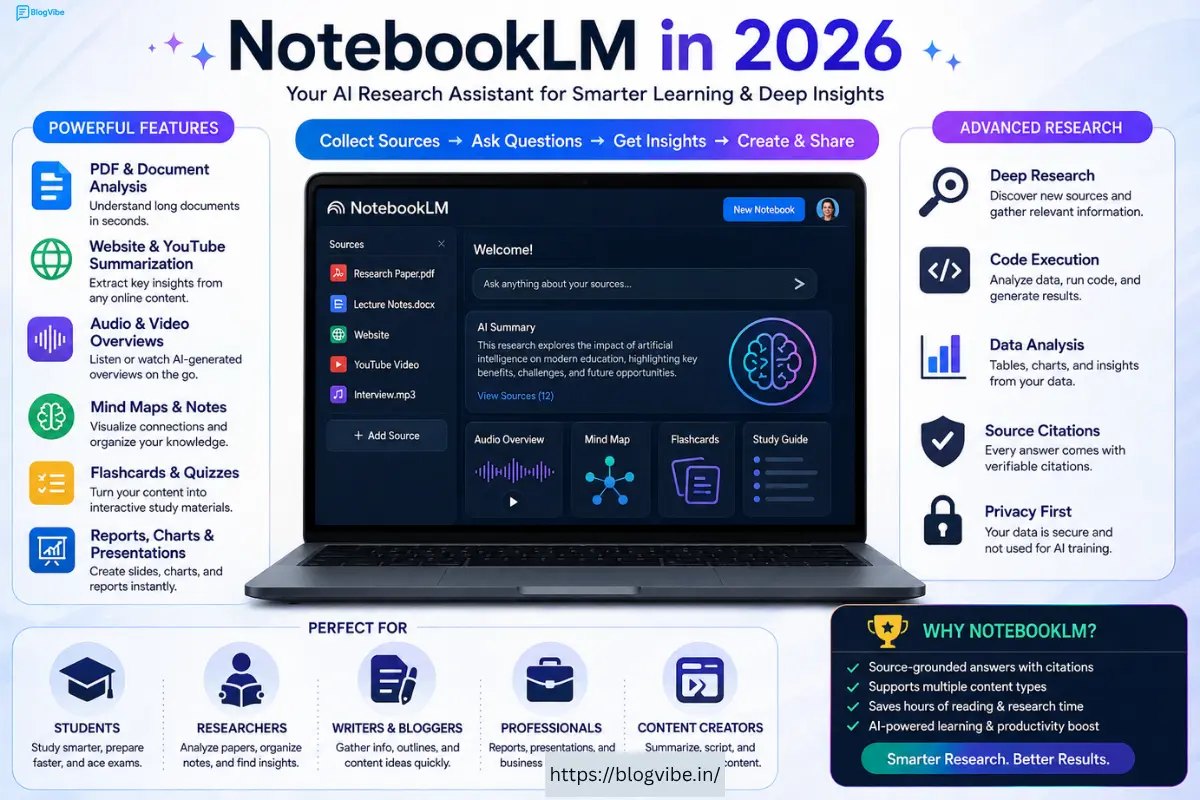
So, is NotebookLM—or Gemini Notebook—really one of the best AI research tools in 2026? And is it worth using for students, researchers, content creators, and professionals?
In this detailed NotebookLM review, we’ll look at its features, how it works, pricing considerations, privacy, reliability, student use cases, advantages, disadvantages, and alternatives.
What Is NotebookLM?
NotebookLM was introduced by Google as an AI-powered research and learning assistant. Unlike a general AI chatbot that can answer questions about almost anything, Google’s AI research tool is designed around the information you provide to it.
You can add sources such as PDFs, websites, YouTube videos, audio files, Google Docs, Google Slides, and other supported materials. The AI then analyzes those sources and lets you ask questions, generate summaries, find connections, and create different types of learning and research materials.
This source-based approach is one of Google’s AI research tool’s biggest advantages.
For example, imagine you have a 200-page research paper. Instead of reading every page manually, you can add the PDF to Google’s AI research tool and ask questions such as:
- What are the main findings?
- What methodology was used?
- What are the limitations?
- Explain this research in simple language.
- Create a study guide from this document.
- Compare the conclusions in these two papers.
NotebookLM can then answer based on the sources in your notebook and provide citations so you can check where the information came from.
NotebookLM Is Now Gemini Notebook
One of the biggest 2026 changes is the name.
In July 2026, Google announced that Google’s AI research tool is now Gemini Notebook. Google says it is the same product, with existing notebooks remaining accessible. The change reflects Google’s plan to connect notebooks more closely with Gemini and Google Search.
For SEO purposes, it is still useful to mention both names because many users continue searching for “Google’s AI research tool.”
NotebookLM’s Core Features: Mastering PDFs & More
Google’s AI research tool has evolved far beyond being a simple PDF summarizer. Its source-based research workflow now supports multiple types of content and several AI-generated outputs.
1. PDF Analysis
PDF analysis is one of Google’s AI research tool’s most useful features.
You can upload research papers, books, reports, educational documents, manuals, and other PDFs and ask questions about their contents.
Instead of manually searching through dozens of pages, you can ask the AI to locate specific information or summarize particular sections.
For students, this can make revision much faster. Researchers can also use it to compare multiple papers and identify common themes.
2. Website Sources
Google’s AI research tool can also work with website sources. This is useful when you’re researching a topic and want to organize information from online sources into a single notebook.
For example, if you’re researching artificial intelligence, you could collect several relevant web sources and then ask NotebookLM to identify common findings, differences, and important conclusions.
3. YouTube Videos
Another useful feature is the ability to work with supported YouTube video sources.
This can be particularly useful for educational content. Instead of watching a long lecture from beginning to end just to find one concept, you can use Google’s AI research tool to help understand and summarize the material.
4. Audio Overviews
One of Google’s AI research tool’s most popular features is Audio Overview.
It can turn your source material into a podcast-style discussion that you can listen to while travelling, exercising, or doing other activities.
Google describes Audio Overview as a way to turn your sources into engaging “Deep Dive” discussions.
This makes learning less dependent on reading from a screen.
5. Video Overviews
Google’s AI research tool has also expanded into AI-generated video content.
Google introduced Cinematic Video Overviews in 2026, using technologies including Gemini, Nano Banana Pro and Veo 3 to create more immersive visual explanations from source material. The feature was initially made available in English to Google AI Ultra subscribers aged 18 and over on web and mobile.
This could be particularly useful for visual learners.
6. Mind Maps
Mind Maps can help transform complex information into a more visual structure.
If your source contains many concepts and relationships, a visual overview can make it easier to understand how the ideas connect.
7. Flashcards and Quizzes
Students can use Google’s AI research tool to turn study material into revision resources such as flashcards and quizzes.
Instead of manually creating questions from a textbook, you can ask the AI to generate practice material based on your sources.
8. Infographics and Presentations
Google’s AI research tool can also help transform research into different output formats.
Google’s 2026 research upgrades introduced capabilities for creating outputs such as charts, spreadsheets, and slide decks, along with more advanced research and analysis workflows.
Advanced Research, OCR, Presentations & Slide Editing
The biggest change in Google’s AI research tool during 2026 is that Google is positioning it as more than a document Q&A tool.
Google announced upgrades involving advanced reasoning, source discovery, code execution, data analysis, charts, spreadsheets, and slide decks.
Advanced Research
You can begin a project with a broad idea and use Google’s AI research tool’s research capabilities to help organize relevant information.
For example:
Topic: “How will AI affect small businesses?”
Instead of manually collecting every source, an advanced research workflow can help you build a structured research repository before analyzing the information.
This is particularly useful for:
- Students
- Bloggers
- Researchers
- Journalists
- Business owners
- Content creators
- Marketing professionals
Data Analysis
Google has also introduced a secure cloud computer for Google’s AI research tool that can write and execute code for deeper analysis. Google says this can enable more complex research and data-analysis workflows.
For example, if your notebook contains numerical research data, AI-assisted analysis can help you explore trends and generate charts.
This makes NotebookLM much more interesting for professionals working with data.
Presentation Creation
Research doesn’t always end with understanding information. Sometimes you need to present it.
NotebookLM’s newer output capabilities can help transform source material into presentation-oriented formats, including slide decks.
However, users should still review generated presentations before using them professionally. AI-generated slides can require editing for accuracy, design, context, and presentation quality.
How to Use NotebookLM: A Step-by-Step Guide
Using NotebookLM is relatively straightforward.
Step 1: Open Gemini Notebook
Start by opening the Gemini Notebook/NotebookLM experience on the web or supported mobile experience.
Google says the product continues to be available as a standalone tool while becoming more integrated with Gemini.
Step 2: Create a Notebook
Create a notebook for a specific project.
For example:
- “BCA Exam Preparation”
- “AI Research”
- “YouTube Content Research”
- “Business Plan”
- “History Project”
Keeping different topics in separate notebooks makes your research easier to manage.
Step 3: Add Your Sources
Upload or add relevant materials such as PDFs, websites, YouTube videos, audio files, Google Docs, and Google Slides.
The goal is to provide high-quality sources because the quality of your sources directly affects the usefulness of your research.
Step 4: Ask Questions
Once your sources are ready, start asking questions.
For example:
“Summarize the most important points from these documents.”
Or:
“Compare the arguments made in these two research papers.”
Step 5: Check the Citations
One of Google’s AI research tool’s strongest features is source citations.
Rather than simply giving you an answer, it can show where information came from, allowing you to inspect the original source.
This is especially important when using AI for academic or professional research.
Step 6: Generate Learning Materials
Depending on the available features and account, you can create materials such as:
- Audio Overviews
- Video Overviews
- Flashcards
- Quizzes
- Mind Maps
- Infographics
- Reports
- Presentations
Step 7: Review Everything
Never assume an AI-generated answer is automatically correct.
Google itself notes that Google’s AI research tool can still produce inaccuracies.
Always verify important facts against the original sources.
NotebookLM for Students: A Specialized Review
Students are one of the biggest groups that can benefit from NotebookLM.
Imagine preparing for an exam with five PDFs, several lecture notes, and a long textbook. Instead of switching between different files, you can organize the materials inside a notebook and use AI to understand them.
Best Uses for Students
Exam Preparation
Upload your study materials and ask NotebookLM to identify the most important concepts.
Create Practice Questions
Ask it to create quiz questions from your notes.
For example:
“Create 20 multiple-choice questions from these chapters.”
Generate Flashcards
Flashcards can help students remember definitions, formulas, concepts, and important facts.
Simplify Difficult Topics
If a textbook explanation is too complicated, ask NotebookLM to explain it in simple language.
Audio Learning
Audio Overviews can turn study material into a podcast-style discussion, which can be useful for revision when you’re away from your desk.
Research Projects
Students writing research assignments can use NotebookLM to organize sources and identify important arguments.
However, students should use AI as a learning assistant rather than blindly submitting AI-generated work as their own.
Reliability, Pricing & Privacy: Is NotebookLM Good?
Is NotebookLM Reliable?
Google’s AI research tool’s source-grounded approach is one of its biggest strengths.
Because you provide the sources, the system can focus on those materials instead of relying entirely on general knowledge. Google says the tool provides citations showing the source information behind its responses.
However, source grounding does not mean zero mistakes.
AI systems can misunderstand information, misinterpret context, or generate inaccurate conclusions. Google explicitly warns that Google’s AI research tool can produce inaccuracies.
For important research, always verify the original material.
NotebookLM Pricing
Pricing and feature availability can vary depending on the Google account, subscription, region, and rollout.
Google has introduced advanced capabilities to Google AI Ultra and certain Workspace customers, with some features rolling out to Pro users.
Therefore, before purchasing a plan specifically for Google’s AI research tool, check Google’s current pricing and feature limits for your account and country.
This is particularly important because Google continues to change the product and integrate it with Gemini.
Privacy
Privacy is another important consideration when uploading documents.
Google says that organizational data in Gemini Notebook is not used to train its generative AI models. For individual users, Google says content is not used for training unless the user shares feedback.
Still, users should avoid uploading highly sensitive personal, financial, confidential business, or legally protected information unless they understand the applicable privacy and account policies.
The Verdict: NotebookLM vs. Alternatives & Final Advice
NotebookLM vs. ChatGPT
ChatGPT is a broad general-purpose AI assistant that can handle writing, coding, brainstorming, analysis, research, and many other tasks.
NotebookLM has a more focused purpose: working with your research sources and knowledge base.
If your main goal is analyzing a collection of PDFs and documents, NotebookLM can be an excellent choice.
If you need a general AI assistant for many different tasks, ChatGPT may be more versatile.
NotebookLM vs. Gemini
Gemini is Google’s broader AI assistant ecosystem.
Google’s AI research tool, now called Gemini Notebook, is more specifically focused on notebooks, research, source analysis, and learning. Google is increasingly connecting the two experiences, including notebook syncing between Gemini and Google’s AI research tool.
Pros and Cons
Pros
- Excellent for source-based research
- Supports multiple source formats
- Useful PDF analysis
- Provides citations
- Audio Overviews are useful for learning
- Helpful for students
- Supports quizzes and flashcards
- Can create visual and presentation-style outputs
- Increasingly powerful research capabilities
- Strong integration with the Google ecosystem
Cons
- AI-generated information can still contain errors
- Some advanced features require paid plans
- Feature availability can vary
- Generated content still needs human review
- It is more specialized than general AI assistants
- Privacy requirements should be considered before uploading sensitive information
Final Verdict: Is NotebookLM Worth It in 2026?
Yes—especially if your work involves research, documents, studying, or large amounts of source material.
NotebookLM has changed significantly since its early days. In 2026, Google has expanded it with advanced reasoning, research capabilities, data analysis, code execution, charts, spreadsheets, presentations, and new multimedia experiences.
The July 2026 rebranding to Google’s AI research tool is also significant. Google is clearly moving the product toward a larger ecosystem where your notebooks can connect with Gemini and, eventually, Google Search.
Our Rating: 9/10
Best for: Students, researchers, bloggers, content creators, professionals, and anyone who frequently works with documents and research sources.
Best feature: Source-grounded answers with citations.
Biggest weakness: It can still make mistakes, and some advanced capabilities depend on subscription and availability.
If you want an AI tool specifically for researching, understanding, organizing, and learning from your own sources, NotebookLM—now Gemini Notebook—is one of the strongest options to consider in 2026.
For general-purpose AI conversations, writing, coding, and creative tasks, however, tools such as ChatGPT and Gemini may still be better suited.
The bottom line is simple: Google’s AI research tool is no longer just an AI PDF reader. In 2026, it is becoming a much more complete AI research and knowledge workspace.
READ MORE:
AI Song Maker Review 2026: Amazing Features, Pricing & Pros & Cons

