

Businesses process invoices, pay suppliers, manage purchase orders, and maintain financial records every day. When these activities are handled manually, they can consume valuable time, create payment delays, and increase the possibility of accounting errors.
This is where AP automation becomes useful.
AP automation helps businesses streamline accounts payable activities using software, artificial intelligence (AI), and automated workflows. It can handle tasks such as invoice capture, data extraction, invoice matching, approval routing, payment processing, and reconciliation.
Whether you operate a small business, manage an accounting department, or work in financial technology, understanding accounts payable automation can help you improve financial operations.
In this guide, you will learn what AP automation is, how it works, its seven major benefits, the technologies behind it, and how businesses can implement it.
What Is AP Automation?
AP automation (Accounts Payable Automation) is the use of software and digital technologies to automate repetitive tasks involved in managing money a business owes to its suppliers and vendors.
Traditionally, employees receive invoices, enter information into accounting systems, check purchase orders, request approvals, and arrange payments manually.
AP automation replaces or reduces many of these manual activities through connected digital workflows.
For example, when a supplier sends an invoice through email, AP automation software can extract the invoice number, supplier name, date, and total amount. It can then compare the information with purchase orders, route the invoice to the appropriate manager, and prepare it for payment.
Depending on the software, payment execution and bank reconciliation may also be automated.
The main objective is to make accounts payable faster, more accurate, more transparent, and easier to manage.
What Does AP Stand For?
AP stands for Accounts Payable.
Accounts payable represents the money a business owes to suppliers for products or services it has already received but has not yet paid for.
For example, imagine a company purchases office computers worth $5,000 from a supplier with payment due in 30 days.
The company records the $5,000 as accounts payable until the payment is completed.
AP automation helps businesses manage these outstanding payments and the activities involved in processing supplier invoices.
How Does AP Automation Work?
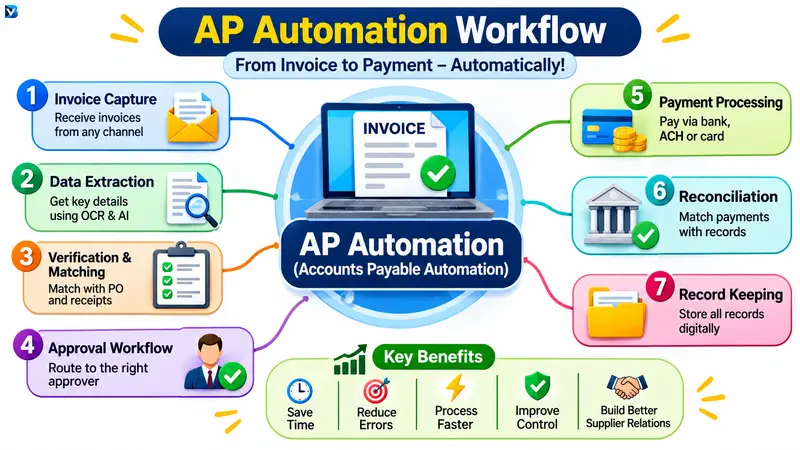
AP automation works through a series of connected steps that transform incoming invoices into approved and recorded payments.
Here is a typical accounts payable automation workflow.
1. Invoice Capture
The process begins when a business receives an invoice from a supplier.
Invoices can arrive through different channels, including:
- Email attachments.
- PDF documents.
- Electronic invoicing systems.
- Supplier portals.
- Scanned paper invoices.
- Direct accounting system integrations.
AP automation software collects these invoices and organizes them in a centralized digital system.
This reduces the need to manually download, print, and organize documents.
2. Automatic Data Extraction
After receiving an invoice, the software extracts important information.
This may include:
- Supplier name.
- Invoice number.
- Invoice date.
- Payment due date.
- Product or service description.
- Tax information.
- Total invoice amount.
Many systems use Optical Character Recognition (OCR) and AI-based document processing to identify information from invoices.
Employees may still need to review extracted information, especially when documents are unclear or unusual.
3. Invoice Verification and Matching
The next step is to verify whether the invoice matches the original business transaction.
For example, a company may compare an invoice with its purchase order and goods receipt.
Two common methods are:
Two-way matching: Compares the supplier invoice with the purchase order.
Three-way matching: Compares the supplier invoice, purchase order, and goods receipt.
Three-way matching helps businesses confirm that the goods or services were ordered and received before approving the payment.
If the values do not match, the system can flag the invoice for investigation.
4. Invoice Coding
Invoice coding assigns expenses to the appropriate accounting categories.
For example, an office equipment invoice might be assigned to an equipment expense account or asset account, depending on the company’s accounting policy.
Automation software can suggest general ledger codes, departments, cost centers, or project categories.
The accounting team can review these suggestions before the information is posted.
5. Automated Approval Workflow
Once an invoice passes the required checks, the software sends it to the appropriate person for approval.
Companies can establish approval rules based on:
- Invoice value.
- Department.
- Supplier.
- Project.
- Cost center.
- Management responsibility.
For example, a company may require a department manager to approve an office purchase before the accounts payable team can prepare payment.
If an invoice contains an error, it can be sent to the relevant employee for review instead of moving forward automatically.
6. Payment Processing
After approval, the invoice becomes eligible for payment.
Depending on the software and integrations, businesses may be able to schedule or execute payments through supported banking connections.
Common payment methods include:
- Bank transfers.
- ACH payments in the United States.
- Electronic funds transfers.
- Business checks.
- Other supported local payment methods.
Not every AP automation platform executes payments itself. Some only prepare approved payments and send the information to an accounting system or banking platform.
7. Payment Reconciliation and Record Keeping
The final stage involves recording completed payments and updating financial records.
The software may match payment information with bank transactions and accounting records.
It can also maintain digital invoice histories, approval records, payment status, and supporting documents.
This makes it easier for finance teams to review transactions and prepare for audits.
Technologies Used in AP Automation
Modern accounts payable automation combines several technologies.
Artificial Intelligence (AI)
AI can help identify invoice information, recognize patterns, recommend accounting codes, and flag unusual transactions.
Some newer systems also use AI agents to assist with invoice processing and exception handling.
AI can improve automation, but important financial decisions still require suitable controls and human oversight.
Optical Character Recognition (OCR)
OCR converts text in scanned images and documents into machine-readable information.
For example, OCR can identify an invoice number and amount from a scanned PDF.
OCR is useful for reducing manual data entry, although poor-quality documents may still require correction.
Robotic Process Automation (RPA)
RPA uses software bots to perform repetitive, rule-based activities.
These activities might include moving invoice information between systems, entering data, or triggering predefined workflows.
Enterprise Resource Planning (ERP)
ERP software connects financial and operational business processes.
AP automation platforms may integrate with ERP systems to share supplier information, purchase orders, invoice records, and payment details.
Electronic Data Interchange (EDI)
EDI allows business partners to exchange structured business documents electronically.
Businesses can use it to receive invoices and other purchasing documents without depending entirely on paper or email attachments.
7 Powerful Benefits of AP Automation
AP automation can improve financial processes in several ways.
1. Saves Time
Manual invoice processing requires employees to enter data, check information, send emails, and follow up on approvals.
Automation handles many repetitive tasks, allowing employees to spend more time on financial analysis and exception management.
2. Reduces Manual Errors
Manual data entry can result in incorrect invoice numbers, amounts, supplier details, or accounting codes.
Automated extraction, validation, and matching can reduce these errors.
However, businesses should continue reviewing exceptions and verifying important transactions.
3. Improves Invoice Processing Speed
Automated workflows can route invoices to the correct approvers without relying on long email conversations.
This can reduce approval delays and help businesses process invoices more efficiently.
4. Improves Payment Management
AP automation gives finance teams better visibility into outstanding invoices, due dates, approvals, and payment status.
This helps businesses organize payment schedules and manage available cash more effectively.
5. Helps Prevent Duplicate Payments
Duplicate invoices can result in unnecessary payments.
AP automation systems can compare supplier details, invoice numbers, amounts, and other information to identify potential duplicates.
Unusual transactions can be flagged for further investigation before payment.
6. Strengthens Financial Visibility
A centralized AP system makes invoice and payment information easier to access.
Managers can review outstanding liabilities, track approval status, and understand which payments are approaching their due dates.
This information can support better financial planning.
7. Improves Supplier Relationships
Late payments and unclear invoice statuses can create problems between businesses and suppliers.
Automation can improve invoice tracking, approval efficiency, and payment communication.
When payments are processed according to agreed terms, supplier relationships can become easier to manage.
Manual Accounts Payable vs AP Automation
Understanding the difference between traditional accounts payable and automated accounts payable helps explain why businesses adopt these systems.
| Feature | Manual AP | AP Automation |
| Invoice entry | Manual data entry | Automated data extraction |
| Invoice storage | Paper or separate files | Centralized digital records |
| Invoice matching | Manual checking | Automated matching rules |
| Approval | Email and paperwork | Digital approval workflows |
| Duplicate detection | Manual verification | Automated checks |
| Payment scheduling | Manual tracking | Automated scheduling options |
| Reconciliation | Manual comparison | Connected reconciliation options |
| Reporting | Manual spreadsheets | Digital reporting and dashboards |
Manual processing can be sufficient for very small operations with only a few invoices.
As transaction volume and business complexity increase, automation can become more valuable.
AP Automation vs AR Automation
AP and AR are two different areas of business accounting.
Accounts Payable (AP) manages payments a business owes to suppliers.
Accounts Receivable (AR) manages payments a business expects to receive from customers.
| Feature | AP Automation | AR Automation |
| Full name | Accounts Payable Automation | Accounts Receivable Automation |
| Main purpose | Manage outgoing payments | Manage incoming payments |
| Main documents | Supplier invoices | Customer invoices |
| Main activities | Invoice approval and payment | Billing and payment collection |
| Main objective | Manage business expenses | Collect customer payments |
Both technologies help automate financial operations, but they solve different business problems.
AP Automation for Small Businesses
AP automation is not limited to large corporations.
Small businesses can also benefit from automating invoice management and payment approvals.
A small business may initially receive invoices through email, track payment dates in spreadsheets, and manually update accounting records.
As the number of suppliers grows, this process can become difficult to manage.
A suitable AP automation solution can help small businesses:
- Store supplier invoices digitally.
- Extract invoice information automatically.
- Track outstanding payments.
- Create simple approval workflows.
- Identify potential duplicate invoices.
- Sync invoice records with accounting software.
Example of AP Automation in a Small Business
Imagine a small online store that receives 100 supplier invoices every month.
Its employees previously entered invoice information manually and followed up with managers through email.
After implementing an AP automation solution, incoming invoices are captured digitally, important details are extracted, and invoices are routed according to predefined approval rules.
The accounting team can review the invoice status in one place and prepare approved payments.
This is a hypothetical example illustrating how the workflow can operate, not a measured customer result.
How to Choose the Best AP Automation Software
Choosing the right AP automation software depends on your business size, invoice volume, accounting system, security requirements, and budget.
Before purchasing software, evaluate the following features.
1. Invoice Data Capture
Choose software that can receive invoices through the channels your suppliers actually use.
Check whether it supports PDFs, scanned documents, electronic invoices, and email-based submissions.
2. OCR and AI Features
Look for reliable invoice extraction, validation, and correction workflows.
Check what happens when the software cannot confidently read an invoice.
3. Approval Management
Make sure the platform supports approval rules based on invoice amounts, departments, and employee responsibilities.
4. Accounting and ERP Integration
Confirm that the software integrates with your current accounting system or ERP.
Check whether integration uses an API, a supported connector, or another data exchange method.
5. Security and Access Controls
Look for role-based permissions, approval logs, access controls, encryption, and audit trails.
Also verify how the provider protects supplier banking information and handles payment changes.
6. Reporting and Analytics
Useful reporting features should help you review pending invoices, processing times, payment status, and exceptions.
7. Pricing and Scalability
Compare subscription costs, transaction charges, implementation expenses, and support costs.
Choose a solution that matches your current requirements without making future growth unnecessarily expensive.
How to Implement AP Automation
A successful implementation starts with understanding the existing accounts payable process.
Here is a practical approach.
Step 1: Review your current process.
Identify how your business receives, checks, approves, and pays invoices.
Step 2: Identify repetitive tasks.
Find activities that consume time, such as manual data entry, invoice matching, and approval follow-ups.
Step 3: Define your requirements.
Decide which processes need automation and which activities require human approval.
Step 4: Select suitable software.
Compare multiple solutions based on functionality, integration, security, support, and total cost.
Step 5: Connect your accounting system.
Configure the necessary connections between AP software, accounting platforms, ERP systems, and supported banking services.
Step 6: Set approval rules.
Create clear approval responsibilities, payment permissions, and exception-handling procedures.
Step 7: Test the workflow.
Start with a limited group of suppliers or invoice types. Check extracted information, matching results, approvals, and accounting records.
Step 8: Monitor and improve.
Track processing performance, identify recurring errors, and update your automation rules when necessary.
Challenges and Limitations of AP Automation
Although AP automation offers several benefits, businesses should understand its limitations.
Initial Implementation Costs
Some systems require subscription payments, integration work, employee training, and additional setup expenses.
Incorrect Data Extraction
OCR and AI systems can misread unclear invoices or unusual document layouts.
Businesses should provide a process for reviewing and correcting extracted information.
Integration Difficulties
An AP platform may not work seamlessly with every accounting or ERP system.
Check integration compatibility before purchasing.
Security and Fraud Risks
Automated systems still require strong controls.
Businesses should verify supplier bank-account changes independently, restrict sensitive permissions, and require appropriate authorization for payments.
Employee Training
Employees need to understand the new workflow and know how to handle unusual invoices, approval problems, and payment exceptions.
Not Every Process Can Be Fully Automated
Disputed invoices, missing purchase orders, incorrect amounts, and unusual transactions may still require human investigation.
Automation should support financial controls rather than remove accountability.
How to Measure AP Automation Performance
Businesses should establish performance measurements before implementing an AP automation solution.
Some useful accounts payable metrics include:
| Metric | What it measures |
| Invoice processing time | Time required to process an invoice |
| Cost per invoice | Total AP processing cost divided by invoices processed |
| Invoice error rate | Percentage of invoices requiring correction |
| Approval time | Time spent waiting for invoice approval |
| Exception rate | Percentage of invoices requiring manual intervention |
| On-time payment rate | Percentage of payments completed by their due dates |
| Touchless processing rate | Percentage of invoices processed without manual intervention |
These metrics help businesses understand whether automation is improving their processes.
For example, a company can compare its average invoice processing time before and after implementation to identify operational improvements.
Frequently Asked Questions About AP Automation
1. What is AP automation in simple words?
AP automation is the use of software to automate business invoice processing, approvals, payment preparation, and other accounts payable activities.
2. How does AP automation work?
It captures supplier invoices, extracts information, checks invoice details, routes approvals, prepares payments, and updates accounting records.
3. What are the main benefits of AP automation?
The main benefits include saving time, reducing manual errors, improving invoice processing, managing payments, detecting duplicates, and improving financial visibility.
4. Is AP automation suitable for small businesses?
Yes. Small businesses can use AP automation to organize invoices, track outstanding payments, manage approval workflows, and reduce repetitive accounting tasks.
5. What is AP automation software?
AP automation software is a digital platform that helps businesses manage accounts payable activities using invoice capture, data extraction, matching, approval workflows, and payment integrations.
6. Does AP automation use artificial intelligence?
Many modern AP platforms use AI and machine learning for invoice data extraction, document recognition, coding suggestions, and exception detection. However, not every AP automation system uses AI.
7. Is AP automation secure?
It can improve financial controls through access permissions, approval rules, transaction validation, and audit records. However, security depends on proper implementation, system configuration, and ongoing monitoring.
8. What is the difference between AP automation and AR automation?
AP automation manages outgoing payments to suppliers, while AR automation manages customer invoices and incoming payments.
Conclusion
AP automation is changing how businesses manage accounts payable by reducing repetitive work and improving invoice processing workflows.
From automated invoice capture and data extraction to approval routing, payment preparation, and reconciliation, it helps finance teams manage supplier transactions more efficiently.
Businesses should evaluate their current accounting processes, select suitable automation software, and establish clear financial controls before implementing a solution.
Whether you operate a growing small business or a large organization, accounts payable automation can help create a more organized and transparent financial workflow.
READ MORE :
How to Create Automation Rules in Jira: 7 Easy Steps

One thought on “What Is AP Automation? 7 Benefits and How It Works”