
Introduction
Zapier Review: If you use several apps for your work, you probably know how frustrating repetitive tasks can be.
You may receive a lead in a form, copy the details into Google Sheets, add the person to your CRM, and then send an email. Doing this once is easy. Doing it 50 or 100 times is a different story.
This is where Zapier comes in.
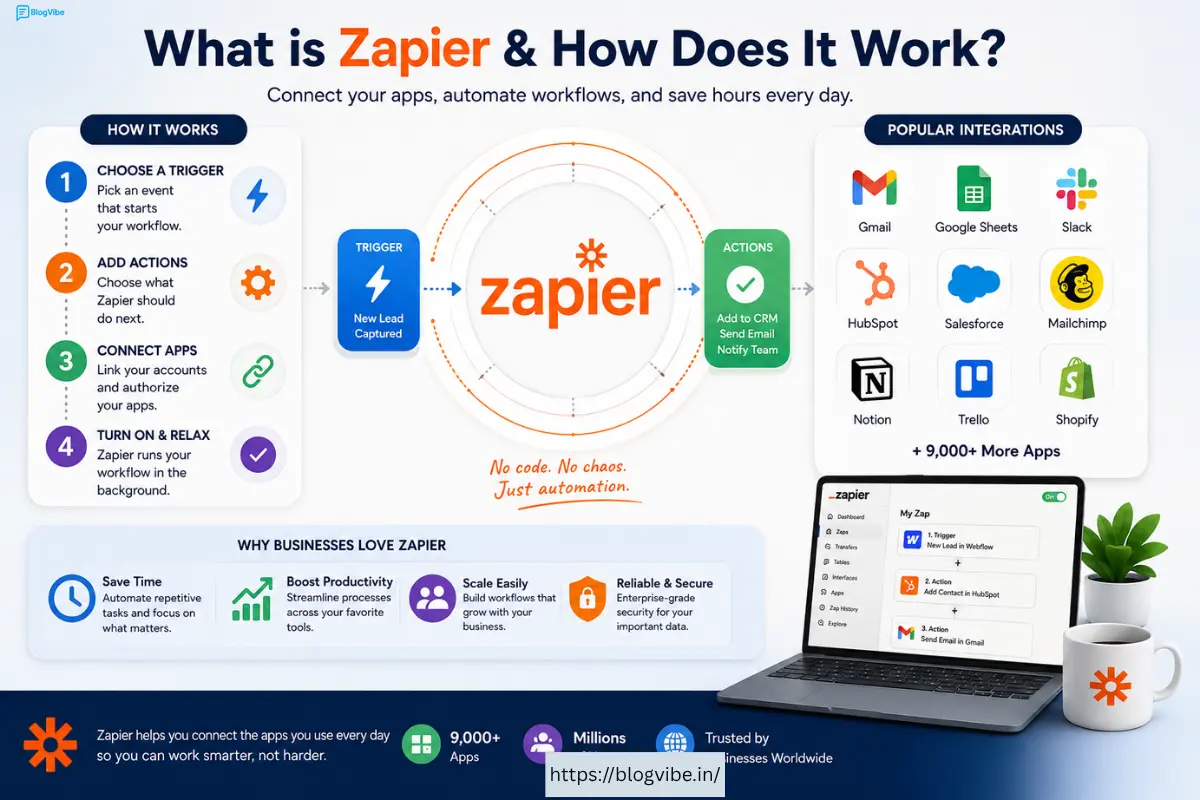
Zapier connects different apps and lets them work together automatically. You can create a workflow once and let Zapier handle the repetitive work in the background.
But is Zapier worth paying for in 2026? What is Zapier pricing? How does Zapier AI work? And are alternatives such as n8n or Make better?
In this guide, we’ll answer all of these questions in simple language.
What Is Zapier?
So, what is Zapier?
Zapier is an automation platform that connects different apps and services. It allows information to move from one app to another without you having to do everything manually.
For example, suppose you have a website contact form.
Someone fills it out.
Instead of manually copying their information into your CRM, Zapier can do it automatically.
It can also send the person an email and notify your team.
That’s the basic idea behind Zapier.
A Simple Example
Imagine this workflow:
New Form Submission → Google Sheets → Gmail → Slack
Someone fills out your form.
Zapier saves their details in Google Sheets, sends them a confirmation email, and alerts your team on Slack.
You don’t have to perform these steps yourself.
How Does Zapier Work?
Zapier automation is based on a simple idea: when something happens, do something else automatically.
A workflow normally starts with a trigger.
For example:
- A new email arrives.
- A customer submits a form.
- Someone buys a product.
- A new row is added to a spreadsheet.
Then Zapier performs one or more actions.
For example:
- Create a CRM contact.
- Send an email.
- Add a spreadsheet row.
- Send a Slack message.
Zapier calls these automated workflows Zaps.
You can create a very simple Zap or build a more advanced workflow with multiple steps.
What Is a Zap?
A Zap is simply an automated workflow.
Let’s say you run an online store.
You could create a Zap like this:
New Shopify Order → Add Order to Google Sheets → Send Email → Notify Slack
Every time someone places an order, Zapier handles these steps automatically.
This is especially useful when your business starts receiving lots of orders or leads.
Zapier Pricing 2026
One of the biggest questions people have is how much does Zapier cost?
Zapier currently offers Free, Professional, Team, and Enterprise plans.
The Free plan starts at $0 per month. Professional starts at $19.99 per month, while Team starts at $69 per month. Enterprise pricing is customized for larger organizations.
Pricing can change, and your actual cost depends on how much automation you use.
| Plan | Starting Price | Best For |
| Free | $0/month | Beginners |
| Professional | From $19.99/month | Individuals & small businesses |
| Team | From $69/month | Teams |
| Enterprise | Custom | Large organizations |
Is Zapier Free?
Yes.
Zapier has a free plan that lets you try the platform before paying.
The Free plan currently includes 100 tasks per month and supports two-step Zaps.
If you’re new to automation, the free plan is a good place to start.
You can create a few simple workflows and see whether Zapier actually saves you time.
What Are Zapier Tasks?
Tasks are important when understanding Zapier pricing.
Think of a task as an action performed by your automation.
For example, suppose a new lead enters your system.
Your Zap adds that lead to a CRM.
That action may count as one task.
If your workflow performs several actions, your task usage can increase.
This is why a business running thousands of automations may need a paid plan.
Before choosing a plan, think about how many actions your workflows will perform every month.
Zapier Professional Plan
The Professional plan is designed for people who need more than basic automation.
It supports features such as multi-step Zaps and premium apps.
This can be useful for freelancers, marketers, creators, and small businesses.
For example, instead of having only:
Form → Google Sheets
you can build:
Form → AI → Google Sheets → CRM → Email → Slack
That gives you much more flexibility.
Zapier Team Plan
The Team plan is aimed at businesses where several people need to work with automation.
You can share workflows and app connections with your team.
This is useful when automation is no longer something one person manages.
For example, a marketing team could use Zapier to manage leads while the sales team receives the results automatically.
Zapier Enterprise
Large organizations may need more control over their automation.
That’s where the Enterprise plan comes in.
It offers advanced administration, security, governance, and support features.
Enterprise pricing is customized rather than being a simple fixed monthly price.
If you’re a small business or individual, you probably don’t need this plan.
Zapier AI Automation Explained
Let’s say a customer sends this message:
“My order arrived damaged. Can you help me get a replacement?”
An AI-powered Zap could:
- Read the message.
- Understand that it is an order problem.
- Identify it as a replacement request.
- Check or create a customer record.
- Create a support ticket.
- Notify the support team.
- Draft a response.
You don’t need to manually read and organize every message.
That’s one of the biggest benefits of combining AI with automation.
AI by Zapier
Zapier also offers AI by Zapier, which allows AI capabilities to be added directly into workflows.
You can use AI for tasks such as:
- Summarizing text
- Classifying information
- Extracting data
- Generating content
- Analyzing messages
- Making workflow decisions
In 2026, Zapier introduced model-based pricing for AI by Zapier.
Standard models use a 1× task multiplier, Advanced models use 3×, and Premium models use 5×.
This means AI-heavy workflows can consume tasks faster than simple workflows.
So if you plan to use AI extensively, keep an eye on your task usage.
Zapier Copilot
Zapier Copilot is designed to make automation easier.
Instead of building everything manually, you can describe what you want to automate.
For example:
“When I receive a new lead from my website, add it to Google Sheets and notify my sales team.”
Copilot can help you create the workflow.
This is particularly useful for beginners who understand what they want to automate but don’t know exactly how to configure it.
Zapier Integrations
One of Zapier’s biggest strengths is its huge collection of integrations.
Zapier currently says its platform connects with 9,000+ apps.
That means you can connect many of the tools you already use.
Popular categories include:
- CRM
- Ecommerce
- Marketing
- Project management
- Communication
- AI
- Forms
- Productivity
- Databases
Some popular apps available through Zapier include Gmail, Google Sheets, Slack, HubSpot, Salesforce, Shopify, and many others.
The exact triggers and actions available can vary from one integration to another.
Best Zapier Integrations
Here are some common ways people use Zapier integrations.
Gmail + Google Sheets
When you receive a specific email, automatically add information to a spreadsheet.
This can be useful for tracking leads, invoices, applications, or customer requests.
Google Forms + Slack
When someone submits a form, your team can instantly receive a Slack notification.
Shopify + Google Sheets
When a customer places an order, automatically add the order information to a spreadsheet.
HubSpot + Gmail
When a new contact is created, automatically send a personalized email.
AI + CRM
AI can analyze a lead and then send useful information to your CRM.
These are just examples. The real value comes from building workflows around your own business.
Zapier App: What Can You Do With It?
When people search for the Zapier app, they are often looking for ways to manage their automations and connected services.
The important thing to understand is that Zapier is more than a single app.
It’s an automation ecosystem.
You can connect your tools, create workflows, manage automation, and use AI capabilities through the platform.
For example:
Website → Zapier → AI → CRM → Email
Instead of opening each service separately, Zapier can connect the entire process.
Zapier Alternatives
Zapier is popular, but it isn’t the only automation platform.
There are several Zapier alternatives worth considering.
Some of the most popular options include:
- n8n
- Make
- Microsoft Power Automate
- IFTTT
- Pipedream
- Node-RED
- Workato
Each platform has different strengths.
The best alternative depends on your budget and technical skills.
n8n vs Zapier
The n8n vs Zapier comparison is especially popular.
Both platforms can automate workflows, but they are designed with different users in mind.
Zapier Review focuses heavily on simplicity.
n8n gives technical users more control and offers self-hosting options.
Zapier’s own comparison explains that Zapier Review is a fully managed cloud platform, while self-hosted n8n requires the user to manage infrastructure such as updates, security, backups, and uptime.
Zapier
Zapier is better if you want:
- Easy setup
- No-code automation
- Many integrations
- Managed infrastructure
- Business-friendly tools
n8n
n8n may be better if you want:
- Self-hosting
- More technical control
- Custom workflows
- Developer-friendly features
- More control over infrastructure
n8n vs Zapier: Quick Comparison
| Feature | Zapier | n8n |
| Beginner friendly | Excellent | Good |
| No-code | Excellent | Good |
| Self-hosting | No | Yes |
| Integrations | 9,000+ apps | Large node ecosystem |
| AI automation | Yes | Yes |
| Customization | Good | Excellent |
| Infrastructure control | Limited | High |
| Best for | Beginners & businesses | Developers & technical users |
There isn’t one winner for everyone.
If you want something simple, Zapier Review is a strong choice.
If you are technical and want more control, n8n can be very attractive.
n8n vs Zapier Pricing
| Feature | Zapier | n8n |
| Free Plan | $0/month | Free Community Edition |
| Starter / Entry Plan | Professional: From $19.99/month | Starter: €20/month |
| Next Plan | Team: From $69/month | Pro: €50/month |
| Usage Limit | Tasks | Workflow executions |
| Starter Usage | 100 tasks/month on Free | 2,500 executions/month |
| Workflow Steps | Depends on plan | Unlimited steps |
| Users | Team & Enterprise plans support multiple users | Unlimited users |
| Self-Hosting | No | Yes |
| AI Automation | Yes | Yes |
| Best For | Beginners, marketers & businesses | Developers & technical teams |
Quick takeaway: Zapier is easier for beginners and focuses on a large app ecosystem. n8n is better suited to users who want more flexibility, unlimited workflow steps, and self-hosting options. Current pricing and included limits can change over time.
Zapier vs Make
Make is another popular Zapier Review alternative.
Make is known for its visual workflow builder.
It allows users to create more complex automation scenarios visually.
Zapier is generally easier for beginners.
Make can be attractive when you want to see how different steps connect together and build more complicated workflows.
If you’re just starting with automation, I’d recommend trying both before committing to a paid plan.
Zapier vs Microsoft Power Automate
Microsoft Power Automate is another strong alternative.
It’s particularly useful for businesses already using Microsoft’s ecosystem.
For example, if your company uses Microsoft 365, Teams, Excel, SharePoint, Outlook, and other Microsoft services, Power Automate can fit naturally into your workflow.
Zapier is more appealing when you need to connect a wide range of third-party apps.
Best Zapier Alternative for Beginners
If you’re a complete beginner, Make or Zapier are usually easier starting points than more technical platforms.
Zapier has a particularly simple approach.
You choose an app, select a trigger, choose an action, connect your accounts, and test the workflow.
You don’t need to understand servers or write complicated code.
Best Zapier Alternative for Developers
For developers, n8n and Pipedream can be interesting alternatives.
They provide more flexibility for custom logic and APIs.
n8n is especially interesting if you want to self-host your automation.
However, that flexibility also means more responsibility.
You may need to think about hosting, updates, security, backups, and maintenance.
Zapier Careers
Another common search is Zapier careers.
Zapier Review isn’t only a software product. It’s also a company with teams working in engineering, marketing, sales, customer operations, AI, security, and other areas.
Zapier’s official careers page lists opportunities across areas including engineering, marketing, data, customer operations, sales, customer success, finance, security, IT, and applied AI.
If you’re interested in working at Zapier, the official careers page is the best place to check current openings.
What Skills Can Help?
The required skills depend on the job.
For technical roles, useful skills may include:
- Python
- JavaScript
- APIs
- Databases
- Cloud technologies
- AI
- Software engineering
For non-technical roles, skills in marketing, sales, customer success, operations, or project management may be more important.
The growing importance of AI also means that knowledge of AI tools and automation can be useful for many modern roles.
Zapier for Small Businesses
Small businesses can benefit greatly from automation.
Imagine you receive 100 leads every month.
Without automation, someone may need to:
- Check the form
- Copy the lead
- Add it to the CRM
- Send an email
- Notify the salesperson
With Zapier, much of this can happen automatically.
That means your employees can spend more time talking to customers instead of moving data between apps.
Zapier for Bloggers
Bloggers can use Zapier in several ways.
For example, when you publish a new article, an automation can notify your team or send information to another platform.
You can also connect forms, email marketing tools, spreadsheets, and content management systems.
If you run a website and regularly perform the same task after publishing content, it’s worth asking:
“Can I automate this?”
If the answer is yes, Zapier Review may be able to help.
Zapier for Marketing
Marketing teams deal with repetitive tasks all the time.
For example:
Lead Form → CRM → Email → Slack → Spreadsheet
Instead of manually moving leads between platforms, Zapier Review can handle the process.
AI can make this even more useful.
You could ask AI to classify leads, summarize customer messages, or generate personalized content before the information reaches another system.
Zapier for Ecommerce
Ecommerce businesses can also use automation to save time.
For example:
New Order → Spreadsheet → Customer Email → Team Notification
You could also create workflows around customer support, abandoned carts, inventory information, and CRM updates.
The exact workflow depends on your ecommerce platform and the apps you’re using.
How to Start Using Zapier
Getting started is fairly simple.
First, create a Zapier Review account.
Then choose the apps you want to connect to.
Next, select a trigger.
After that, choose what should happen when the trigger occurs.
Connect your accounts and test the workflow.
If everything works correctly, turn the Zap on.
That’s it.
You don’t need to build a complicated automation on your first day.
Start with one boring task that you repeat frequently.
Automate that first.
How to Save Money on Zapier
If you’re worried about Zapier Review pricing, there are a few things you can do.
Track Your Tasks
Check how many tasks your workflows use.
Remove Unnecessary Steps
Don’t create actions that don’t provide real value.
Use Filters
Only run a workflow when it actually needs to continue.
Choose AI Models Carefully
AI by Zapier Review uses different task multipliers depending on the model tier.
If you don’t need an advanced model, using a simpler option may help reduce task consumption.
Start Small
Don’t automate your entire business immediately.
Start with one process.
Measure the results.
Then expand.
Is Zapier Worth It in 2026?
For many users, yes.
The biggest reason to use Zapier Review isn’t simply that it connects apps.
It’s the amount of time you can save.
If an employee spends five hours every week doing repetitive data entry, automation could potentially free up a significant amount of that time.
That’s where Zapier Review becomes valuable.
However, pricing matters.
If you’re running a small number of workflows, the cost may be easy to justify.
If you’re running thousands of actions every day, you should carefully calculate your task usage.
Zapier Pros and Cons
Pros
Easy to use: You don’t need to be a developer.
Large ecosystem: Zapier supports thousands of apps.
AI features: You can add AI to many workflows.
Good for businesses: Teams can use shared automation and collaboration features.
Managed platform: You don’t have to maintain your own automation server.
Cons
Can become expensive: High-volume automation can increase costs.
Task-based pricing: You need to understand how tasks are counted.
Less infrastructure control: Self-hosted platforms give you more control.
Advanced workflows can take time: Simple Zaps are easy, but complicated automation requires planning.
Important Zapier Update for 2026
If you already use Zapier, there’s an important update worth knowing.
Zapier announced that Zapier Functions is being deprecated on September 1, 2026.
Users with existing Functions workflows are advised to migrate them to Code by Zapier before the deadline.
If you have never used Zapier Functions, this change probably won’t affect you.
But if you have older workflows using Functions, check them before September 2026.
FAQ(Zapier Review)
What is Zapier used for?
Zapier is used to automate repetitive tasks between different apps.
For example, you can automatically send form submissions to a spreadsheet or CRM.
Is Zapier free?
Yes.
Zapier offers a Free plan with limited task usage and basic automation features.
How much is Zapier pricing?
Zapier’s current starting prices include Free at $0/month, Professional from $19.99/month, and Team from $69/month. Enterprise pricing is customized.
What is Zapier AI?
Zapier AI refers to AI-powered capabilities that can help users create, analyze, and automate workflows.
What are the best Zapier alternatives?
Popular alternatives include n8n, Make, Microsoft Power Automate, IFTTT, and Pipedream.
Is n8n better than Zapier?
It depends on your needs.
Zapier is easier for beginners.
n8n is often more attractive to technical users who want self-hosting and greater control.
How many integrations does Zapier have?
Zapier currently advertises more than 9,000 apps in its ecosystem.
Can beginners use Zapier?
Yes.
Zapier is specifically designed to make automation accessible to people without advanced programming skills.
Can Zapier automate AI tasks?
Yes.
AI can be used for tasks such as summarizing, classifying, extracting information, and generating content.
Final Verdict(Zapier Review)
Zapier makes it easy to connect apps and automate repetitive tasks without coding. With Zapier AI, you can also summarize, classify, and process information automatically.
The main thing to consider is Zapier pricing, especially if you run many automations. Compared with n8n, Zapier is easier for beginners, while n8n offers more control and self-hosting.
Overall, Zapier is a strong choice for businesses, marketers, creators, and freelancers who want to save time through automation.
READ MORE:
Veo 3.1 Login, Veo Camera & AI Video Generation: Complete Guide 2026

