
Finding potential customers, researching businesses, qualifying prospects, and following up with leads can take hours of work every day. For small businesses, freelancers, and sales teams, managing these activities manually becomes increasingly difficult as the number of prospects grows.
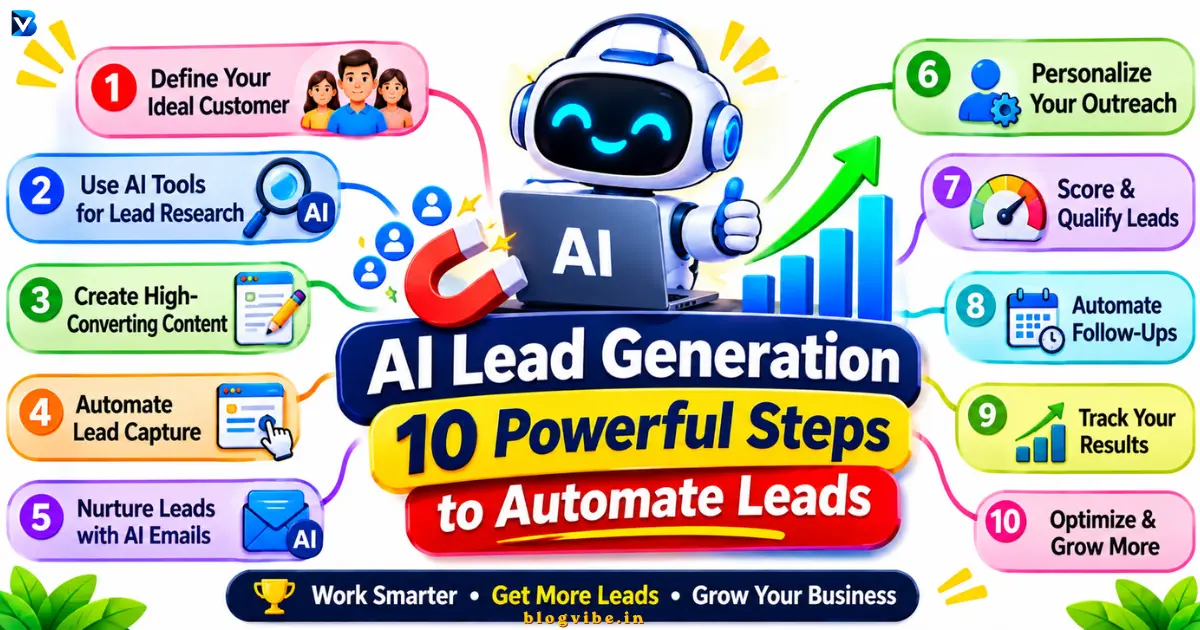
This is where AI lead generation can help.
By combining artificial intelligence with automation tools such as n8n, businesses can collect prospect information, organize leads, qualify potential customers, assign scores, and prepare personalized follow-up messages with less manual effort.
In this guide, you will learn how to automate lead generation using AI, which tools you need, how to create a beginner-friendly n8n workflow, and how to manage leads more efficiently.
You will also get a practical AI prompt, an example lead-scoring system, and a workflow structure that you can adapt to your business.
What Is AI Lead Generation?
AI lead generation is the process of using artificial intelligence and automation to identify, attract, collect, research, and qualify potential customers.
Traditional lead generation often involves manually finding businesses, checking websites, collecting contact information, researching prospects, and sending follow-up messages.
AI-powered systems can assist with many of these activities.
For example, when someone submits a contact form on your website, an automated workflow can:
- Collect the person’s name, business email, company, and requirements.
- Store the information in Google Sheets or a CRM.
- Analyze the information using an AI model.
- Determine whether the prospect matches your ideal customer profile.
- Assign a lead score.
- Notify your sales team about high-priority prospects.
- Prepare a personalized follow-up draft for human review.
The purpose is not to remove people from the sales process. It is to reduce repetitive work so that sales teams can spend more time talking to relevant potential customers.
How Does AI Lead Generation Work?
An AI lead generation system connects several tools to move prospect information through an organized process.
A typical workflow follows these stages:
Lead source → Lead capture → Data validation → AI qualification → Lead scoring → CRM or spreadsheet → Human review → Follow-up
Each stage has a specific responsibility.
| Stage | What happens | Example tool |
| Lead source | A potential customer discovers your business | Website, landing page |
| Lead capture | Collects prospect information | n8n Form Trigger |
| Data validation | Checks and cleans submitted information | n8n |
| Lead management | Saves and organizes records | Google Sheets |
| AI qualification | Evaluates whether a prospect fits your criteria | ChatGPT or another LLM |
| Lead scoring | Assigns a numerical priority | n8n |
| Follow-up | Prepares or sends approved communication | Gmail or CRM |
For example, imagine a software company receives a contact form submission from a business owner interested in automating customer support.
The workflow saves the submission, evaluates the company’s requirements, assigns a lead score, and sends a notification to the sales team.
The team can then review the information and decide what to do next.
Benefits of AI Lead Generation
AI-powered automation can improve several parts of the sales process.
1. Less manual work
Sales employees often spend time copying information between spreadsheets, researching companies, and organizing prospect records.
Automation can handle repetitive tasks such as storing submissions, categorizing leads, and notifying the appropriate team member.
2. Faster lead qualification
AI can analyze submitted business information and compare it with predefined qualification criteria.
For example, a marketing agency might prioritize businesses that:
- Operate in its target industry.
- Have an appropriate company size.
- Need marketing or automation services.
- Have a clearly defined project requirement.
The AI can prepare an initial assessment for the sales team.
3. Better lead organization
An automated CRM or spreadsheet can organize prospects by industry, location, business type, score, and qualification status.
This makes it easier to identify which leads need attention first.
4. Personalized follow-ups
AI can use information voluntarily provided by a prospect to prepare more relevant follow-up messages.
Instead of sending the same generic message to everyone, businesses can create drafts that reflect the customer’s stated requirements.
5. Improved workflow consistency
An automation system follows the same defined steps for every submission.
This can reduce missed inquiries, inconsistent records, and forgotten follow-ups.
However, automation does not guarantee more customers or higher conversion rates. Results depend on lead quality, the offer, sales processes, and the accuracy of the underlying information.
Best AI Lead Generation Tools
You do not need dozens of applications to build an effective automated lead generation system.
Start with a small set of tools that work together.
| Tool | Main purpose | Best suited for |
| n8n | Connects applications and automates workflows | Custom automation |
| Google Sheets | Stores and organizes leads | Beginners and small businesses |
| HubSpot CRM | Manages contacts, deals, and sales activities | Sales teams |
| Apollo | Helps discover and research B2B prospects | B2B prospecting |
| Clay | Supports prospect research and data enrichment | Advanced lead research |
| ChatGPT or another LLM | Analyzes information and drafts messages | Qualification and personalization |
1. n8n
n8n is a workflow automation platform that connects different applications and APIs.
You can use it to receive form submissions, process information, connect AI models, update spreadsheets, and notify your team.
It supports both cloud-based and self-hosted deployment options.
Official documentation: https://docs.n8n.io/
2. Google Sheets
Google Sheets is a useful starting point for managing leads.
You can create columns for contact details, company information, lead scores, qualification status, and follow-up activities.
n8n supports operations such as reading, appending, and updating spreadsheet rows.
3. HubSpot CRM
HubSpot CRM can help businesses manage contact records, customer communication, sales pipelines, and deal information.
It is useful when a simple spreadsheet is no longer sufficient for managing the sales process.
4. Apollo
Apollo supports B2B prospect discovery and contact research.
Businesses can use prospecting filters to identify companies and potential contacts that match their target market.
Always review the provider’s data sourcing, usage permissions, and privacy requirements before using contact information.
5. Clay
Clay supports prospect research, data enrichment, qualification, and personalization.
It can be useful for businesses that want to build more advanced prospecting workflows.
6. ChatGPT and other AI models
An AI model can analyze submitted information, summarize a prospect’s requirements, categorize leads, and prepare follow-up drafts.
The model should only use available and verified information. It should not invent company details, buying signals, or contact information.
How to Automate Lead Generation Using AI with n8n
Now let’s build a practical beginner-friendly AI lead generation workflow.
For this example, we will use:
- n8n for workflow automation.
- n8n Form Trigger for collecting leads.
- Google Sheets for storing prospect information.
- An AI model for lead qualification.
- Gmail for notifying the sales team or preparing an approved follow-up.
You will need access to the relevant applications and credentials. Some AI models and integrations may require paid accounts or API usage.
Step 1: Define Your Ideal Customer Profile
Before creating an automation, decide which customers your business actually wants.
This is called an Ideal Customer Profile (ICP).
An ICP describes the type of company that is most suitable for your product or service.
For example, suppose you operate an AI automation agency.
Your target customer profile might look like this:
| Criteria | Example requirement |
| Industry | Marketing, consulting, SaaS |
| Company size | 5–100 employees |
| Location | United States |
| Decision-maker | Founder, owner, operations manager |
| Business requirement | Repetitive manual tasks |
| Main problem | Time-consuming processes |
| Service interest | AI agents and workflow automation |
These are illustrative criteria. Your actual ICP should reflect the customers your business can serve profitably.
A clear ICP helps the AI evaluate leads using consistent rules rather than making random decisions.
Step 2: Create a Lead Capture Form
The next step is to collect information from potential customers.
You can create a form using your website, a landing-page builder, or the n8n Form Trigger node.
Include fields such as:
| Form field | Purpose |
| Full name | Identify the contact |
| Work email | Contact information |
| Company name | Understand the business |
| Website URL | Provide company context |
| Job role | Identify the person’s role |
| Industry | Categorize the business |
| Business requirement | Understand the problem |
| Project timeline | Understand urgency |
| Contact permission | Record applicable consent or communication preferences |
Avoid collecting unnecessary personal information.
Add a clear privacy notice explaining how submitted information will be used. Where consent is required, obtain and record it appropriately.
Step 3: Create a Google Sheets Lead Database
Open Google Sheets and create a spreadsheet called:
AI Lead Generation Database
Create these columns:
| Column | Description |
| Lead ID | Unique record identifier |
| Name | Contact name |
| Work email | |
| Company | Business name |
| Website | Company website |
| Industry | Business category |
| Requirement | Customer’s stated need |
| Lead Source | Where the lead originated |
| Consent Status | Applicable permission record |
| Fit Score | Customer profile match |
| Intent Score | Interest level |
| Total Score | Combined lead score |
| Lead Status | Qualified, review, or low priority |
| AI Summary | Explanation of the assessment |
| Follow-Up Status | Pending, reviewed, or contacted |
| Created Date | Submission date |
You can later connect this spreadsheet to your n8n workflow.
Step 4: Create an n8n Workflow
Log in to your n8n account and create a new workflow.
Give it the name:
AI Lead Generation Automation
The beginner workflow can follow this structure:
Form Trigger → Edit Fields → Google Sheets Lookup → IF (Duplicate Check) → AI Qualification → Score Calculation → Google Sheets → Human Approval → Notification or Follow-Up
The exact node configuration depends on your n8n version and connected applications.
Start with a simple workflow before adding advanced prospect discovery or external research services.
Step 5: Configure the Lead Capture Trigger
Add the Form Trigger node in n8n.
This node starts the workflow whenever someone submits the form.
Configure the form with fields such as name, email, company, website, industry, and project requirements.
During development, use the Test URL and submit sample information to inspect the incoming data.
Once the workflow is ready, publish it and use its Production URL.
The n8n Form Trigger documentation explains the difference between test and production URLs:
https://docs.n8n.io/integrations/builtin/core-nodes/n8n-nodes-base.formtrigger
Step 6: Validate and Remove Duplicate Leads
Before sending information to an AI model, clean the submitted data.
For example:
- Remove unnecessary spaces from names and email addresses.
- Convert email addresses to lowercase for consistent matching.
- Check that required fields are present.
- Validate the email format.
- Normalize company website addresses.
- Reject incomplete or clearly invalid submissions.
Next, check whether the email address already exists in Google Sheets.
You can use the Google Sheets Get Row(s) operation to look for an existing record.
If the email already exists, update the existing record where appropriate instead of creating another entry.
If it does not exist, create a new row.
This prevents duplicate records from unnecessarily increasing your lead count.
Step 7: Use AI to Qualify Leads
Now connect an AI model to your n8n workflow.
The AI model will examine the submitted information and compare it with your ideal customer profile.
For example, suppose a marketing agency receives this submission:
Company: Example Digital Agency
Industry: Digital Marketing
Employees: 25
Requirement: Automate repetitive client reporting and customer communication.
The AI model can identify whether the company appears to match the agency’s target customer profile.
Use the following prompt as a starting point.
Copy-and-paste AI lead qualification prompt
You are an AI lead qualification assistant.
Your job is to evaluate potential business leads
using the information provided below.
IDEAL CUSTOMER PROFILE:
Industry: Digital marketing, consulting, and SaaS
Company size: 5–100 employees
Target roles: Founder, CEO, or Operations Manager
Business needs: Workflow automation, AI agents,
customer support automation, and business efficiency.
LEAD INFORMATION:
Name: {{name}}
Email: {{email}}
Company: {{company}}
Website: {{website}}
Industry: {{industry}}
Job Role: {{job_role}}
Business Requirement: {{requirement}}
INSTRUCTIONS:
1. Evaluate the lead against the ideal customer profile.
2. Identify relevant business requirements.
3. Explain why the lead may or may not be suitable.
4. Identify missing information.
5. Never invent company information.
6. Do not assume that a person has buying intent
without supporting information.
7. If information is missing, mark it as unknown.
8. Return valid JSON only.
OUTPUT FORMAT:
{
“fit_summary”: “”,
“fit_score”: 0,
“intent_score”: 0,
“data_quality_score”: 0,
“total_score”: 0,
“qualification”: “”,
“reasons”: [],
“missing_information”: [],
“recommended_action”: “”
}
SCORING RULES:
Fit Score: 0–50
Intent Score: 0–35
Data Quality Score: 0–15
Total Score must equal the sum of all three scores.
Qualification:
70–100: High Priority
40–69: Needs Review
0–39: Low Priority
Base every assessment only on the information supplied.
This prompt provides a structured starting point for AI-based qualification.
For better reliability, use structured-output validation and check that the returned values are within their permitted ranges. Do not accept an AI-generated score without validating it.
Step 8: Calculate and Assign Lead Scores
Lead scoring helps determine which prospects deserve attention first.
You can use a simple 100-point scoring model.
| Scoring category | Maximum points |
| Industry match | 20 |
| Company size match | 10 |
| Decision-maker relevance | 10 |
| Target location match | 10 |
| Demonstrated interest | 20 |
| Clearly defined business requirement | 10 |
| Relevant engagement | 5 |
| Information completeness | 15 |
| Total | 100 |
The weights above are an example, not a universal scoring standard.
You can use n8n expressions or a Code node to validate the AI output and calculate the total score.
For instance:
- 70–100: High priority.
- 40–69: Needs human review or nurturing.
- 0–39: Low priority or not currently suitable.
Use these thresholds as initial rules and adjust them using actual sales outcomes.
Do not treat an AI-generated score as proof that someone intends to purchase.
Step 9: Store the Results and Notify Your Team
Once the lead has been qualified and scored, save the results in Google Sheets or your CRM.
For high-priority leads, configure an n8n notification to the appropriate sales representative.
A notification could contain:
New Lead – High Priority
- Name: Example Business Owner
- Company: Example Digital Agency
- Industry: Digital Marketing
- Total Score: 85/100
- Requirement: Workflow automation
- Suggested action: Review the inquiry and prepare a consultation response.
These are illustrative values, not a real customer record.
For lower-priority leads, you can keep the record in a separate review or nurturing category.
Step 10: Prepare Personalized Follow-Ups
The final stage is communication.
You can use an AI model to prepare an email based on the customer’s actual requirements.
For example:
Subject: About your workflow automation requirements
Hi [Name],
Thank you for sharing your requirements.
I understand that your team is interested in reducing repetitive reporting and communication tasks.
We may be able to help you explore practical workflow automation options based on your current process.
Would you be available for a short conversation to discuss your requirements?
Best regards,
[Your Name]
This is an example follow-up draft.
Do not automatically send every AI-generated message. Have a human review the content, confirm that the details are accurate, and verify that the communication is permitted.
The workflow is now ready to assist with lead capture, qualification, organization, and follow-up preparation.
Example AI Lead Generation Workflow
Here is the complete system in one view:
WEBSITE LEAD FORM
|
v
n8n Form Trigger
|
v
Data Cleaning
|
v
Duplicate Check
|
v
AI Analysis
|
v
Lead Scoring
|
+——+——+
| |
v v
High Score Low Score
| |
v v
Human Review Review / Nurture
|
v
Approved Follow-Up
|
v
CRM / Sheets
This architecture can be expanded with company enrichment, contact verification, CRM updates, sales notifications, and additional workflow stages.
AI Lead Generation Examples for Different Businesses
AI lead generation is not limited to large companies. Different businesses can automate different parts of their prospecting process.
| Business type | Automation example | Potential benefit |
| Digital marketing agency | Qualify website inquiries | Prioritize suitable clients |
| SaaS business | Categorize trial signups | Identify users needing sales support |
| Consulting company | Analyze consultation requests | Understand prospect requirements |
| Web development agency | Classify project inquiries | Identify relevant projects |
| E-commerce business | Qualify wholesale inquiries | Organize business customers |
| Real estate agency | Categorize property inquiries | Route inquiries to the right agent |
The best automation depends on where your business receives leads and what information is available.
Advantages and Disadvantages of AI Lead Generation
AI automation can improve efficiency, but it also introduces risks that businesses should understand.
| Advantages | Disadvantages |
| Reduces repetitive manual work | Requires initial setup |
| Organizes customer information | Incorrect input can produce poor results |
| Supports faster lead qualification | AI can produce inaccurate assessments |
| Helps personalize communication | Generic AI messages can feel impersonal |
| Connects multiple applications | Some integrations require paid plans |
| Supports consistent workflows | Requires monitoring and maintenance |
A good system combines automation with human judgment instead of trying to automate every business decision.
Common AI Lead Generation Mistakes
1. Targeting everyone
Trying to find every possible customer creates unnecessary work.
Solution: Define a specific ideal customer profile before building your automation.
2. Trusting AI-generated information without checking it
AI models may generate incorrect company descriptions, contact information, or buying signals.
Solution: Validate important information using reliable sources and route uncertain records for manual review.
3. Sending identical automated emails
Generic messages are unlikely to address individual customer needs.
Solution: Use relevant information supplied by prospects to prepare personalized drafts, and have a person review them.
4. Ignoring duplicate leads
Repeated submissions can make your CRM unreliable and distort performance reporting.
Solution: Check existing email addresses or unique lead identifiers before adding records.
5. Building an overly complicated workflow
Adding too many applications at the beginning makes troubleshooting harder.
Solution: Begin with a form, AI qualification, Google Sheets, and notifications. Add more integrations only when necessary.
6. Ignoring follow-up preferences
A person who has opted out or objected to marketing should not continue receiving promotional messages.
Solution: Maintain suppression records, check communication permissions, and respect opt-out requests throughout the workflow.
Is AI Lead Generation Legal?
AI lead generation is not automatically legal or illegal. Its compliance depends on the information being collected, how it is obtained, how it is used, the communication method, and the laws applicable to the business and recipient.
Businesses should consider:
- Whether they have a lawful basis or required permission to collect and process personal data.
- Whether third-party data providers have the appropriate rights to supply the information.
- Whether their privacy notice explains the relevant data collection and use.
- Whether marketing emails comply with the applicable electronic marketing rules.
- Whether recipients can opt out where required.
- Whether personal information sent to AI providers is protected appropriately.
For businesses communicating with people in the United States, review the FTC’s CAN-SPAM compliance guide.
For Gmail deliverability, Google also publishes sender requirements covering authentication, spam rates, and unsubscribe mechanisms for applicable senders.
For international businesses, requirements can differ under regulations such as the GDPR and local electronic marketing laws. Review the relevant rules before activating an outbound campaign.
Useful official resources:
- FTC CAN-SPAM Guide: https://www.ftc.gov/business-guidance/resources/can-spam-act-compliance-guide-business
- Google Email Sender Guidelines: https://support.google.com/mail/answer/81126
- ICO Guidance: https://ico.org.uk/
- Canadian Privacy Commissioner AI Principles: https://www.priv.gc.ca/en/privacy-topics/technology/artificial-intelligence/gd_principles_ai/
How to Measure AI Lead Generation Performance
Do not judge an automation system only by how many leads it collects.
Measure whether those leads are relevant and produce meaningful sales opportunities.
| Metric | How to measure it |
| Total leads | Number of unique leads collected |
| Qualified lead rate | Qualified leads ÷ total leads × 100 |
| Duplicate rate | Duplicate submissions ÷ total submissions × 100 |
| Lead-to-meeting rate | Meetings booked ÷ total leads × 100 |
| Positive reply rate | Positive replies ÷ delivered outreach emails × 100 |
| Cost per qualified lead | Total acquisition cost ÷ qualified leads |
Review these metrics regularly.
For example, if an automation collects many leads but only a small number match your ideal customer profile, improve the targeting criteria instead of simply increasing the lead volume.
Frequently Asked Questions
1. What is AI lead generation?
AI lead generation uses artificial intelligence and automation to identify, collect, research, qualify, and organize potential customers. It can also help prepare personalized follow-up messages.
2. How can I automate lead generation using AI?
Start by defining your ideal customer profile, collecting information through a website form, connecting the form to n8n, analyzing submissions with an AI model, assigning lead scores, and saving qualified records in a CRM or spreadsheet.
3. What are the best AI lead generation tools?
Useful options include n8n, Apollo, Clay, HubSpot, Google Sheets, and AI models such as ChatGPT. The right combination depends on whether you need prospect discovery, lead qualification, enrichment, or workflow automation.
4. Can n8n automate lead generation?
Yes. n8n can connect forms, AI services, spreadsheets, databases, CRM platforms, and notification tools. It can automate data collection, processing, qualification, and follow-up preparation.
5. Is AI lead generation free?
Some tools provide free plans or self-hosting options, but AI model usage, data enrichment, hosting, CRM features, and integrations may involve costs. Check the current pricing and usage limits of each provider before building your system.
6. Can ChatGPT generate leads?
ChatGPT can help define customer profiles, analyze supplied prospect information, qualify leads, and prepare personalized messages. To find and collect live prospects automatically, it needs suitable data sources and integrations.
7. What is B2B lead generation automation?
B2B lead generation automation uses connected software to identify suitable businesses, collect prospect information, qualify opportunities, organize contact records, and support sales follow-up.
8. How do I qualify leads using AI?
Provide the AI model with a clear ideal customer profile and relevant prospect information. Ask it to assess company fit, business requirements, missing information, and potential interest. Validate the result and use a scoring system that your sales team can review.
9. Is automated lead generation suitable for small businesses?
Yes. Small businesses can start with a basic form, n8n, Google Sheets, and an AI model. A simple system may be sufficient before investing in advanced prospecting platforms or enterprise CRM software.
10. How can I prevent AI lead generation errors?
Validate submitted information, check for duplicate records, use structured AI outputs, enforce scoring limits, verify important facts, and require human approval before sending external messages.
Conclusion
AI lead generation can help businesses reduce repetitive work and organize their sales processes more efficiently.
By combining n8n, an AI model, Google Sheets, and a CRM or notification system, you can build an automation that collects potential customers, evaluates their requirements, assigns lead scores, and prepares follow-up messages.
The best approach is to start with a simple workflow, test it with sample records, and improve it using actual business results.
Remember that AI should support your sales team, not replace human judgment. Accurate information, relevant communication, customer privacy, and appropriate follow-up practices remain essential.
Ready to build your first automation? Start with an n8n form, connect Google Sheets, and add AI-based lead qualification. Once the basic system works reliably, expand it with CRM integrations and more advanced automation.
READ MORE:
How to Build an AI Customer Support Agent with n8n (Step-by-Step Guide)