
n8n AI Agent Workflows: Imagine having an AI assistant that can answer customer questions, find new leads, manage emails, research topics, and even prepare reports—all without manually handling every task.
That’s exactly what you can build with n8n AI Agent Workflows.
Unlike traditional automation, which follows fixed instructions, an AI agent can analyze information, choose from available tools, and decide what action to take within the boundaries you configure.
Whether you’re a beginner, developer, freelancer, or business owner, these seven n8n AI automation workflows will help you understand how to build practical AI-powered systems.
In this guide, you’ll discover real-world examples, the tools required, workflow structures, and steps to create your own AI agents using n8n.
What Are n8n AI Agent Workflows?
An n8n AI agent workflow combines artificial intelligence with automation to complete tasks that involve understanding information and making decisions.
For example, imagine receiving 100 customer messages every day. A traditional automation might forward every message to your support team. An AI agent can classify questions, search your knowledge base, prepare answers, and escalate complicated issues to a human.
An AI agent workflow typically combines:
- AI Agent Node: Handles reasoning and selects tools.
- Chat Model: Provides the language model that powers the agent.
- Tools: Allow the agent to interact with applications, APIs, and data.
- Memory: Helps maintain conversational context when needed.
- Triggers: Start the automation when an event happens.
- Human Approval: Adds oversight before important actions.
You can explore the official n8n advanced AI documentation to understand agents, tools, memory, and other AI concepts.
READ MORE:
n8n vs Make.com pricing
7 Best n8n AI Agent Workflows You Should Try in 2026
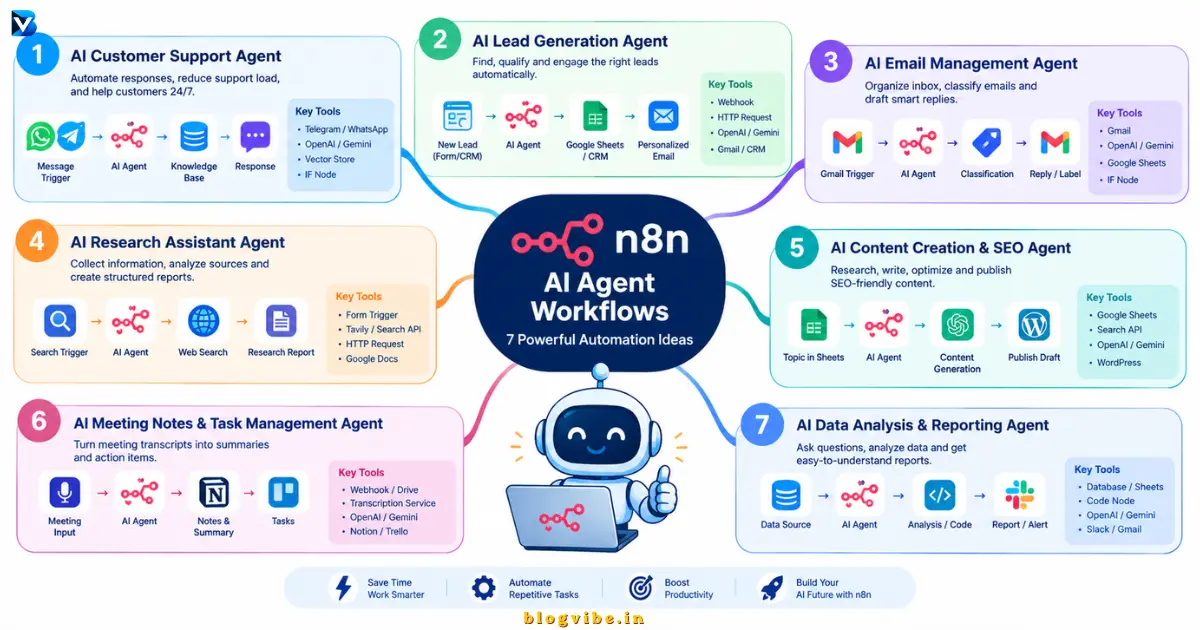
Here are seven practical n8n AI agent examples that can save time, reduce repetitive work, and improve business productivity.
1. AI Customer Support Agent
Best for: Online businesses, SaaS companies, and eCommerce stores
Imagine running an online business and receiving customer questions 24/7.
Customers may ask about product information, shipping updates, refunds, payment problems, or account issues. Answering every question manually can consume valuable time.
An AI customer support agent can handle common questions automatically.
How Does This Workflow Work?
The workflow receives a customer message, searches your knowledge base, generates a relevant answer, and sends the response through your preferred communication channel.
Example Workflow Structure
Telegram / WhatsApp / Webhook → AI Agent → Knowledge Base → Response
| n8n Node / Tool | Purpose |
| Telegram Trigger | Receives customer messages |
| AI Agent | Understands the question |
| OpenAI or Gemini Chat Model | Generates responses |
| Vector Store | Searches company knowledge |
| IF Node | Checks escalation conditions |
| Telegram / WhatsApp | Sends the answer |
Practical Example
Customer: “Where is my order?”
The AI agent can identify the order number, use an authorized order lookup tool, retrieve the latest status, and prepare an accurate response.
For complicated refund or payment problems, it can create a support ticket instead of guessing.
Benefits
- Provides faster responses to common questions.
- Reduces repetitive support tasks.
- Supports multiple communication channels.
- Helps customers outside normal business hours.
Pro Tip: Connect the AI agent to your actual company documentation using a Retrieval-Augmented Generation (RAG) system. This helps it answer using approved business information rather than relying only on general model knowledge.
2. AI Lead Generation and Qualification Agent
Best for: Freelancers, agencies, startups, and sales teams
Finding potential customers is one of the most time-consuming parts of growing a business.
An AI lead generation agent can help discover prospects, organize their information, evaluate their suitability, and prepare personalized outreach messages.
Instead of manually checking every lead, you can automate much of the research and qualification process.
How Does This Workflow Work?
- A new lead enters through a website form or CRM.
- n8n collects the available contact and company information.
- An AI agent analyzes the lead against your ideal customer profile.
- The agent assigns a qualification category.
- The details are saved in Google Sheets or a CRM.
- A personalized email draft is created for review.
Example Workflow Structure
Webhook → Lead Enrichment → AI Agent → Qualification → Google Sheets / CRM → Email Draft
| Tool | Purpose |
| Webhook | Captures new leads |
| HTTP Request | Retrieves permitted company information |
| AI Agent | Evaluates lead relevance |
| Google Sheets | Stores lead information |
| Gmail | Prepares personalized outreach |
| CRM | Tracks qualified prospects |
Example
Suppose an AI automation agency wants to find companies that could benefit from workflow automation.
The agent can evaluate prospects based on:
- Company industry
- Business size
- Available website information
- Potential automation requirements
- Match with your ideal customer profile
It can categorize them as High, Medium, or Low priority.
Why Is This Workflow Useful?
You spend less time researching unsuitable prospects and more time communicating with potential customers.
Pro Tip: Let the agent prepare outreach emails, but require human approval before sending them. This helps prevent inaccurate personalization and unwanted messages.
3. AI Email Management and Response Agent
Best for: Business owners, remote workers, and professionals
How much time do you spend checking emails every day?
Important messages can easily get lost between newsletters, promotional emails, customer requests, and routine notifications.
An n8n AI email agent can organize incoming emails and help you respond faster.
How Does This Workflow Work?
When a new email arrives, n8n reads its content and sends it to an AI agent for classification.
The agent identifies the email category and decides which permitted action should follow.
Example Workflow Structure
Gmail Trigger → Email Extraction → AI Agent → Classification → Gmail / Google Sheets
| Email Category | AI Agent Action |
| Customer inquiry | Prepare a response |
| Important business email | Notify you |
| Newsletter | Apply a suitable label |
| Meeting request | Extract proposed meeting details |
| Urgent issue | Send an alert |
Example
You receive this email:
“Hello, I am interested in your automation services. Could you share your pricing and available packages?”
The AI agent can identify it as a potential sales inquiry, summarize the request, and prepare a professional reply.
You can review and approve the response before it is sent.
Benefits
- Organizes incoming emails.
- Identifies important messages.
- Reduces repetitive email work.
- Creates useful summaries and reply drafts.
Pro Tip: Use a human approval step before sending external emails or deleting messages. AI-generated actions should always have appropriate permissions.
4. AI Research Assistant Agent
Best for: Bloggers, developers, marketers, and researchers
Research often requires visiting multiple websites, collecting information, checking facts, and preparing summaries.
An AI research assistant can automate much of this repetitive process.
You can give it a topic, and it can search connected research tools, collect relevant information, summarize findings, and save the results.
How Does This Workflow Work?
- Enter a topic using a form, chat trigger, or Google Sheet.
- n8n starts the research workflow.
- The AI agent uses connected search tools.
- It collects information from relevant sources.
- The agent compares findings and prepares a summary.
- The final research report is saved in Google Docs or Notion.
Example Workflow Structure
Form Trigger → AI Agent → Search API → Webpage Extraction → Research Summary → Google Docs
| Tool | Purpose |
| Form Trigger | Receives research topics |
| AI Agent | Plans and organizes research |
| Tavily / Search API | Finds relevant information |
| HTTP Request | Retrieves source content |
| Google Docs | Stores the final report |
| Google Sheets | Tracks research projects |
Example
Enter the topic:
“Best AI automation tools for small businesses in 2026.”
The agent can collect relevant sources, organize tools by category, compare features, and create a structured research report.
Benefits
- Saves time during research.
- Organizes information from multiple sources.
- Helps generate research summaries.
- Creates reusable reports.
Pro Tip: Ask the agent to include source URLs and publication dates. Always verify important claims before using the report in a public article.
5. AI Content Creation and SEO Agent
Best for: Bloggers, SEO specialists, and digital marketers
Creating quality content requires more than writing paragraphs. You also need keyword research, competitor analysis, SEO titles, descriptions, images, and content optimization.
An AI content creation agent can connect these activities into one automated workflow.
For example, you can enter a blog topic in Google Sheets and let n8n prepare a content brief and first draft.
How Does This Workflow Work?
- Add a topic and focus keyword to Google Sheets.
- An AI research agent collects relevant information.
- The agent organizes the research into headings.
- Another AI step creates the first draft.
- The workflow generates SEO title and meta description suggestions.
- The final draft is saved in WordPress as a draft for editing.
Example Workflow Structure
Google Sheets → AI Research Agent → Content Generation → SEO Review → WordPress Draft
| Tool | Purpose |
| Google Sheets | Stores topics and keywords |
| AI Agent | Coordinates content tasks |
| Search API | Researches relevant sources |
| OpenAI / Gemini | Generates content |
| WordPress | Saves article drafts |
| Google Docs | Stores content for editing |
Example
Your input:
“7 Best n8n AI Agent Workflows”
The workflow can prepare:
- SEO-friendly article outline
- Introduction
- H2 and H3 headings
- Workflow examples
- Frequently asked questions
- Meta title and description
- Suggested internal links
Benefits
- Speeds up content preparation.
- Creates consistent article structures.
- Reduces repetitive SEO work.
- Helps organize your publishing process.
Pro Tip: Never publish AI-generated content without editorial review. Verify technical details, add original examples, check keyword intent, and make sure the article genuinely helps readers.
For WordPress websites, start by saving generated content as a draft rather than automatically publishing it.
6. AI Meeting Notes and Task Management Agent
Best for: Businesses, remote teams, and freelancers
Important tasks can easily be forgotten after meetings.
An AI meeting assistant can convert meeting transcripts into summaries, decisions, and action items.
Instead of manually writing notes, you can automate the process using n8n and an AI model.
How Does This Workflow Work?
- A meeting transcript or recording becomes available.
- n8n receives the transcript through a supported integration or webhook.
- The AI agent extracts important points.
- It identifies decisions and action items.
- It organizes the tasks by owner and deadline.
- Tasks are saved in project management software.
Example Workflow Structure
Meeting Transcript → Transcription / Text Extraction → AI Agent → Task Extraction → Notion / Trello
| Tool | Purpose |
| Webhook / Drive Trigger | Receives meeting material |
| Transcription Service | Converts audio into text |
| AI Agent | Summarizes the meeting |
| Notion | Saves meeting notes |
| Trello | Creates action items |
| Gmail | Prepares follow-up emails |
Example
Meeting discussion:
“We need to finish the website redesign by November 10. Rahul will handle the homepage, and Priya will complete the contact page.”
The AI agent can extract:
| Task | Deadline |
| Complete homepage | November 10 |
| Complete contact page | November 10 |
It can also identify task owners if those names are mapped to the team’s records.
Benefits
- Creates meeting summaries automatically.
- Organizes action items.
- Reduces manual note-taking.
- Improves team coordination.
Pro Tip: Ask participants for permission before recording meetings, and verify assigned owners and deadlines before creating tasks.
7. AI Data Analysis and Reporting Agent
Best for: Business analysts, marketers, and data-driven teams
Businesses collect huge amounts of information every day.
However, having data is not the same as understanding it.
An AI data analysis agent can help users ask questions about business data and receive useful summaries without manually creating every report.
How Does This Workflow Work?
- Connect a data source such as Google Sheets or a database.
- A user submits a question.
- The AI agent identifies the required information.
- It uses an authorized data retrieval tool.
- The results are analyzed and summarized.
- The final report is sent through email, Slack, or another platform.
Example Workflow Structure
Chat Trigger → AI Agent → Database Tool → Data Analysis → Report Generation → Slack / Email
| Tool | Purpose |
| Chat Trigger | Receives user questions |
| AI Agent | Understands the request |
| PostgreSQL / Google Sheets | Provides business data |
| Code Node | Performs calculations |
| OpenAI / Gemini | Explains the findings |
| Slack / Gmail | Delivers the report |
Example
Ask your AI agent:
“Which products generated the highest sales this month?”
The agent can retrieve authorized sales data, calculate totals, rank products, and generate a readable summary.
Benefits
- Makes business data easier to understand.
- Reduces repetitive reporting.
- Helps identify trends and patterns.
- Provides faster access to information.
Pro Tip: Use read-only database credentials and restrict the AI agent to approved tables and queries. Validate calculations before using the results for business decisions.
Comparison: Which n8n AI Agent Workflow Should You Build First?
Not every AI agent requires advanced technical knowledge. Some workflows are much easier to create than others.
| Workflow | Difficulty | Best For |
| AI Customer Support | Intermediate | Businesses |
| AI Lead Generation | Intermediate | Sales teams |
| AI Email Management | Beginner–Intermediate | Professionals |
| AI Research Assistant | Intermediate | Researchers |
| AI Content Creation | Intermediate | Bloggers |
| AI Meeting Assistant | Intermediate | Teams |
| AI Data Analysis | Advanced | Analysts |
My recommendation: Start with the AI email management agent or research assistant. Both provide practical experience with triggers, AI models, data processing, and connected tools.
How to Build AI Agents in n8n: Step-by-Step Tutorial
Now that you understand the seven workflows, let’s look at the basic process of creating an AI agent in n8n.
You don’t need to build a complicated multi-agent system on your first attempt.
Start with one task, connect the necessary tools, and expand the workflow after testing it.
Step 1: Set Up Your n8n Instance
You can use n8n Cloud or self-host n8n on your own server.
For self-hosting, Docker is a common deployment option.
Make sure your n8n instance is accessible and properly configured.
Step 2: Create a New Workflow
Open your n8n dashboard and create a new workflow.
Add a trigger depending on your use case.
Examples include:
- Chat Trigger
- Webhook
- Gmail Trigger
- Schedule Trigger
- Telegram Trigger
The trigger determines when the workflow starts.
Step 3: Add the AI Agent Node
Add an AI Agent node to your workflow.
This node helps the workflow decide how to handle a request and which connected tools to use.
Provide clear instructions about the agent’s role, responsibilities, available actions, and limitations.
Step 4: Connect an AI Model
Connect a supported chat model, such as:
- OpenAI
- Google Gemini
- Anthropic Claude
- DeepSeek
- Other supported model integrations
Configure the appropriate credentials and model settings.
Step 5: Connect Tools and Memory
Connect only the tools that the agent needs.
For example, an email assistant might need Gmail and Google Sheets, while a research agent might need a search API and Google Docs.
Add memory when the task requires conversational context.
Remember that conversation memory and long-term document storage are different things.
Step 6: Add Conditions and Human Approval
Do not give an AI agent unlimited permission to perform every action.
Use IF nodes, validation steps, and human approval for sensitive operations.
Examples:
- Approve emails before sending.
- Verify payment-related actions.
- Confirm customer refunds.
- Check data before updating a CRM.
Step 7: Test and Activate Your Workflow
Test the workflow with multiple inputs, including unusual and incomplete requests.
Check the execution history and fix any errors.
Only activate the workflow when the output is reliable and the connected tools have appropriate permissions.
Important: For additional examples, read the official n8n AI examples and concepts.
Common Mistakes to Avoid When Building on AI Automation Workflows
Even a well-designed workflow can fail when it lacks proper testing and controls.
Avoid these common mistakes:
- Unclear agent instructions: Give the AI a specific role and clearly defined tasks.
- Too many connected tools: Only provide the tools required for the job.
- No human approval: Require review before sensitive or irreversible actions.
- Poor data quality: Validate incoming information before sending it to the AI model.
- Ignoring API costs: Monitor model usage and third-party service costs.
- No error handling: Add fallback paths and notifications for failed executions.
- Skipping testing: Test normal, unusual, and incomplete inputs before activating the workflow.
The best n8n AI agent is not necessarily the most complicated one. It is the one that performs a useful task consistently and safely.
Conclusion: Start Building Your First n8n AI Agent Today
AI agents are changing how businesses approach repetitive tasks and workflow automation.
From customer support and lead generation to email management, content creation, research, and data analysis, n8n AI Agent Workflows provide a flexible way to connect AI models with real business applications.
You don’t need to build all seven workflows at once.
Start with one small automation, test it with real-world data, and gradually add more tools and capabilities.
The most important thing is to build an AI agent that solves an actual problem rather than adding AI just for the sake of using AI.