
If you want to create songs without spending hours learning music production, Mureka AI is an AI-powered music creation platform worth exploring. It can turn text prompts and lyrics into complete songs, help generate vocals and instrumentals, and provide tools for editing and remixing music.
In this Mureka AI review, we’ll look at what Mureka is, how the Mureka AI music generator works, its main features, pricing, commercial-use options, pros and cons, and whether it is worth trying in 2026.
Ready to create your first AI song?
Try Mureka AI here
Disclosure: This article contains a promotional/affiliate link. If you purchase through the link, the publisher may receive a commission at no additional cost to you.
What Is Mureka AI?
Mureka AI is an AI music-generation platform designed to help creators produce songs, melodies, vocals, lyrics, instrumentals, and other audio content using artificial intelligence.
Instead of needing a traditional digital audio workstation and extensive music-production knowledge, you can describe the music you want in natural language. Mureka’s AI can then transform your idea into a musical composition.
The platform is designed for a range of users, including YouTubers, musicians, content creators, filmmakers, social-media creators, and people who simply want to experiment with songwriting.
Mureka’s official platform currently highlights newer generation models, AI music editing, remixing, stem separation, reference-based creation, and music-video capabilities.
One of the biggest advantages of this approach is speed. Instead of starting with a blank project, you can begin with an idea such as:
“Create an emotional cinematic song about overcoming failure, with piano, strings, powerful drums, and expressive male vocals.”
The AI can use that description as the foundation for a track.
How Does the Mureka AI Music Generator Work?
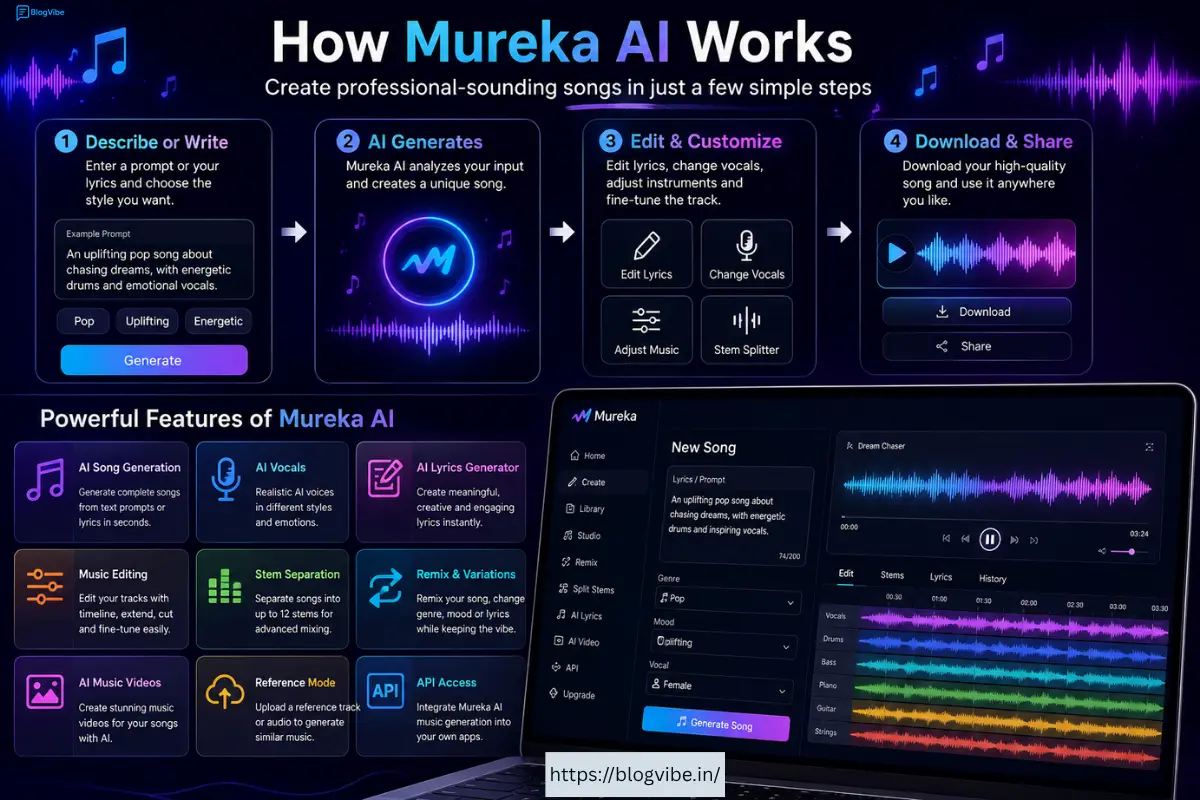
The basic process is relatively simple.
First, you provide an idea, prompt, or lyrics. You can describe the genre, mood, instruments, vocal style, tempo, subject, and overall atmosphere.
For example:
Prompt:
“Create an uplifting pop song about chasing your dreams, with energetic drums, bright synths, emotional vocals, and a catchy chorus.”
Mureka then processes the instructions and generates music based on your input.
For users who want more control, Mureka also supports lyrics-based song generation. Its API documentation shows that users can provide lyrics and a prompt, select a model, and specify options such as vocal gender.
This makes Mureka useful for both beginners and more experienced creators.
Key Mureka AI Features
1. AI Song Generation
The main attraction is the ability to generate complete songs with AI.
You don’t necessarily need to understand music theory, chord progressions, or professional production techniques. You can start with a simple text description and let the AI handle much of the composition.
Mureka’s official site describes its platform as an all-in-one environment for composing, remixing, and producing music.
This can be particularly useful when you need background music for YouTube videos, social-media content, podcasts, short films, or other creative projects.
2. Text-to-Music
With text-to-music generation, your written description becomes the starting point for your track.
You can specify things such as:
- Music genre
- Mood
- Tempo
- Instruments
- Vocal characteristics
- Energy level
- Song theme
- Overall atmosphere
For example, you could request a relaxing piano track for meditation or an energetic electronic track for a travel video.
This makes the Mureka AI music generator accessible even if you have never used music-production software before.
3. AI Lyrics Generation
Writing lyrics can sometimes be harder than creating the instrumental.
Mureka can help with the songwriting process by generating lyrics based on a theme or idea. The platform’s feature set includes AI lyrics generation designed around musical styles and song structures.
You could provide a topic such as:
“Write an emotional Hindi-inspired love song about two people separated by distance.”
The generated lyrics can then become the basis for a song.
You can also start with your own lyrics if you already have a song idea.
4. AI Vocals
Another important part of modern AI music creation is vocals.
Mureka provides AI-generated vocal capabilities, allowing users to create songs with artificial voices rather than recording vocals themselves. Its current product pages also highlight voice-related features and the ability to use different voices in advanced workflows.
For independent creators, this can eliminate the need to immediately hire a singer for every experimental song.
However, creators should always check the platform’s current terms and licensing conditions before using generated vocals commercially, especially when using advanced voice-related features.
5. Music Editing
Mureka is not limited to one-click generation.
Its current subscription information highlights Mureka Studio, which includes editing capabilities such as timeline editing, stem extraction, and track extension.
This is important because the first AI-generated version of a song may not always be perfect.
Instead of starting over completely, you can work with the generated track and make adjustments.
6. Stem Separation
Stem separation is one of the more useful features for creators who want additional production control.
A finished song normally combines multiple elements, such as:
- Vocals
- Drums
- Bass
- Piano
- Guitar
- Synths
- Other instruments
Mureka’s newer platform information says its Splitter can separate a song into up to 12 stems.
This can be useful if you want to remix a song, isolate vocals, create an instrumental version, or continue editing individual elements.
7. Remix and Reference Features
Mureka also provides tools for creating variations and experimenting with existing musical ideas.
The platform currently promotes a Remix feature that can change aspects such as genre or lyrics while retaining the basic musical concept. It also offers reference-based creation, where an uploaded reference can help guide the resulting music.
These tools can be particularly useful when the first version of your song is good but not quite what you imagined.
8. AI Music Videos
Mureka’s current product offering also includes AI-generated music-video capabilities.
According to its subscription page, users can create cinematic music videos from tracks using different creation approaches, including one-click and storyboard-oriented workflows.
This could be valuable for YouTube creators who want to create both the music and visual presentation from the same ecosystem.
Mureka AI Pricing
Pricing for AI tools can change frequently, so it is best to check the official Mureka pricing page before purchasing.
Mureka currently uses subscription plans and a credit/Gold-based system for some features. The available capabilities can differ depending on the plan and may include differences in models, generation limits, downloads, editing, stems, and advanced production features.
For example, the platform’s current information highlights differences between plans around advanced models, commercial rights, downloads, stem splitting, Mureka Studio, and voice-related functionality.
Because pricing and included credits can change, I recommend checking the live pricing information before making a decision.
Check the latest Mureka AI plans here:
View Mureka AI pricing and start creating
Is Mureka AI Free?
Mureka provides a free starting option, although the amount of generation and access to advanced features can depend on the current plan.
The official platform currently shows a free option and paid plans with additional capabilities.
If you are only interested in testing AI music generation, starting with the free option can make sense.
If you plan to create music regularly for monetized YouTube videos, commercial projects, or professional production, you should carefully compare the paid plan’s licensing and feature limitations before upgrading.
Can You Use Mureka AI Music Commercially?
This is an important question for YouTubers and content creators.
Mureka’s current terms distinguish between free-tier and paid-tier output. The terms state that paid users who purchase credits or subscribe to a paid tier receive ownership interests in generated output as described in the agreement, while free-tier output has more restrictive usage conditions and requires attribution for permitted non-commercial use.
Therefore, if your goal is to monetize your music, YouTube channel, advertisements, games, or other commercial projects, read the current Mureka terms carefully and make sure your specific plan gives you the rights you need.
Don’t assume that every track generated on every plan has identical commercial rights.
Mureka AI for YouTube Creators
Mureka can be particularly interesting for YouTube creators.
Imagine you are making a video about:
- Travel
- Wildlife
- Technology
- AI tools
- Motivation
- Gaming
- Luxury
- Education
- Documentary content
Instead of searching through stock-music libraries, you could create a track specifically for the mood of your video.
For example:
Travel video:
“Epic cinematic adventure music with orchestral strings, powerful drums, ethnic instruments, and an uplifting atmosphere.”
Wildlife documentary:
“Atmospheric cinematic background music with deep percussion, mysterious strings, soft ambient textures, and a natural wilderness feeling.”
Motivational video:
“Powerful inspirational pop-rock track with emotional piano, energetic drums, rising strings, and an uplifting chorus.”
The ability to describe the exact atmosphere can make AI music more flexible than using generic stock tracks.
Mureka AI for Beginners
One of Mureka’s strongest advantages is its relatively approachable workflow.
Traditional music production can involve learning:
- DAWs
- MIDI
- Mixing
- Mastering
- Equalization
- Compression
- Synthesizers
- Music theory
- Recording
AI music tools reduce the initial learning barrier.
That doesn’t mean professional music knowledge is useless. Experienced producers can often get better results because they know how to describe what they want and how to edit the output.
But for beginners, Mureka provides a way to experiment without first spending months learning production software.
Mureka AI Pros and Cons
Pros
Easy to use: You can start with text prompts or lyrics instead of building a song from scratch.
Complete music workflow: Mureka combines generation with tools for editing, remixing, and production.
AI lyrics: Useful when you have a song idea but don’t know how to structure the lyrics.
AI vocals: Makes it possible to experiment with complete vocal songs without recording yourself.
Stem separation: Advanced users can isolate different components of a track.
Reference and remix tools: Useful for creating variations and exploring different musical directions.
Useful for creators: YouTubers, filmmakers, social-media creators, and independent musicians can all benefit from faster music creation.
API availability: Developers can integrate Mureka’s music-generation capabilities into applications and workflows.
Cons
AI output isn’t always perfect: You may need multiple generations before finding the result you really like.
Credits can matter: Advanced AI generation and production features can consume credits or require a paid subscription.
Licensing requires attention: Commercial rights can depend on the plan and terms, so users should read the current agreement carefully.
Less control than traditional production: AI can produce impressive results, but professional musicians may still want detailed manual control.
Results depend on prompts: A vague prompt can produce a generic result. More specific instructions usually give you a better starting point.
Mureka AI vs Traditional Music Production
Traditional music production gives you maximum control, but it also requires time, equipment, software, and knowledge.
Mureka takes the opposite approach: describe an idea and let AI handle much of the technical work.
For a professional producer, Mureka can be a creative assistant rather than a replacement for a DAW.
For a beginner, it can be a way to turn ideas into complete songs without mastering every part of music production first.
The best approach may actually be to combine both methods: use AI to generate ideas quickly and then use traditional production tools to refine the final result.
Who Should Use Mureka AI?
Mureka could be a good fit if you are:
- A YouTube creator who needs original background music
- A songwriter looking for musical ideas
- A beginner experimenting with AI music
- A filmmaker who needs custom soundtracks
- A social-media creator making short videos
- A musician looking for songwriting inspiration
- A developer interested in AI-generated audio
- A creator who wants to experiment with different genres quickly
It may be less suitable if you want complete manual control over every note, instrument, mix parameter, and recording decision.
Final Verdict: Is Mureka AI Worth It?
So, is Mureka AI worth trying?
For creators who want to generate songs quickly, the answer is yes, it is worth testing.
The platform goes beyond simple text-to-song generation. Its current feature set includes AI song creation, lyrics, vocals, editing, remixing, reference-based workflows, stem separation, and AI music-video tools.
The biggest advantage is convenience. You can start with an idea and move toward a complete musical production without having to build everything manually.
However, users should pay close attention to credits, plan limitations, and commercial licensing before using Mureka for monetized projects.
If you are curious about AI music creation, the easiest way to judge it is to try it yourself and generate a few different songs.
Start Creating With Mureka AI
Want to turn your ideas into AI-generated music?
Try Mureka AI and create your first song
Mureka AI is an interesting option for anyone who wants faster songwriting, AI vocals, custom instrumentals, and modern music-production tools in one platform.
Whether you are making YouTube videos, social-media content, background music, or simply experimenting with songwriting, Mureka gives you a fast way to turn a simple idea into something you can actually hear.
Frequently Asked Questions About Mureka AI
1. What is Mureka AI?
Mureka AI is an AI-powered music creation platform that can generate songs, lyrics, vocals, instrumentals, and other music from text prompts or user-provided lyrics.
2. Is Mureka AI free to use?
Mureka AI offers a free option for users who want to try its music-generation features. Paid plans provide additional credits and access to more advanced features. Check the current pricing before subscribing.
3. Can Mureka AI create complete songs?
Yes. Mureka AI can generate complete songs based on your prompts or lyrics, including musical arrangements and AI-generated vocals.
4. Can I use Mureka AI music on YouTube?
Depending on your plan and the applicable terms, Mureka-generated music may be usable for commercial projects such as YouTube content. Always check the current licensing terms for your specific plan before monetizing the music.
5. Is Mureka AI good for beginners?
Yes. Mureka AI is designed to make music creation easier for people without professional music-production experience. You can start with a simple text prompt or lyrics and let the AI generate the music.
READ MORE:
NotebookLM Review 2026: Features, Pricing, Pros & Cons: Best AI Research Tool?

