
If you attend a lot of online meetings, interviews, classes, sales calls, or team discussions, taking detailed notes can be difficult. You may miss important points while trying to write everything down. This is where Otter.ai comes in.
Otter.ai is an AI-powered meeting assistant that can record conversations, create real-time transcriptions, identify speakers, generate summaries, and help users find important information from past meetings. In 2026, Otter has expanded beyond being a simple AI notetaker and is positioning itself as a broader Conversational Knowledge Engine that connects meeting information with AI-powered workflows.
In this Otter.ai review 2026, we’ll look at its features, pricing, benefits, drawbacks, latest news, alternatives, and whether Otter.ai is worth paying for.
What Is Otter.ai?
Otter.ai is an AI meeting assistant designed to automatically capture and organize spoken conversations. Instead of manually writing notes during a meeting, you can let Otter record and transcribe the conversation while you concentrate on the discussion.
The platform can create AI-generated meeting summaries, capture action items, and make conversations searchable. Otter also supports integrations with popular meeting and productivity platforms.
Its current product direction goes further than transcription. In April 2026, Otter announced its Conversational Knowledge Engine, designed to connect conversations across meetings and time so organizations can turn spoken information into searchable knowledge and automated actions.
This makes Otter particularly interesting for businesses that have hundreds or thousands of meetings and need a way to find information from those conversations later.
Otter.ai Features
1. AI Meeting Transcription
One of Otter’s core features is automatic transcription.
During a meeting, Otter can convert spoken words into text in real time. This means you don’t have to type everything manually.
The resulting transcript can be searched and reviewed after the meeting, making it easier to find specific discussions or decisions.
For students, journalists, researchers, salespeople, managers, and remote teams, this can save significant time.
2. Automated Meeting Summaries
Long meeting transcripts can contain thousands of words, so reading the entire transcript isn’t always practical.
Otter can generate AI-powered summaries that help users quickly understand what happened during a meeting.
Instead of reviewing the complete conversation, you can use the summary to identify important topics, decisions, and follow-up tasks.
3. AI Chat
One of Otter’s more interesting developments is its AI Chat functionality.
Rather than simply searching for a keyword in a transcript, users can interact with their meeting information using AI.
This can be useful for questions such as:
- What decisions were made during the meeting?
- What tasks were assigned to me?
- What did the customer say about the product?
- What were the main concerns discussed?
- What should we follow up on?
Otter has continued expanding AI Chat and its connections with external AI systems. Its MCP capabilities can allow AI tools such as ChatGPT and Claude to access authorized Otter meeting information.
4. Speaker Identification
Meetings frequently involve multiple people. Otter can organize transcripts around different speakers, helping users understand who said what.
This is especially useful for interviews, team meetings, customer calls, and research conversations.
5. Searchable Meeting History
One of Otter’s biggest advantages is that meeting information doesn’t have to disappear after the call ends.
Users can search their saved conversations and transcripts to locate previous discussions.
For businesses, this can be valuable because important information is often buried inside meetings and forgotten later.
6. Meeting Workflows
Otter is increasingly focused on turning meeting information into actions.
Its newer product direction includes AI-powered meeting workflows and integrations that connect conversations with other business tools. Otter has also promoted its MCP technology as a way to connect meeting knowledge with tools such as Gmail, Google Docs, Notion, Jira, Salesforce, Slack, ChatGPT, and Claude.
This means Otter can potentially become part of a larger productivity workflow rather than functioning only as a transcription application.
7. Otter for Teams
Businesses can use Otter to create a shared source of meeting information.
Team members can collaborate around notes and conversations, making it easier to maintain context when employees join meetings at different times.
The Business tier includes collaborative note editing, larger transcription allowances, file importing, and additional workspace and administration capabilities.
How Does Otter.ai Work?
Using Otter.ai is relatively straightforward.
First, create an Otter account and choose the plan that fits your needs. You can start with the free Basic plan.
During a meeting, Otter can capture the conversation and produce a transcript. Depending on your workflow, you can use Otter alongside supported meeting platforms or work with uploaded audio and video files.
After the conversation finishes, Otter organizes the recording and transcript. Its AI tools can then help summarize the meeting and identify useful information.
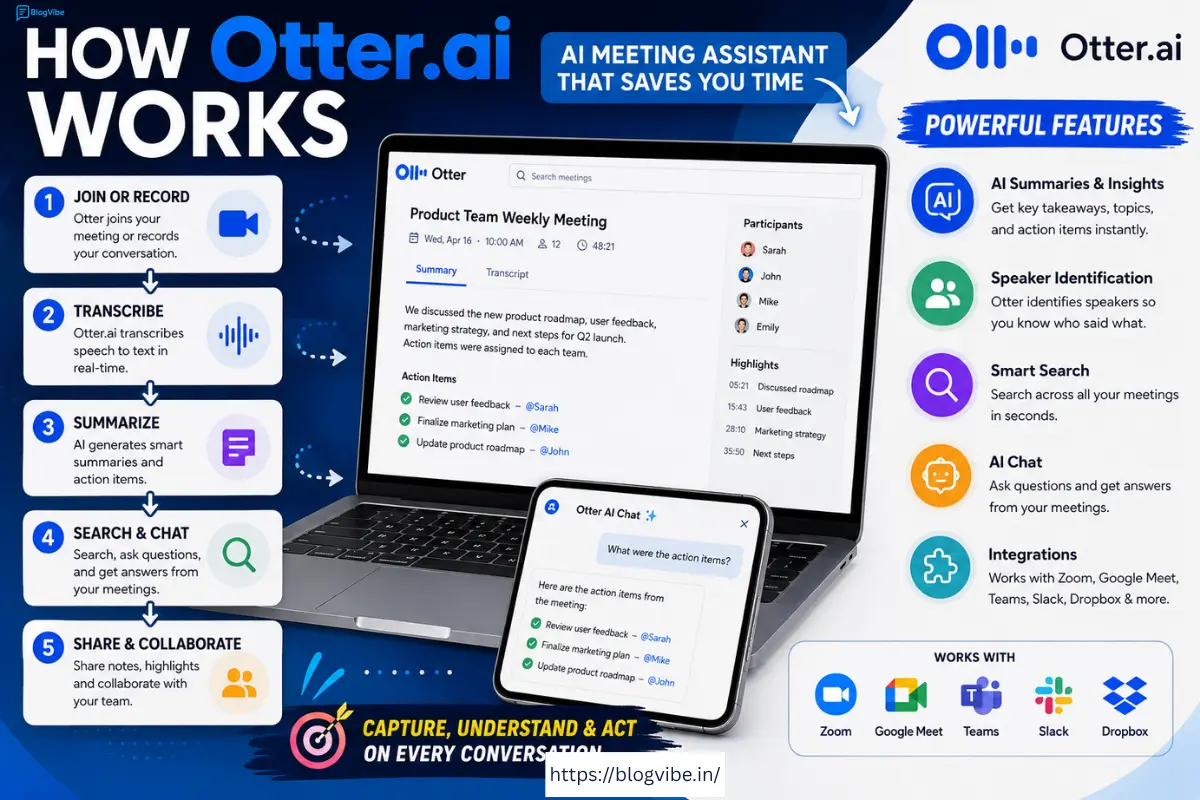
The basic workflow looks like this:
Record → Transcribe → Summarize → Search → Take Action
The biggest benefit is that you can spend more attention on the actual conversation instead of constantly switching between listening and taking notes.
Benefits of Using Otter.ai
Saves Time
Manual note-taking can take a lot of effort. Otter automates much of this process.
Better Meeting Documentation
Important decisions and conversations can be preserved in searchable form instead of relying on someone’s handwritten notes.
Useful for Remote Teams
Distributed teams often have multiple meetings every day. Otter can help create a consistent record of those conversations.
AI-Powered Search and Questions
AI Chat makes meeting information more accessible than simply scrolling through transcripts.
Useful Integrations
Otter is becoming increasingly connected to other AI and productivity tools, including ChatGPT and Claude through its MCP capabilities.
Useful for Different Users
Otter can be useful for:
- Business professionals
- Sales teams
- Students
- Teachers
- Journalists
- Researchers
- Recruiters
- Consultants
- Content creators
- Remote teams
Cons of Otter.ai
Despite its impressive features, Otter.ai isn’t perfect.
Free Plan Limitations
The free Basic plan is useful for trying the service, but it has usage limitations. Otter’s current materials list 300 transcription minutes per month for Basic, along with limits on AI Chat usage.
For people who attend meetings frequently, those limits can become restrictive.
Pricing Can Become Expensive for Teams
If you have a large team, paying for every user can increase the overall cost.
Businesses should calculate the number of users and expected transcription requirements before upgrading.
AI Isn’t Always Perfect
No transcription system is perfect. Background noise, accents, overlapping speakers, technical terminology, and poor microphone quality can affect transcription quality.
For important legal, medical, or business information, transcripts should be reviewed rather than blindly trusted.
Privacy Considerations
Meetings can contain confidential information. Before recording a conversation, organizations should consider their privacy policies, applicable laws, and whether participants need to be informed or provide consent.
Otter’s terms also state that the company does not guarantee that user content or processing results will never be accessible by others.
Otter.ai Pricing 2026
Otter’s pricing has changed over time, and the company currently offers multiple plans.
The Basic plan is free, while paid plans provide higher limits and additional features. Current Otter materials list Pro at approximately $8.33 per user per month when billed annually, while Business is approximately $19.99 per user per month when billed annually. Enterprise pricing is customized.
| Plan | Price | Best For |
| Basic | Free | Casual users |
| Pro | About $8.33/user/month annually | Individuals & small teams |
| Business | About $19.99/user/month annually | Businesses |
| Enterprise | Custom | Large organizations |
Pricing and promotional offers can change, so it’s a good idea to verify the current price on Otter’s official pricing page before purchasing.
Otter.ai News and Latest Updates in 2026
One of the biggest Otter.ai developments in 2026 is its move beyond traditional meeting transcription.
In April 2026, Otter announced its Conversational Knowledge Engine, describing a system designed to connect information from conversations across teams and over time. The company also announced expanded MCP capabilities, AI Chat, and Otter for Desktop as part of this evolution.
Another important development is Otter’s integration with ChatGPT. Otter announced that its MCP-based integration can allow ChatGPT to access authorized meeting transcripts, summaries, action items, and searchable conversation history.
Otter has also expanded its MCP approach to other AI tools. Its official Claude integration describes a workflow where Claude can search Otter transcripts, summaries, and action items without requiring users to manually copy and paste the information.
These developments show that Otter is trying to become more than an AI transcription tool. Its goal is increasingly to turn meeting conversations into a searchable knowledge source that can feed other AI and business workflows.
Otter.ai Alternatives
Otter.ai isn’t the only AI meeting assistant available.
Fireflies.ai
Fireflies.ai is a popular alternative for teams that want meeting transcription, integrations, and conversation intelligence.
It can be worth considering if your primary requirement is connecting meeting information with sales and productivity workflows.
Fathom
Fathom is another popular AI meeting assistant. It focuses heavily on meeting recordings, transcripts, summaries, and follow-up workflows.
It may be attractive to users who want a straightforward meeting-notetaking experience.
Notta
Notta focuses on transcription and meeting productivity and can be useful for users who need transcription across different types of conversations.
Descript
Descript is better suited to creators who want to edit audio and video alongside transcription.
If your main objective is podcast or video production rather than meeting management, Descript may be worth considering.
Who Should Use Otter.ai?
Otter.ai is particularly useful if you regularly participate in meetings and don’t want to spend the entire conversation taking notes.
Students can use it to capture lectures and organize information.
Business professionals can use it to document meetings and follow-up tasks.
Sales teams can use transcripts to review customer conversations.
Managers can use searchable meeting histories to keep track of decisions.
Journalists and researchers can use transcription to analyze interviews.
Content creators can use transcripts as a starting point for articles, videos, summaries, and social media content.
Is Otter.ai Worth It?
For people who attend frequent meetings, Otter.ai can be worth paying for because it combines transcription, summaries, searchable meeting history, AI assistance, and integrations in one platform.
The free plan is a good way to test the service before spending money. However, frequent users may quickly encounter the limits of the free tier.
The biggest reason to consider Otter in 2026 is not simply transcription. Its newer AI Chat, MCP connections, and Conversational Knowledge Engine approach make it more useful for organizations that want to turn meeting conversations into reusable information.
Final Verdict
Otter.ai is one of the more capable AI meeting assistants in 2026.
Its core transcription and meeting-summary capabilities remain useful, but the platform’s newer direction is even more interesting. Otter is increasingly connecting meeting information with AI assistants and business workflows.
Our Rating: 4.5/5
Pros:
- AI-powered transcription
- Automatic meeting summaries
- Searchable meeting history
- AI Chat
- Speaker identification
- Team collaboration
- ChatGPT and Claude connectivity through MCP
- Free plan available
Cons:
- Free plan has usage limits
- Paid plans may become expensive for larger teams
- Transcription can still require manual correction
- Privacy and consent should be considered when recording meetings
Overall, Otter.ai is a strong choice for professionals, students, sales teams, researchers, and businesses that want to automatically capture and understand their conversations. If your main goal is meeting notes and searchable conversation intelligence, Otter.ai is definitely worth trying.
Frequently Asked Questions
Is Otter.ai free?
Yes. Otter.ai offers a free Basic plan, although it has limits on transcription and AI features.
Is Otter.ai worth it?
It can be, especially if you attend frequent meetings and need automatic transcripts, summaries, and searchable meeting information.
Can Otter.ai work with ChatGPT?
Yes. Otter announced an MCP-based ChatGPT integration that can provide authorized access to meeting transcripts, summaries, action items, and conversation history.
Does Otter.ai have AI summaries?
Yes. AI-generated meeting summaries are one of Otter’s core features.
What is the best Otter.ai alternative?
There isn’t one universal winner. Fireflies.ai, Fathom, Notta, and Descript can each be better depending on whether you prioritize team workflows, meeting summaries, transcription, or audio/video editing.
Is Otter.ai good for business?
Yes. Otter provides business-oriented collaboration, administration, transcription, and workflow features, while its newer AI and MCP capabilities are designed to connect meeting knowledge with broader business workflows.
Final takeaway: If you want an AI tool that can record, transcribe, summarize, search, and turn meeting conversations into useful information, Otter.ai is one of the tools worth considering in 2026.
READ MORE:
Mureka AI Review 2026: Powerful AI Music Generator – Features, Pricing & Pros and Cons

