
Free AI Image Generators: have changed the way we create pictures online. You no longer need expensive software or advanced Photoshop skills to create portraits, illustrations, social media graphics, fantasy scenes, and other visuals.
The biggest problem is finding a Free AI Image Generators with no restrictions. Many websites advertise themselves as free or unlimited, but then add watermarks, daily limits, credits, account requirements, or strict content filters.
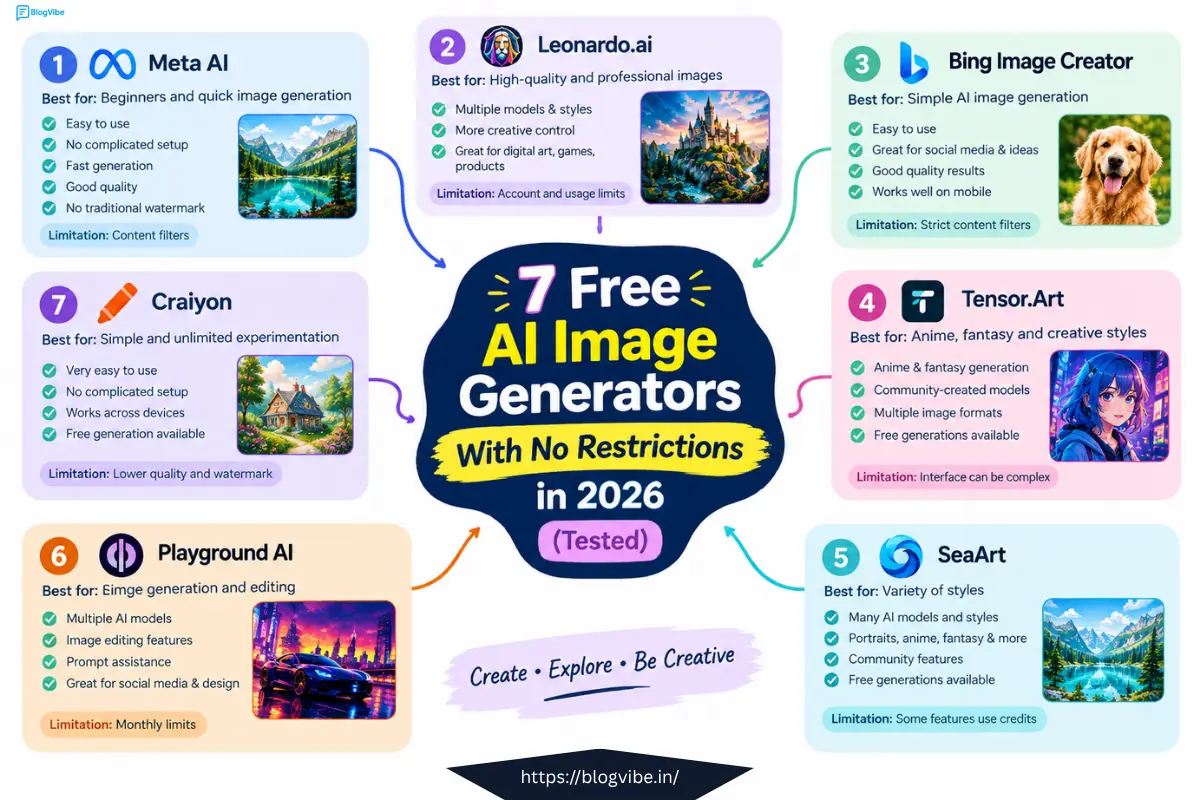
So, which tools are actually worth trying in 2026?
In this guide, we look at seven popular Free AI Image Generators and compare their free limits, image quality, ease of use, watermarks, and restrictions. Whether you are a beginner, content creator, student, blogger, or designer, this list should help you choose the right tool.
What Is a Free AI Image Generator With No Restrictions?
A free AI image creation lets you create images from text prompts without paying for every image.
However, “no restrictions” does not always mean completely unlimited or completely unfiltered. Some tools have daily or monthly limits, while others have content-safety rules.
For example, one platform may offer hundreds of free generations but still block certain prompts. Another may allow unlimited generations but place a watermark on every image.
That’s why it is important to look beyond the word “free.”
1. Meta AI
Best for: Beginners and quick image generation
Meta AI is one of the easiest options for people who want to create AI images without dealing with complicated settings.
You can describe the image you want using a normal text prompt and let the AI generate it for you. It is particularly useful for social media images, simple creative concepts, portraits, and general artwork.
Why Try Meta AI?
- Easy for beginners
- No complicated interface
- Fast image generation
- Good quality for everyday images
- No traditional image watermark
- Works well on mobile devices
The biggest advantage is convenience. You can start creating without learning complicated AI models or advanced settings.
However, Meta AI still has safety filters. Some prompts may be rejected, so it should not be considered completely unrestricted.
Best choice if: You want a simple free AI image creation for everyday creative work.
2. Leonardo.ai
Best for: High-quality and professional-looking images
Leonardo.ai is a strong option if image quality and creative control are more important to you.
Unlike simple image generators, Leonardo provides more options for controlling the final result. You can experiment with different models, styles, prompts, and generation settings.
It is especially useful for:
- Character design
- Digital art
- Game assets
- Fantasy artwork
- Product concepts
- Professional creative projects
The main disadvantage is that you need an account, and the free plan has a usage limit.
Still, if you want more control over your images, Leonardo is worth trying.
Best choice if: You want higher-quality results and more creative control.
3. Bing Image Creator
Best for: Simple AI image generation
Bing Image Creator is Microsoft’s free AI image creation tool and is another popular choice for beginners.
The interface is straightforward. You simply describe what you want and let the AI create the image.
It is useful for creating:
- Illustrations
- Social media graphics
- Landscapes
- Fantasy scenes
- Creative concepts
- General artwork
One downside is that Microsoft’s content filters can be quite strict. Some prompts that seem harmless may still be rejected.
You also need a Microsoft account to use the service.
Best choice if: You want a simple and reliable tool and already use Microsoft services.
4. Tensor.Art
Best for: Anime, fantasy, and creative styles
If you are interested in anime, manga, fantasy, or highly stylized artwork, Tensor.Art is an interesting option.
The platform offers access to different community models and styles, giving users more creative possibilities than basic AI image creation
You can experiment with different aspect ratios and visual styles to create unique artwork.
Advantages
- Strong anime and fantasy generation
- Many community-created models
- Multiple image formats
- Free generations available
- Large creative community
Disadvantages
- The interface can feel complicated
- Some images may contain a small logo or watermark
- Results may vary depending on the model
Best choice if: Your main goal is anime, fantasy, or stylized AI artwork.
5. SeaArt
Best for: Variety of styles
SeaArt is another platform worth considering if you want a large selection of AI image styles.
It combines image generation with a community where users can explore different models and creative ideas.
You can use it for portraits, fantasy images, anime, illustrations, and many other types of artwork.
One of its biggest advantages is the variety of styles available.
However, some advanced models or features may require credits, and you may need to create an account.
Best choice if: You enjoy experimenting with different AI models and artistic styles.
6. Playground AI
Best for: Creators who want image generation and editing
Playground AI is designed for people who want more than simple text-to-image generation.
It provides image creation and editing features that can be useful for social media creators, bloggers, marketers, and designers.
You can experiment with different AI models and use editing features to improve your designs.
What Makes It Useful?
- Multiple AI models
- Image editing features
- Prompt assistance
- Useful for creative projects
- Suitable for social media content
- Commercial projects may be supported depending on the plan and current terms
The biggest thing to remember is that free usage is limited. A monthly quota can be used quickly if you generate images every day.
Best choice if: You want a combination of AI image generation and editing tools.
7. Craiyon
Best for: Simple and unlimited experimentation
Craiyon is one of the older names in the AI image generation space.
Its biggest advantage is simplicity. You can enter a prompt and generate images without dealing with a complicated setup.
It is useful for experimenting with ideas and creating basic AI artwork.
Advantages
- Simple interface
- Easy for beginners
- Free generation available
- No complicated setup
- Works across different devices
Disadvantages
- Image quality can be lower than newer tools
- Generation can take longer
- Free images may include a watermark
- Fewer advanced controls
Craiyon may not produce the most realistic images on this list, but it remains useful if you simply want to experiment with AI image generation.
Best choice if: You want a simple tool for testing creative ideas.
Free Free AI Image Generators Compared
| AI Image Generator | Best For | Free Access | Main Limitation |
| Meta AI | Beginners | High | Content filters |
| Leonardo.ai | Professional images | Limited | Account and usage limits |
| Bing Image Creator | Simple generation | Available | Strict filters |
| Tensor.Art | Anime & fantasy | Available | Watermark/interface |
| SeaArt | Style variety | Available | Some features use credits |
| Playground AI | Creation & editing | Available | Monthly limits |
| Craiyon | Basic experimentation | Available | Lower quality and watermark |
Remember that free plans, limits, and platform policies can change over time. Always check the current terms before using an AI-generated image commercially.
Which Free AI Image Generators Should You Choose?
There is no single best Free AI Image Generators for everyone.
If you are a complete beginner, Meta AI is a great place to start because it is simple and quick.
If image quality and creative control are your priorities, Leonardo.ai is a stronger option.
For anime and fantasy artwork, Tensor.Art can be a better choice.
If you want a simple Microsoft-based solution, try Bing Image Creator.
For experimenting with different styles and community models, SeaArt is worth exploring.
And if you want basic image generation without learning complicated tools, Craiyon can still be useful.
Are Free AI Image maker Really Unlimited?
Not always.
This is one of the most important things to understand.
A website may use words such as “free,” “unlimited,” or “no restrictions” in its marketing, but its actual service can still have limitations.
These may include:
- Daily generation limits
- Monthly credits
- Account requirements
- Watermarks
- Content filters
- Restricted AI models
- Lower image resolution
- Slower generation speeds
Therefore, always check the current rules of a platform before depending on it for a large project.
Tips for Getting Better AI Images
The quality of your result depends heavily on your prompt.
Instead of writing:
“A beautiful girl”
try something more detailed:
“A young woman standing in a modern city at sunset, cinematic lighting, realistic photography, natural skin texture, detailed background, soft depth of field, high-resolution portrait.”
Adding details about the subject, lighting, environment, camera style, colors, and mood can make your results much better.
You can also experiment with different prompts instead of generating the same description repeatedly.
Final Thoughts
Free AI Image Generators have become much more powerful in 2026. You can now create impressive images without buying expensive software or having professional design skills.
However, there is an important difference between free and completely unrestricted.
Some tools provide large free quotas but have content filters. Others offer more creative freedom but add watermarks or limit image quality. Some provide advanced features but require an account or credits.
For beginners, Meta AI is a good starting point. Leonardo.ai is better for users who want more control and higher-quality results, while Tensor.Art and SeaArt are interesting choices for people who enjoy experimenting with creative styles.
The best approach is to try several tools and find the one that matches your needs, workflow, and type of content.
Frequently Asked Questions
1. What is the best free AI image generator in 2026?
There is no universal winner. Meta AI is a strong choice for beginners, while Leonardo.ai is better for users who want more control and professional-looking results.
2. Are free AI image generator completely unrestricted?
No. Most platforms have some form of restriction, such as content filters, usage limits, watermarks, or account requirements.
3. Can I use Free AI Image Generators commercially?
It depends on the platform and the specific plan or terms of service. Always check the current commercial-use rules before using an image for business, advertising, products, or monetized content.
4. Which Free AI Image Generators is best for anime?
Tensor.Art and SeaArt are strong options for anime and other stylized artwork because they provide access to a variety of models and creative styles.
5. Which free AI image generator is easiest for beginners?
Meta AI and Bing Image Creator are among the easier options because you can generate images using simple text prompts without learning complicated settings.
6. Do free free AI image creation add watermarks?
Some do and some don’t. Watermark policies can also change, so check the current platform terms before downloading images for professional use.
7. Can I create unlimited AI images for free?
Some platforms advertise unlimited generation, but “unlimited” may still come with content restrictions, slower speeds, watermarks, or other limitations. Always check the current rules of the service.
READ MORE:
5 Best Free AI YouTube Script Generator Tools to Write Scripts in Minutes (2026 Guide)

