

AI content automation is changing how businesses research topics, create content, manage workflows, and distribute information. From small blogs to growing companies, AI-powered tools can reduce repetitive work and help teams manage larger content operations.
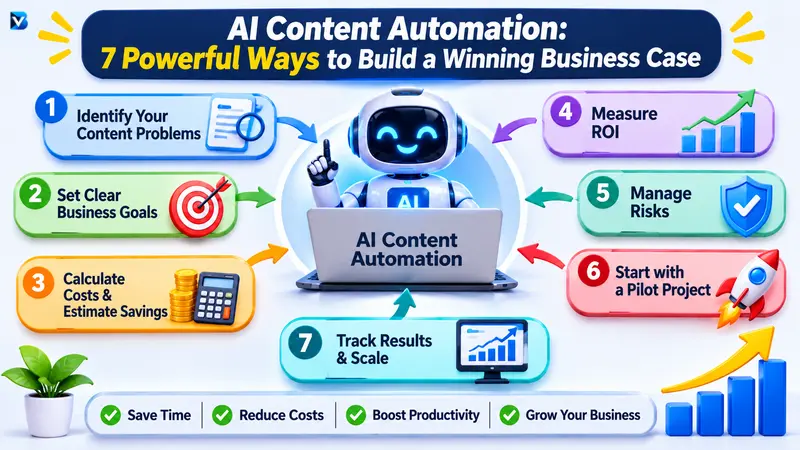
However, buying AI tools does not automatically make a business more productive. Without a clear strategy, automation can create unnecessary expenses, low-quality content, and additional editing work.
The solution is to build a strong business case before investing.
A business case explains why your organization should adopt AI content automation, what problems it will solve, how much it may cost, and what measurable benefits it could deliver.
In this guide, you will learn how to build a business case for AI content automation, calculate its potential ROI, select the right tools, and create an implementation strategy.
What Is AI Content Automation?
AI content automation is the use of artificial intelligence and workflow automation tools to support or manage different stages of content production.
These stages may include:
- Topic research and content planning
- Keyword research and content briefs
- Draft generation and editing assistance
- Social media captions and post creation
- Content formatting and publishing workflows
- Email newsletter preparation
- Content repurposing and distribution
- Performance reporting and analysis
For example, a business could create a workflow that takes an approved blog topic, prepares a content brief, generates a first draft, sends it to an editor for review, and stores the approved version in its content management system.
The important point is that automation should support the content team, not remove the need for human judgment.
Why Businesses Are Investing in AI Content Automation
Traditional content production often involves several repetitive tasks. Writers may spend time researching topics, preparing outlines, formatting articles, creating social media versions, and organizing publishing schedules.
AI content automation can help reduce some of this manual work.
Here are seven potential business benefits.
1. Reduce Repetitive Content Work
Content teams frequently repeat the same activities for every article or campaign.
Examples include:
- Creating content outlines
- Formatting headings
- Preparing social media captions
- Converting articles into email summaries
- Organizing content calendars
Automated workflows can handle predictable steps and allow employees to spend more time on research, creativity, and quality improvement.
2. Improve Content Production Efficiency
Businesses that publish regularly need a consistent production process.
AI tools can help teams prepare drafts, summarize research materials, generate content variations, and organize information.
This does not mean every task should be automated. A better approach is to automate predictable work while keeping people responsible for important decisions.
3. Reduce Operational Costs
AI content automation may reduce the time spent on repetitive activities.
For example, a company that manually prepares five social media captions for every article could use an AI-assisted workflow to generate initial versions automatically.
The team can then review and improve those captions.
Potential savings come from reduced manual effort, fewer repeated tasks, and better use of existing staff time.
4. Maintain a Consistent Publishing Schedule
Manual workflows can become difficult to manage when several people work on the same content project.
Automation can help with:
- Assigning content tasks
- Sending review notifications
- Tracking deadlines
- Organizing approved content
- Preparing publishing schedules
This makes the content process easier to monitor.
5. Scale Content Operations
As a business grows, its content requirements may increase.
Instead of adding manual steps every time production increases, businesses can create repeatable workflows.
For example, one approved blog article could be repurposed into:
- A LinkedIn post
- An email newsletter
- Several short social media captions
- A short video script
- A content summary
Each format should be reviewed and adapted for its intended audience.
6. Support Better Content Decisions
AI tools can help organize large amounts of information, summarize performance reports, and identify patterns.
However, recommendations should be checked against actual business data.
AI-generated insights should support decision-making rather than replace reliable analytics.
7. Free Employees to Focus on Higher-Value Work
One of the most useful benefits of automation is giving employees more time for activities that require human expertise.
These activities include:
- Original research
- Interviews and expert opinions
- Brand strategy
- Fact-checking
- Customer communication
- Creative storytelling
The goal is not simply to produce more content. It is to improve the value of the work your team produces.
How to Build a Business Case for AI Content Automation
A successful business case should connect automation to a real business problem.
Follow these seven steps before purchasing tools or building complex workflows.
Step 1: Identify Your Current Content Problems
Start by understanding how your existing content process works.
Do not begin by selecting an AI tool. First, identify the activities that consume time, create delays, or increase costs.
Ask your team questions such as:
- How long does it take to produce one article?
- Which tasks require the most manual effort?
- How many people participate in the content process?
- Where do publishing delays happen?
- How much time is spent editing and formatting?
- Which repetitive tasks could follow a standard workflow?
Create a simple baseline table.
| Content activity | Current problem | Possible automation |
| Topic research | Repeated manual research | AI-assisted research summaries |
| Content briefs | Time-consuming preparation | Automated brief templates |
| First drafts | Repetitive initial writing | AI-assisted drafting |
| Social captions | Manual rewriting | Caption generation workflow |
| Publishing | Repeated formatting | CMS workflow automation |
| Reporting | Manual data collection | Automated report preparation |
The purpose of this step is to identify specific opportunities instead of automating everything.
Step 2: Define Clear Business Objectives
Once you understand the problems, decide what the business wants to achieve.
Your objectives should be measurable.
Examples include:
- Reduce time spent preparing content briefs.
- Reduce repetitive formatting work.
- Improve publishing consistency.
- Increase the number of content assets produced using existing resources.
- Reduce the time required to repurpose approved articles.
- Improve workflow visibility and accountability.
Avoid vague objectives such as “use more AI” or “publish as much content as possible.”
A stronger objective would be:
“Reduce the average time required to prepare and format a standard blog article by 25% within three months, without reducing editorial quality.”
This gives the team a target that can be measured.
Step 3: Estimate the Cost of Your Current Workflow
Before calculating potential savings, understand what your current content process costs.
Include both direct and indirect costs.
Direct costs may include:
- Writer payments
- Editor payments
- Content management software
- Research subscriptions
- Design tools
- Freelance services
Indirect costs may include:
- Time spent on repetitive tasks
- Delays caused by manual approvals
- Rework caused by inconsistent formatting
- Time spent moving information between applications
For employee time, use a consistent hourly cost.
For example:
Suppose a content employee spends 10 hours per week on repetitive tasks and the estimated fully loaded labor cost is $20 per hour.
Monthly repetitive-work cost:
10 hours × 4 weeks × $20 = $800
This is a simplified estimate, not a guaranteed saving. The business should confirm actual working hours and labor costs before using the figure in a formal budget.
Step 4: Estimate the Cost of AI Content Automation
Next, calculate how much the proposed automation system will cost.
Consider the following categories:
| Cost category | Examples |
| AI subscriptions | AI writing and research tools |
| Automation software | Workflow automation platforms |
| Integration | Connecting applications and APIs |
| Setup | Workflow design and configuration |
| Training | Employee onboarding |
| Maintenance | Monitoring and troubleshooting |
| Human review | Editing and fact-checking |
Do not calculate ROI using only the monthly subscription price.
A tool that costs $30 per month may still require several hours of setup, training, and ongoing maintenance.
Your business case should include both initial and recurring costs.
Step 5: Calculate the Potential ROI
ROI helps businesses understand whether an investment may deliver enough financial value to justify its cost.
A basic ROI formula is:
ROI = (Net Benefit ÷ Total Investment) × 100
Where:
Net Benefit = Financial Benefit − Total Investment
For a content automation project, you can estimate the financial benefit using time saved and other measurable cost reductions.
Hypothetical AI content automation ROI example
Imagine a small business has the following monthly workflow:
| Metric | Before automation |
| Repetitive work | 40 hours |
| Estimated hourly labor cost | $20 |
| Monthly repetitive-work cost | $800 |
The business introduces an AI-assisted workflow and estimates that it can reduce repetitive work by 50%.
| Metric | After automation |
| Remaining repetitive work | 20 hours |
| Estimated labor value saved | $400 |
| AI and automation subscriptions | $80 |
| Monthly maintenance and review cost | $70 |
| Total monthly automation cost | $150 |
The estimated monthly net benefit is:
$400 − $150 = $250
The estimated ROI is:
($250 ÷ $150) × 100 = 166.7%
This is an illustrative calculation, not a real-world performance claim.
It assumes the saved time creates measurable business value. If employees simply have unused time and the business does not use that capacity productively, the financial benefit may be lower.
For a more complete business case, also consider implementation costs, training, integration expenses, and the time required to manage the new workflow.
Step 6: Identify Risks and Limitations
Every business investment has risks. AI content automation is no exception.
Common risks include:
Incorrect information: AI-generated content may contain inaccurate claims, outdated details, or fabricated references.
Brand inconsistency: Automatically generated content may not match the company’s tone or communication standards.
SEO quality problems: Producing large volumes of unoriginal content can damage the usefulness and credibility of a website.
Data privacy: Employees may accidentally share confidential business or customer information with an AI service.
Unexpected costs: API usage, integrations, maintenance, and human review may increase the total investment.
Workflow failures: An automation can stop working because of an API change, expired credentials, or an application outage.
Create a risk-management plan before implementation.
| Risk | Recommended solution |
| Incorrect facts | Human fact-checking |
| Weak content quality | Editorial review checklist |
| Brand inconsistency | Brand guidelines and approved prompts |
| Privacy concerns | Access controls and approved data policies |
| Workflow failure | Monitoring and error notifications |
| Unexpected expenses | Usage limits and monthly cost reviews |
Step 7: Present a Pilot Project
Do not automate the entire content operation immediately.
Start with a small pilot project.
For example, choose one content workflow such as turning an approved blog article into social media captions and an email summary.
Run the workflow for a defined period and compare the results with your existing process.
Measure:
- Time required before and after automation
- Total workflow cost
- Editing and correction time
- Number of successful workflow runs
- Content quality
- Employee feedback
If the pilot produces measurable improvements without reducing quality, consider expanding it.
If the results are poor, improve the workflow before investing further.
READ MORE:
How to Turn One Blog Post into 10 Social Media Posts Automatically with AI
Best AI Tools for Content Workflow Automation
The best tools depend on your business requirements, existing software, budget, and technical skills.
Here are several categories worth evaluating.
| Tool or platform | Main purpose | Potential use |
| ChatGPT | AI assistance and content generation | Research support, outlines, drafts, summaries |
| n8n | Workflow automation | Connecting AI services and business applications |
| Zapier | No-code automation | Connecting content tools and triggering tasks |
| Make | Visual workflow automation | Managing multi-step content processes |
| WordPress | Content management | Reviewing and publishing approved articles |
These tools are not direct replacements for one another. Some focus on AI assistance, while others connect applications and automate processes.
Before choosing a platform, evaluate:
- Pricing and usage limits
- Integration options
- Ease of use
- Data privacy and security
- Workflow monitoring
- Error handling
- Human approval capabilities
- Ability to export or retrieve your data
For example, a small blog may only need an AI writing assistant and a simple automation platform. A larger content team may need approval workflows, role-based access, analytics, and more advanced integrations.
Always verify current pricing, features, and terms on the provider’s official website before purchasing.
AI Content Automation Implementation Strategy
After approving the business case, create a practical implementation plan.
A phased approach makes it easier to identify problems before they affect the entire organization.
Phase 1: Workflow Assessment
Document the current content process.
Identify repetitive tasks, existing applications, approval requirements, and the people responsible for each stage.
Phase 2: Tool Selection
Choose tools based on the problems identified in your assessment.
Avoid purchasing several overlapping subscriptions before confirming what your team actually needs.
Phase 3: Workflow Development
Create a simple workflow with clear steps.
For example:
- A content manager submits an approved topic.
- The workflow prepares a content brief.
- An AI tool generates a first draft.
- An editor reviews the draft.
- The editor approves or requests changes.
- The approved content moves to the publishing stage.
- The workflow records the completion status.
Phase 4: Testing
Test the workflow using a small number of content projects.
Check whether the automation produces accurate, useful, and consistent results.
Also test what happens when an application fails or an approval is delayed.
Phase 5: Employee Training
Explain how the workflow operates and what employees are expected to review.
Employees should understand that AI-generated output requires judgment and verification.
Phase 6: Gradual Expansion
Once the pilot is successful, expand automation to other suitable activities.
Keep reviewing costs, quality, and employee feedback as the workflow grows.
How to Measure Content Automation Performance
A business case should include measurable KPIs (Key Performance Indicators).
These indicators help determine whether automation is delivering the expected value.
| KPI | What it measures |
| Production time | Time required to complete content tasks |
| Cost per content asset | Average cost of producing an asset |
| Editing time | Time spent correcting and improving drafts |
| Workflow success rate | Percentage of successful automation runs |
| Publishing consistency | Whether content is completed on schedule |
| Content quality | Accuracy, originality, usefulness, and brand fit |
| Content engagement | Relevant audience interactions |
| Conversion rate | Visitors completing a desired action |
Do not use content volume as your only success metric.
Publishing more articles is not necessarily valuable if those articles do not help readers or support business objectives.
For websites, monitor organic clicks, impressions, relevant conversions, and engagement using appropriate analytics tools. Compare results over a meaningful period and consider other factors that may influence performance.
Common Mistakes to Avoid
1. Automating Every Content Task
Not every activity should be automated.
Original research, expert interviews, strategic decisions, and sensitive communication may require significant human involvement.
Solution: Automate repetitive steps while keeping humans responsible for quality and important decisions.
2. Ignoring Human Review
AI-generated content can contain incorrect facts, unclear explanations, and unsuitable recommendations.
Solution: Require editorial review before publishing important content.
3. Calculating ROI Without Real Data
Using optimistic assumptions can make an investment look more profitable than it really is.
Solution: Measure current working hours, costs, and output before estimating savings.
4. Choosing Tools Before Identifying Problems
A popular AI platform may not solve your actual workflow challenges.
Solution: Document your business requirements before comparing tools.
5. Focusing Only on Content Quantity
More content does not automatically mean more customers, revenue, or search visibility.
Google advises publishers to prioritize helpful, reliable, people-first content. Generating many pages without meaningful value can fall under its scaled content abuse policy.
Solution: Measure content usefulness and business outcomes, not just publishing volume.
6. Forgetting Maintenance Costs
Automations need monitoring and occasional updates.
Solution: Include maintenance, training, integration, and review costs in the business case.
Frequently Asked Questions
1. What is a business case for AI content automation?
A business case explains why a company should invest in AI content automation. It outlines the current problems, expected benefits, implementation costs, risks, ROI, and measurable objectives.
2. How do you calculate the ROI of AI content automation?
Estimate the financial value of time saved and other measurable benefits. Subtract the total investment and divide the result by the total investment.
ROI = (Financial Benefit − Total Investment) ÷ Total Investment × 100
Use realistic figures and include setup, subscriptions, maintenance, and human review costs.
3. How does AI content automation save business costs?
It can reduce time spent on repetitive activities such as preparing outlines, formatting content, generating initial drafts, and repurposing approved material. Actual savings depend on the workflow and how effectively saved time is used.
4. Is AI content automation suitable for small businesses?
Yes. Small businesses can begin with simple workflows such as creating content briefs, preparing social media captions, or organizing publishing tasks. They do not need a complex automation system to get started.
5. What are the best tools for AI content workflow automation?
ChatGPT can assist with content-related tasks, while platforms such as n8n, Zapier, and Make can connect applications and automate workflows. The best choice depends on budget, integrations, technical skills, and business requirements.
6. Can AI content automation replace human writers?
AI can assist with research, drafting, summarizing, and repetitive content tasks. However, human expertise remains important for original insights, fact-checking, editorial decisions, brand voice, and accountability.
7. How long does it take to implement AI content automation?
Implementation time depends on workflow complexity, available integrations, approval requirements, and employee training. A simple workflow may be introduced relatively quickly, while a multi-application business process may require more planning and testing.
8. How can businesses measure the success of content automation?
Businesses can track production time, cost per asset, editing time, workflow success rate, content quality, publishing consistency, engagement, and conversions.
9. Does AI-generated content affect Google rankings?
Using AI does not automatically make content eligible for better rankings. Google emphasizes helpful, reliable, people-first content. AI-assisted content should be accurate, original, relevant, and valuable to readers. Producing large amounts of unhelpful content to manipulate rankings may violate Google’s spam policies.
Conclusion: Build a Business Case Before Automating
AI content automation can help businesses improve productivity, reduce repetitive work, and create more organized content workflows. However, successful implementation requires more than selecting an AI tool.
Start by identifying your current problems, measuring existing costs, setting clear objectives, and calculating potential ROI. Then choose suitable tools, build a small pilot, and measure the results before expanding the system.
Most importantly, keep human review at the center of your content process. AI should help your team work more efficiently while people remain responsible for accuracy, originality, and quality.
Ready to improve your content workflow? Start with one repetitive task, test an AI-assisted process, and use real results to decide whether automation deserves a larger investment.
READ MORE:
How Does Amazon Automation Work? A Complete Beginner’s Guide to FBA, AI, and Seller Tools