

Amazon has become one of the world’s largest ecommerce marketplaces, giving entrepreneurs an opportunity to sell products to customers across different countries. However, managing an Amazon business involves many activities, including product research, inventory management, order processing, pricing, advertising, and customer service.
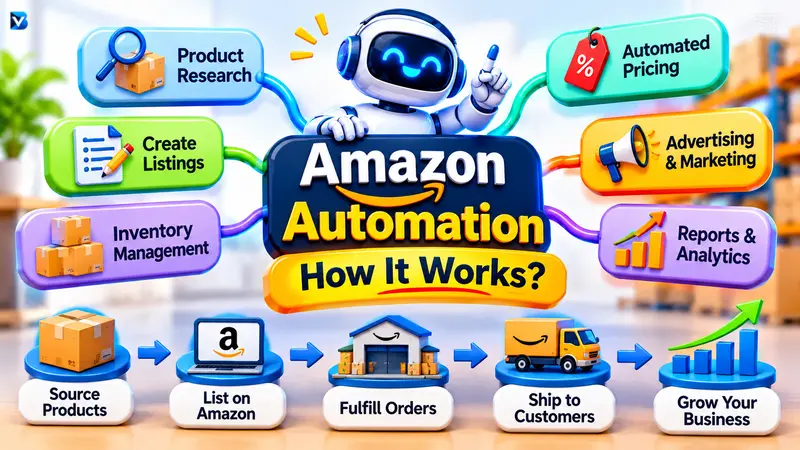
Handling all these tasks manually can become difficult as a business grows. This is where Amazon automation becomes useful.
Amazon automation uses software, artificial intelligence (AI), and fulfillment services to simplify repetitive business activities. Sellers can automate tasks such as inventory tracking, product pricing, order fulfillment, advertising management, and performance reporting.
But how does Amazon automation work? Can beginners use it? Is it profitable, and what tools are needed to get started?
This guide explains how Amazon automation works, the different automation methods, the best tools to consider, potential costs, and the risks beginners should understand before investing in an Amazon business.
What Is Amazon Automation?
Amazon automation is the process of using technology and external services to manage repetitive tasks involved in operating an Amazon store.
Instead of completing every activity manually, sellers can use automation tools to handle specific operations more efficiently.
For example, an Amazon seller might use inventory software to receive low-stock alerts, repricing software to adjust product prices, and Fulfillment by Amazon (FBA) to outsource eligible storage and shipping activities.
Artificial intelligence can also help sellers analyze business information, prepare product descriptions, and identify potential operational problems.
Some common Amazon automation activities include:
- Inventory management: Monitoring stock levels and identifying when products need replenishment.
- Order fulfillment: Using Amazon or third-party fulfillment providers to store, pack, and ship products.
- Price optimization: Adjusting product prices according to predefined rules.
- Product listing management: Organizing product information and improving listing content.
- Advertising management: Monitoring advertising campaigns and managing selected bidding activities.
- Business reporting: Collecting sales, inventory, and expense information.
The purpose of automation is to reduce repetitive work, save time, and make business operations easier to manage.
However, Amazon automation does not mean that a store can operate without supervision. Sellers still need to make important decisions about products, suppliers, pricing, advertising, and financial performance.
How Does Amazon Automation Work?
Amazon automation works by connecting different business activities through Amazon’s services, software applications, and predefined workflows.
Imagine a seller who operates an Amazon store selling kitchen accessories.
The seller researches products, purchases inventory from a supplier, creates product listings, and sends products to an Amazon fulfillment center.
When customers place orders, Amazon can handle fulfillment through FBA. Meanwhile, other applications can monitor inventory, generate pricing recommendations, and prepare business reports.
Here are the main stages of the process.
1. Product Research and Selection
Product research is one of the first steps in building an Amazon business.
Before purchasing inventory, sellers need to understand customer demand, product competition, supplier prices, and potential profit margins.
Product research software can help collect and analyze information about:
- Product demand and search trends.
- Competitor listings.
- Historical pricing.
- Product categories.
- Estimated sales opportunities.
- Competition and market conditions.
Tools such as Jungle Scout and Helium 10 offer product research and keyword research features.
Amazon also provides Product Opportunity Explorer to help sellers investigate customer demand and product opportunities.
These tools make research more organized, but their recommendations should not replace independent product evaluation.
A product with high demand may still be difficult to sell profitably because of strong competition, expensive shipping, or low margins.
2. Product Listing Creation
After selecting a product, the seller needs to create an Amazon listing.
A product listing provides customers with information about what they are purchasing.
It generally includes:
- Product title.
- Product description.
- Product images.
- Product specifications.
- Relevant search keywords.
- Product pricing.
AI-powered writing tools can help prepare descriptions, organize product information, and suggest relevant search phrases.
For example, a seller could provide accurate product specifications to an AI tool and ask it to prepare a clear product description.
However, every detail should be reviewed before publishing. Incorrect product information, exaggerated claims, or misleading images can create customer complaints and listing problems.
3. Inventory Management
Managing inventory is essential for maintaining a healthy Amazon business.
Too little inventory can result in missed sales opportunities, while excessive stock can increase storage expenses and tie up business capital.
Inventory automation software helps sellers monitor stock levels and identify products that may need replenishment.
Consider this example:
A seller has 100 units of a particular product. The seller creates a low-stock notification when the remaining inventory reaches 20 units.
When the stock reaches that level, the software sends a notification so the seller can review demand and arrange another shipment.
Depending on the software and permissions, more advanced systems can also prepare replenishment recommendations or initiate approved inventory workflows.
Amazon provides inventory management features through Seller Central, including inventory reports and replenishment-related information.
4. Automated Order Fulfillment
Order fulfillment is one of the most useful forms of Amazon automation.
With Fulfillment by Amazon (FBA), sellers send their inventory to Amazon fulfillment centers. Amazon handles eligible storage, picking, packing, shipping, customer service, and returns.
The process generally works like this:
- A customer purchases a product from an Amazon listing.
- Amazon receives the order.
- Warehouse staff locate the product.
- The product is packed for delivery.
- Amazon arranges shipment to the customer.
- Amazon provides eligible customer service and return support.
The seller does not have to personally pack and ship every FBA order.
This allows sellers to focus more on sourcing, product development, pricing, and marketing.
However, FBA does not remove every responsibility. Sellers still need to manage inventory, monitor fees, maintain accurate listings, and follow Amazon’s policies.
Learn more from Amazon’s official Fulfillment by Amazon guide.
5. Automated Pricing
Product pricing can change frequently because of competition, demand, and marketplace conditions.
Manually updating prices for every product can take considerable time, especially for sellers managing many listings.
Automated repricing tools help sellers adjust prices using predefined rules.
For example, a seller might configure a pricing rule that responds to changes in competing offers while maintaining a minimum acceptable price.
Amazon’s Automate Pricing feature supports seller-defined pricing rules.
Sellers can use it to:
- Establish automated repricing rules.
- Set minimum price boundaries.
- Set maximum prices where appropriate.
- Apply rules to selected products.
- Monitor pricing performance.
Setting price boundaries is particularly important.
Without proper safeguards, automated repricing may reduce a product’s selling price below the seller’s desired profit margin.
Automated pricing also does not guarantee that a seller will win the Featured Offer. Other factors, including fulfillment and seller performance, may influence eligibility.
6. Advertising and Marketing Automation
Advertising is another important part of managing an Amazon business.
Amazon sellers can use advertising tools and third-party software to monitor campaigns, analyze keywords, adjust bids, and review campaign performance.
For example, an advertising workflow could notify a seller when a campaign spends more than a predefined budget.
Some systems can also adjust bids according to specific rules.
However, advertising automation should not be treated as a replacement for marketing knowledge.
A campaign might receive many clicks but still lose money if customers do not purchase the product.
Sellers should regularly review advertising costs, conversion rates, sales, and profitability.
7. Sales Reporting and Business Analysis
The final stage is monitoring business performance.
Reporting tools organize important business information and help sellers identify areas that need attention.
Common metrics include:
- Total sales.
- Product expenses.
- Advertising costs.
- Inventory levels.
- Customer returns.
- Profit margins.
- Account performance.
For example, a seller may notice that a product generates consistent sales but produces very little profit.
After reviewing the reports, the seller may discover that advertising expenses, storage charges, or supplier costs are reducing the margin.
Automation makes it easier to collect and organize this information, allowing sellers to make more informed decisions.
Different Types of Amazon Automation
Amazon automation is not a single business model. It includes several approaches that sellers can combine depending on their goals.
1. Amazon FBA Automation
FBA stands for Fulfillment by Amazon.
Under this model, sellers send inventory to Amazon fulfillment centers. Amazon manages eligible storage, packing, shipping, customer service, and returns.
The seller remains responsible for choosing products, purchasing inventory, preparing listings, managing pricing, and monitoring business results.
Best for: Sellers who want to outsource order fulfillment and spend less time handling individual orders.
2. Amazon FBM Automation
FBM stands for Fulfilled by Merchant.
With FBM, the seller manages fulfillment independently or works with a third-party logistics provider.
Automation software can help manage orders, synchronize inventory, create shipping labels, and track deliveries.
Best for: Sellers who want greater control over their inventory and fulfillment arrangements.
3. Amazon Software Automation
This approach uses specialized applications to automate individual business activities.
Examples include:
- Inventory management software.
- Automated pricing tools.
- Product research applications.
- Advertising management software.
- Sales analytics platforms.
The seller continues managing the business but uses software to reduce repetitive work.
Best for: Sellers who want to operate their own Amazon business more efficiently.
4. AI-Powered Amazon Automation
AI-powered automation uses artificial intelligence to analyze information, generate recommendations, and assist with selected business activities.
AI tools can help prepare listing content, identify unusual changes in sales, analyze inventory information, and support business decisions.
Amazon has also been developing more advanced Seller Assistant capabilities, including agentic workflows that can monitor business activities and support actions within defined seller permissions.
Availability and capabilities depend on the marketplace and the specific feature.
Best for: Sellers who want to explore AI-assisted business operations.
5. Done-for-You Amazon Automation
Some companies offer managed Amazon store services.
These businesses may provide product research, sourcing, listing management, inventory coordination, advertising, and account management.
The store owner pays for management services and provides the required business capital according to the agreement.
However, a done-for-you service is not necessarily a fully automated business.
A real team may be performing many of the activities behind the scenes.
Before purchasing such a service, examine the contract, inventory ownership, account access, management charges, supplier relationships, and financial reporting arrangements.
Amazon FBA vs. FBM vs. Software Automation
The following table highlights the main differences between these approaches.
| Feature | Amazon FBA | Amazon FBM | Software Automation |
| Inventory | Amazon fulfillment center | Seller or logistics provider | Depends on business model |
| Packing | Amazon | Seller or logistics provider | Depends on fulfillment |
| Shipping | Amazon | Seller or logistics provider | Can support automation |
| Pricing | Seller controlled | Seller controlled | Can be automated |
| Inventory monitoring | Amazon tools available | Seller or software | Can be automated |
| Customer service | Amazon handles eligible FBA support | Seller responsibility under Amazon rules | Can provide assistance |
| Human supervision | Required | Required | Required |
These methods are not mutually exclusive.
For example, a seller can use FBA for shipping, automated pricing software for product prices, and an inventory application for stock management.
How to Start an Amazon Automation Business
Starting an Amazon automation business requires more than purchasing software.
You need a suitable business model, reliable suppliers, adequate capital, and an understanding of Amazon’s selling policies.
Here is a practical beginner-friendly process.
Step 1: Choose Your Business Model
Start by deciding how you want to sell products.
Some common models include:
Private label: You sell products under your own brand.
Wholesale: You purchase existing branded products from authorized suppliers and resell them.
Dropshipping: A supplier fulfills orders on your behalf, provided the arrangement follows Amazon’s dropshipping policy.
Each model has different requirements, expenses, and operational risks.
Choose one that fits your budget, product knowledge, and business objectives.
Step 2: Create an Amazon Seller Account
Register through the official Amazon selling website for the marketplace where you want to operate.
Depending on your country and business type, you may need:
- Government-issued identification.
- Business registration information, where applicable.
- Bank account details.
- Payment information.
- Tax information.
- Address verification.
Requirements vary by marketplace.
Review the official Amazon seller registration information before applying.
Step 3: Research Product Opportunities
Research products before committing money to inventory.
Consider customer demand, competition, supplier prices, delivery expenses, marketplace fees, and advertising costs.
Use product research tools to organize the information, but verify important figures independently.
A product should not be selected simply because an application recommends it.
Step 4: Find Reliable Suppliers
After choosing a product, research potential suppliers.
Compare their product quality, pricing, minimum order quantities, shipping arrangements, production timelines, and replacement policies.
Request samples when appropriate.
Reliable suppliers are important because poor product quality, delayed deliveries, and inconsistent stock can damage your business.
Step 5: Create Your Product Listings
Prepare accurate and informative listings.
Include relevant product specifications, clear images, useful descriptions, and appropriate search terms.
AI can help draft listing content, but review all information before publishing.
Your listings should accurately describe what customers will receive.
Step 6: Choose a Fulfillment Method
Decide whether FBA, FBM, or a suitable third-party logistics provider is appropriate for your products.
With FBA, you send inventory to Amazon fulfillment centers according to its preparation and shipment requirements.
With FBM, you establish a reliable process for storing, packing, shipping, and handling customer orders.
Compare the total costs before deciding.
Step 7: Configure Automation Software
Once your store is operating, identify repetitive activities that could benefit from automation.
For example:
- Enable inventory notifications.
- Configure pricing rules.
- Establish advertising alerts.
- Connect reporting tools.
- Create order-processing workflows.
- Set appropriate permissions for AI tools.
Start with a small number of products and test each workflow before applying it across your catalog.
Step 8: Monitor Your Business
Automation does not eliminate the need to review business performance.
Regularly check sales, inventory, advertising expenses, pricing, customer complaints, and returns.
Investigate unusual changes and adjust your business strategy when necessary.
The goal is to create a more efficient business while maintaining control over important decisions.
Best Tools for Amazon Business Automation
Choosing appropriate software can make Amazon operations easier to manage.
Different applications serve different purposes, so beginners should avoid purchasing several subscriptions before identifying their actual needs.
Here are some tools worth exploring.
| Tool | Main purpose |
| Amazon Seller Central | Account and store management |
| Amazon Automate Pricing | Automated product repricing |
| Jungle Scout | Product and market research |
| Helium 10 | Product research and listing optimization |
| Veeqo | Shipping and inventory workflows |
| Amazon Seller Assistant | AI-assisted seller support |
| Selling Partner API | Custom software integrations |
1. Amazon Seller Central
Amazon Seller Central is the main platform for managing an Amazon seller account.
It provides access to information about listings, orders, inventory, account performance, and other business operations.
It is an essential starting point for Amazon sellers.
2. Amazon Automate Pricing
Amazon Automate Pricing helps eligible sellers manage prices through predefined rules.
Sellers can create pricing strategies, set boundaries, and monitor selected products.
It can be particularly useful for sellers managing multiple listings.
3. Jungle Scout
Jungle Scout provides product research and market analysis features.
It can help sellers investigate potential product opportunities and understand competitive conditions.
4. Helium 10
Helium 10 offers a range of tools for product research, keyword research, listing optimization, and other seller activities.
It may be useful for businesses that want several research and listing features within one platform.
5. Veeqo
Veeqo provides shipping and inventory-related tools for ecommerce operations.
It can be useful for sellers managing orders across multiple sales channels.
Which Tools Should Beginners Start With?
Beginners do not need every available automation application.
A practical starting setup could include:
- Amazon Seller Central for account management.
- Amazon’s native inventory and fulfillment features.
- Amazon Automate Pricing where suitable.
- One product research platform when needed.
- Additional software only when business operations require it.
Amazon’s Selling Partner Appstore and associated software ecosystem can help sellers explore integrations for their specific requirements.
Amazon Automation for Developers
Amazon automation also provides opportunities for developers who want to create custom ecommerce workflows.
Amazon’s Selling Partner API (SP-API) allows authorized applications to interact programmatically with supported seller data and operations.
Depending on permissions and available endpoints, developers can create integrations for orders, inventory, listings, pricing, and reporting.
For example, a developer could build an inventory monitoring application that:
- Retrieves authorized inventory information.
- Checks stock against predefined thresholds.
- Generates low-stock notifications.
- Updates an internal dashboard.
- Produces inventory reports for the business owner.
More advanced systems can connect multiple applications and create workflows for different business activities.
Developers must follow Amazon’s API permissions, security requirements, data protection rules, and current developer policies.
Explore the Selling Partner API documentation for technical details.
How Much Does Amazon Automation Cost?
There is no single price for starting an Amazon automation business.
Your expenses depend on your marketplace, product category, business model, inventory requirements, fulfillment arrangements, software subscriptions, and advertising budget.
Common expenses include:
| Expense | What it covers |
| Seller account | Selling plan charges |
| Product inventory | Purchasing products from suppliers |
| Fulfillment | Picking, packing, and shipping |
| Storage | Inventory storage charges |
| Inbound shipping | Transporting inventory to fulfillment centers |
| Software | Research, repricing, inventory, and analytics applications |
| Advertising | Sponsored advertising campaigns |
| Management services | Optional outsourced store management |
Amazon’s US selling plans, for example, include an Individual plan priced at $0.99 per item sold and a Professional plan priced at $39.99 per month, before applicable selling fees.
These are US-market examples. Other marketplaces have different pricing arrangements, and fees can change.
For Amazon India, sellers should review the current category-based fee schedule, including applicable referral, closing, and fulfillment-related charges.
Always consult the official pricing information for your target marketplace before calculating your starting budget.
Is Amazon Automation Profitable?
Amazon automation can support a profitable ecommerce business, but it does not guarantee financial success.
Profitability depends on product demand, supplier costs, marketplace fees, fulfillment expenses, advertising performance, returns, and other operating costs.
Consider a hypothetical example of a product selling for $40.
| Expense | Example amount |
| Product purchase | $12 |
| Referral fee | $6 |
| Fulfillment | $5 |
| Inbound shipping and preparation | $3 |
| Advertising | $4 |
| Storage, returns, and software allocation | $2 |
| Total expenses | $32 |
| Remaining contribution | $8 |
In this example, the product generates $40 in revenue and leaves $8 after the listed costs.
That represents a 20% contribution margin before any additional fixed overhead and taxes.
This is an illustrative calculation, not an actual seller result or a typical Amazon profit margin.
The example shows why sellers should calculate all expenses before selecting a product.
What Affects Amazon Automation Profitability?
Product selection: Products with realistic demand and manageable competition may provide better opportunities.
Inventory management: Poor stock planning can create storage expenses or missed sales.
Advertising costs: Campaigns that spend too much without generating profitable conversions can reduce margins.
Pricing strategy: Automated price changes should protect the minimum margin required by the business.
Fulfillment expenses: Storage, shipping, and handling charges should be included in every product calculation.
Management expenses: Outsourced services and software subscriptions can add to operating costs.
Automation can improve efficiency, but it cannot turn an unprofitable product into a profitable one automatically.
Advantages and Disadvantages of Amazon Automation
Amazon automation offers several benefits, but it also has limitations.
| Advantages | Disadvantages |
| Reduces repetitive manual work | Requires setup and investment |
| Helps monitor inventory | Incorrect forecasts can create stock problems |
| Simplifies order fulfillment | Fulfillment fees apply |
| Supports faster reporting | Software may provide inaccurate recommendations |
| Helps manage multiple products | More products require stronger supervision |
| Enables AI-assisted workflows | AI outputs can contain mistakes |
| Can support business growth | Profitability is not guaranteed |
The best automation strategy is to identify repetitive tasks that have clear rules and measurable outcomes.
Important decisions involving supplier selection, financial commitments, pricing strategy, and business direction should remain under appropriate human supervision.
Is Amazon Automation Legit or a Scam?
Amazon automation is a legitimate approach to managing ecommerce operations.
Amazon itself offers fulfillment services, seller management features, pricing automation, APIs, and AI-assisted seller tools.
However, some companies advertise done-for-you Amazon stores using unrealistic income claims.
The Federal Trade Commission has taken action against businesses involved in deceptive ecommerce business opportunities.
For example, the FTC announced in March 2024 that it was sending $2.8 million in refunds to consumers harmed by DK Automation’s Amazon and Walmart business opportunity schemes.
This demonstrates why beginners should carefully investigate companies before investing in expensive management packages.
Warning Signs to Watch For
Be cautious when an automation company:
- Guarantees a particular income or investment return.
- Promises that you will never need to manage your store.
- Refuses to explain how products are sourced.
- Does not provide understandable financial reports.
- Hides account or inventory ownership arrangements.
- Pressures customers into making large upfront payments.
- Cannot explain what happens if the business loses money.
Before signing an agreement, review the complete contract, account access, ownership terms, supplier arrangements, fees, inventory responsibilities, and exit conditions.
Remember that outsourcing business operations does not automatically remove your responsibilities as an Amazon seller.
Important: Understand Amazon’s Dropshipping Policy
Dropshipping is sometimes promoted as a way to operate an Amazon business without keeping inventory yourself.
However, not every dropshipping arrangement is permitted.
Amazon’s policy requires sellers to remain clearly identifiable as the seller of record.
For example, purchasing a product from another online retailer and asking that retailer to ship it directly to your Amazon customer with its own branding or invoice can violate Amazon’s policy.
Permitted dropshipping arrangements require appropriate supplier agreements, seller identification on packaging and documentation, and responsibility for customer returns.
Before using dropshipping as part of an automated business model, read Amazon’s official dropshipping requirements and ensure that your supplier arrangement complies with them.
Common Amazon Automation Mistakes Beginners Should Avoid
New sellers sometimes assume that automation will solve every business problem. In reality, poor decisions can become more expensive when automated.
Here are some mistakes worth avoiding.
1. Expecting Completely Passive Income
Amazon automation can reduce manual activities, but sellers still need to manage finances, products, inventory, and account performance.
2. Purchasing Too Much Software
Buying several applications before understanding your business requirements can increase expenses unnecessarily.
Start with the tools you actually need.
3. Ignoring Amazon’s Policies
Product restrictions, listing requirements, dropshipping rules, and account policies must be followed.
Automation does not excuse policy violations.
4. Setting Unsafe Pricing Rules
Repricing software should have suitable minimum and maximum limits where available.
Otherwise, automatic price changes may damage product profitability.
5. Ignoring Inventory Costs
Excess stock can increase storage expenses, while insufficient stock can interrupt sales.
Use realistic demand estimates when planning replenishment.
6. Spending Too Much on Advertising
Monitor campaign expenses and evaluate actual profitability instead of focusing only on clicks or sales volume.
7. Trusting Unrealistic Income Promises
Do not invest in a managed Amazon store simply because someone presents impressive revenue screenshots.
Ask for verifiable financial records and examine the complete contract.
Frequently Asked Questions About Amazon Automation
1. How does Amazon automation work for beginners?
Amazon automation allows beginners to use software and fulfillment services to manage repetitive business activities. They can start by creating a seller account, researching products, selecting a fulfillment method, and configuring suitable inventory and pricing tools.
2. Is Amazon automation profitable?
It can be profitable, but there is no guaranteed return. Profit depends on product costs, supplier reliability, advertising expenses, fulfillment charges, marketplace fees, and customer demand.
3. How much does Amazon automation cost?
Costs vary according to the business model and marketplace. Expenses may include inventory purchases, seller plans, fulfillment, storage, software subscriptions, advertising, and optional management services.
4. Can Amazon stores run automatically?
Some store operations can run automatically, including eligible FBA fulfillment, inventory alerts, pricing rules, reporting, and selected AI workflows. However, important business decisions and account supervision still require human involvement.
5. Is Amazon FBA the same as Amazon automation?
No. Amazon FBA is a fulfillment service that handles eligible storage and order fulfillment activities. Amazon automation is a broader concept that includes FBA, software tools, AI applications, inventory management, and custom integrations.
6. Is Amazon automation legitimate?
Yes, legitimate Amazon automation tools and services exist. However, some done-for-you business opportunities have involved misleading income claims. Investigate companies carefully before paying for their services.
7. What are the best tools for Amazon automation?
Amazon Seller Central, Automate Pricing, Jungle Scout, Helium 10, Veeqo, and Amazon Seller Assistant support different aspects of seller operations. The best combination depends on your business requirements.
8. Can AI automate an Amazon business?
AI can assist with product listings, inventory analysis, business reporting, pricing recommendations, and selected operational workflows. Some newer Amazon Seller Assistant capabilities also support more advanced AI-driven seller tasks.
9. Do I need technical skills to start Amazon automation?
No advanced programming skills are required to use standard Amazon seller tools. However, developers working with custom automation and Selling Partner API integrations need appropriate technical knowledge.
10. What is the difference between automation software and a done-for-you Amazon store?
Automation software provides tools that sellers use to manage their own businesses. A done-for-you service involves an external company managing some activities on the seller’s behalf. The costs, responsibilities, ownership arrangements, and business risks can be very different.
Conclusion: Is Amazon Automation Worth Exploring?
Amazon automation can make ecommerce operations more manageable by reducing repetitive work and improving how sellers handle inventory, fulfillment, pricing, advertising, and reporting.
Beginners do not need to automate everything from the beginning. Starting with Amazon’s native seller tools and adding software as business requirements grow is often a more practical approach.
It is equally important to understand marketplace policies, calculate operating costs, choose reliable suppliers, and monitor financial performance.
AI-powered automation is creating new opportunities for ecommerce businesses, but technology alone cannot guarantee sales or profits.
The smartest way to use Amazon automation is to automate repetitive tasks, make decisions using reliable data, and maintain control of the business.
READ MORE:
How to Edit AI Photos: A Complete Beginner’s Guide