
Automation technologies have become an important part of modern life and business operations. From AI-powered software and automated emails to industrial robots and smart home devices, automation helps people complete tasks faster, improve accuracy, and reduce repetitive manual work.
But what are automation technologies, how do they work, and which types are used in businesses and industries?
Automation technologies are hardware and software systems that perform, monitor, or control tasks with minimal human intervention. They use technologies such as artificial intelligence (AI), robotics, sensors, control systems, software applications, and programmed instructions to automate activities.
Businesses use these technologies to manage workflows, process information, monitor equipment, manufacture products, and improve everyday operations.
In this guide, you will discover seven major types of automation technologies, practical examples, their advantages and disadvantages, and how to choose the right automation solution.
What Are Automation Technologies?
Automation technologies refer to the combination of hardware, software, machines, and control systems designed to perform tasks automatically or with reduced human involvement.
These technologies can handle simple activities, such as sending an automatic email, or complex operations, such as controlling an entire manufacturing production line.
For example, when a customer places an order online, an automated system can record the order, update inventory, generate an invoice, and send a confirmation email without requiring someone to perform every step manually.
Similarly, industrial automation systems use sensors, controllers, and robotic equipment to monitor and control manufacturing operations.
Automation does not necessarily mean removing humans from a process. In many cases, people still create instructions, supervise systems, review important decisions, and manage unexpected situations.
Explore more:
IBM – What Is Automation?
Why Are Automation Technologies Important?
Automation technologies help organizations improve how work gets done.
Their importance comes from several capabilities:
- Efficiency: Automate repetitive tasks and reduce unnecessary manual work.
- Accuracy: Apply consistent instructions to reduce avoidable mistakes.
- Productivity: Help employees spend more time on important activities.
- Scalability: Handle increasing workloads through automated processes.
- Consistency: Follow standardized procedures across operations.
- Monitoring: Collect information and identify problems more quickly.
The actual benefits depend on the process, implementation, and quality of the automation system.
How Do Automation Technologies Work?
Most automation technologies follow a similar process: collect information, evaluate instructions, perform an action, and check the result.
Here is a simplified explanation.
Step 1: Collect Input
An automated system first receives information.
Inputs can come from sensors, forms, databases, cameras, applications, or connected devices.
For example, a temperature sensor measures the temperature of a manufacturing machine.
Step 2: Process Information
The system processes the collected information using programmed rules, algorithms, or AI models.
A business workflow might check whether a customer has completed all required fields before moving to the next stage.
Step 3: Make a Decision
The automation system determines what should happen next.
A basic system may follow predefined rules, while an AI-powered system can analyze information to classify documents or identify patterns.
Step 4: Perform an Action
The system executes the required task.
It might send an email, update a database, activate a machine, move a robotic arm, or generate a report.
Step 5: Monitor and Verify
The system checks whether the expected action occurred.
More advanced systems can provide alerts, record errors, and request human approval when something unusual happens.
Simple example: An automated office lighting system detects movement through a sensor, processes the signal, and switches on the lights when necessary.
Seven Main Types of Automation Technologies
Automation technologies come in different forms depending on the tasks they perform and the environment in which they operate.
Here are seven important categories.
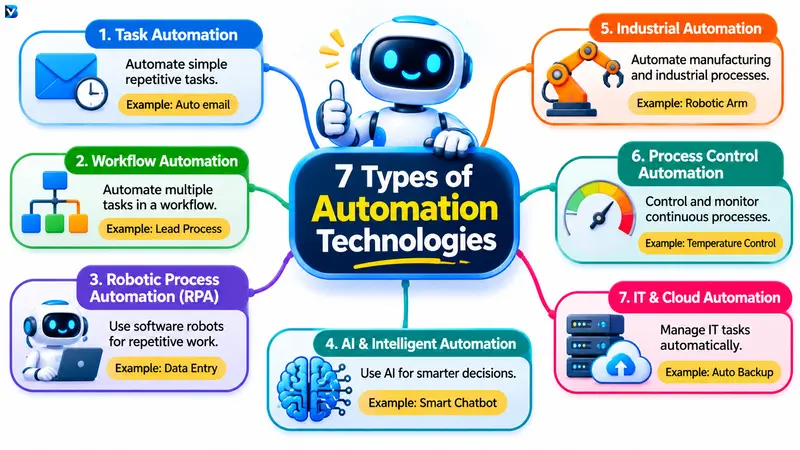
1. Task Automation
Task automation involves using software or machines to perform repetitive individual tasks automatically.
It is generally one of the simplest forms of automation.
Instead of manually completing the same activity every time, a user creates instructions that allow a system to perform it automatically.
Examples:
- Automatically sending email notifications.
- Generating recurring reports.
- Organizing digital files.
- Scheduling social media posts.
- Automatically backing up files.
- Sending appointment reminders.
Business application: An online store can automatically send an order confirmation email whenever a customer completes a purchase.
Task automation is especially useful for individuals, freelancers, bloggers, and small businesses.
2. Workflow Automation
Workflow automation connects multiple tasks into a structured process.
Rather than automating only one activity, it coordinates different actions across applications and services.
For example, a business can automate its customer enquiry process.
A possible workflow:
- A customer submits a contact form.
- The information is added to a customer database.
- The system checks whether required information is available.
- The enquiry is assigned to an employee.
- A notification is sent to the responsible person.
- The customer receives an acknowledgement.
This process reduces manual coordination and makes it easier to track work.
Popular workflow automation platforms include Microsoft Power Automate, Zapier, and Make.
Workflow automation is useful for marketing, sales, customer support, content management, and administrative operations.
3. Robotic Process Automation (RPA)
Robotic Process Automation, commonly known as RPA, uses software robots to perform repetitive, rule-based activities within digital applications.
These software robots interact with existing systems in ways similar to human users.
For example, an RPA bot can:
- Open a business application.
- Read information from a document.
- Enter data into a form.
- Transfer information between systems.
- Download files.
- Generate routine reports.
RPA is particularly useful when organizations need to automate repetitive tasks across applications that do not have convenient direct integrations.
Example: An accounting team receives invoices by email. An RPA system can extract information, enter relevant details into accounting software, and prepare records for review.
Popular RPA technologies include UiPath and Microsoft Power Automate Desktop.
However, RPA is not the same as a physical robot. It primarily refers to software-based automation.
4. AI and Intelligent Automation
Artificial Intelligence automation combines AI capabilities with automated processes to handle tasks that require information analysis, classification, prediction, or language understanding.
Traditional automation generally follows predefined instructions.
AI-powered automation can also interpret data and help systems respond to situations that are more complex than simple rule-based tasks.
Important technologies include:
- Machine learning.
- Natural language processing.
- Computer vision.
- Generative AI.
- Intelligent document processing.
- AI-powered assistants.
Examples:
- AI chatbots answering customer questions.
- Automatically classifying customer support tickets.
- Extracting information from documents.
- Detecting unusual transaction patterns.
- Generating summaries from business reports.
- AI-assisted content workflows.
For example, an AI-powered customer support system can analyze an incoming message, identify its subject, and direct it to the appropriate support team.
Intelligent automation often combines AI, business process management, and RPA.
It can improve business processes, but human review remains important for sensitive decisions and situations where AI may produce incorrect results.
5. Industrial Automation
Industrial automation uses machinery, control systems, sensors, and software to automate manufacturing and industrial processes.
It is commonly used in factories, power plants, warehouses, and other industrial environments.
Industrial automation can help control production equipment, monitor machine performance, and maintain consistent operating conditions.
Examples:
- Robotic arms assembling automobile components.
- Automated packaging machines.
- Conveyor systems moving products.
- CNC machines manufacturing parts.
- Automated inspection systems checking product quality.
- Sensors monitoring production equipment.
Common technologies include programmable logic controllers (PLCs), industrial robots, human-machine interfaces (HMIs), and supervisory control systems.
Industrial automation is especially useful when businesses need repetitive operations to be performed with consistency, precision, and controlled operating conditions.
6. Process Control Automation
Process control automation focuses on monitoring and regulating continuous or batch operations.
It is especially important in industries where variables such as pressure, temperature, flow, and chemical concentration need to remain within specific operating conditions.
For example, a water treatment facility may use automated control systems to monitor water levels and operate pumps according to programmed conditions.
Other applications include:
- Chemical manufacturing.
- Oil and gas operations.
- Food processing.
- Pharmaceutical production.
- Water treatment.
- Power generation.
Process control systems can use sensors, controllers, valves, pumps, and supervisory software to keep operations within defined parameters.
This type of automation can also work alongside industrial robotics and other manufacturing technologies.
7. IT and Cloud Automation
IT automation uses software to manage and control information technology operations with less manual intervention.
It helps organizations handle repetitive activities involving servers, networks, applications, databases, and cloud infrastructure.
Examples include:
- Automatically deploying software updates.
- Creating scheduled backups.
- Monitoring server performance.
- Managing user accounts.
- Scaling cloud resources.
- Running automated software tests.
- Detecting and reporting system errors.
Cloud automation can also help organizations manage infrastructure across cloud services.
For example, an IT team can configure an automated backup schedule so that important business data is backed up at predefined intervals.
IT automation is especially useful for developers, system administrators, DevOps teams, and organizations managing large digital environments.
Types of Industrial Automation Systems
Industrial automation also has a separate classification based on how manufacturing systems are designed.
Three important categories are fixed, programmable, and flexible automation.
| Type | How it works | Example |
| Fixed automation | Performs a specific operation repeatedly | High-volume assembly line |
| Programmable automation | Can be reconfigured for different production batches | CNC manufacturing |
| Flexible automation | Allows quicker changes between products or tasks | Flexible robotic manufacturing cell |
Fixed Automation
Fixed automation is designed to perform a specific task or sequence of tasks repeatedly.
It is suitable for high-volume manufacturing where production requirements remain relatively consistent.
Example: An automated production line assembling the same product repeatedly.
Programmable Automation
Programmable automation allows production instructions to be changed when manufacturing requirements change.
It is useful for businesses producing different products in batches.
Example: A CNC machine programmed to manufacture different metal components.
Flexible Automation
Flexible automation allows equipment to switch between different production tasks with relatively little manual changeover.
Example: A robotic manufacturing cell that can perform different assembly operations depending on the selected product.
These industrial classifications should not be confused with software automation categories such as RPA and workflow automation.
Essential Technologies Used in Automation
Different automation systems combine multiple technologies to perform their functions.
Here are some of the most important building blocks.
| Technology | Purpose | Practical example |
| Sensors | Collect information | Temperature monitoring |
| Actuators | Perform physical actions | Operating a valve |
| PLCs | Control industrial equipment | Conveyor control |
| SCADA | Monitor and supervise industrial processes | Factory monitoring |
| Robotics | Perform physical tasks | Automated assembly |
| AI and ML | Analyze information and identify patterns | Predictive maintenance |
| IoT | Connect devices and share data | Smart building systems |
| APIs | Connect software applications | Transferring business data |
| Machine vision | Analyze images | Product inspection |
| Cloud platforms | Run and coordinate digital services | Automated data processing |
For example, in an automated manufacturing process, sensors collect machine information, a PLC processes control instructions, and actuators operate the equipment.
A SCADA system can provide operators with a broader view of the industrial process.
Real-World Automation Technology Examples
Automation is used in many industries and everyday activities.
Here are some practical examples.
Automation in Everyday Life
Automatic washing machines select and execute programmed washing cycles.
Smart thermostats adjust heating and cooling based on configured settings.
Online banking systems process transactions through automated software.
Automatic payment notifications inform customers about transactions.
Smart lighting systems respond to schedules or motion sensors.
Automation in Business
- Email marketing platforms send scheduled campaigns.
- CRM systems automatically assign customer enquiries.
- Accounting software generates recurring financial reports.
- E-commerce systems update order records.
- Customer support platforms categorize incoming requests.
Automation in Manufacturing
- Robotic arms perform welding and assembly.
- Conveyor systems move products between production stages.
- Automated inspection systems detect defects.
- Packaging machines prepare products for distribution.
- Sensors monitor equipment performance.
Automation in Healthcare
- Laboratory equipment performs automated testing processes.
- Hospital systems send appointment reminders.
- Software helps organize patient information.
- Medical inventory systems monitor stock levels.
Healthcare automation must be implemented carefully, with appropriate privacy protections and professional oversight.
Benefits of Automation Technologies
Automation offers several advantages when applied to suitable processes.
1. Saves Time
Automated systems can perform repetitive activities without requiring an employee to manually complete every step.
2. Improves Productivity
Employees can spend more time on planning, customer relationships, problem-solving, and other valuable activities.
3. Reduces Repetitive Errors
Consistent instructions can help reduce mistakes associated with manual data entry and repetitive tasks.
However, an incorrectly configured automation can repeat the same error at scale.
4. Supports Business Growth
Automation helps organizations manage larger workloads without increasing manual coordination for every individual task.
5. Improves Process Consistency
Automated workflows can follow standardized procedures, making business operations more predictable.
6. Provides Better Monitoring
Digital automation systems can maintain activity records, generate alerts, and help managers understand operational performance.
7. Supports Decision-Making
AI-powered systems can analyze information and provide insights that help people make better-informed decisions.
Disadvantages and Challenges of Automation
Automation is useful, but it is not suitable for every task.
Businesses should understand its limitations before investing.
| Challenge | Explanation | Possible solution |
| Initial investment | Hardware, software, and implementation may be expensive | Start with a small project |
| Maintenance | Systems require monitoring and updates | Create a maintenance schedule |
| Technical complexity | Some systems require specialized skills | Train employees |
| Security risks | Connected systems can introduce vulnerabilities | Apply access controls and security reviews |
| Integration problems | Different applications may not work together easily | Check compatibility first |
| Unexpected errors | Incorrect rules can create repeated failures | Add testing and human review |
| Limited flexibility | Some systems struggle with unusual situations | Include exception handling |
One important lesson is that automation should improve a process rather than simply make a bad process run faster.
How to Choose the Right Automation Technology
Choosing the right automation solution depends on the problem you want to solve.
Follow these steps before investing in any technology.
Step 1: Identify Repetitive Tasks
Find activities that consume time and follow similar steps regularly.
Examples include data entry, invoice processing, customer notifications, and inventory updates.
Step 2: Understand the Process
Document how the task currently works.
Identify its inputs, outputs, dependencies, exceptions, and approval requirements.
Step 3: Select the Appropriate Technology
Different tasks need different solutions.
| Business requirement | Suitable technology |
| Automate email notifications | Task automation |
| Connect multiple applications | Workflow automation |
| Automate repetitive screen-based work | RPA |
| Analyze documents and messages | AI automation |
| Control factory equipment | Industrial automation |
| Manage cloud resources | IT automation |
Step 4: Check Integration and Security
Before implementation, make sure the chosen technology can connect to the required systems and protect sensitive information.
Step 5: Start With a Small Pilot
Test automation on one suitable process before expanding it across the organization.
Measure accuracy, time savings, costs, and the number of errors or manual corrections.
Step 6: Monitor and Improve
Review automation performance regularly.
Update instructions, fix errors, and involve employees when a process requires human judgement.
Common Automation Mistakes to Avoid
Beginners and businesses sometimes make avoidable mistakes when adopting automation technologies.
Automating everything: Not every task benefits from automation. Activities requiring empathy, creativity, or complex judgement may need significant human involvement.
Ignoring process quality: Automating an inefficient process can make existing problems happen more quickly.
Choosing tools without understanding requirements: A popular automation platform may not be suitable for every business.
Ignoring security: Automation systems should have appropriate permissions, access controls, monitoring, and data protection.
Skipping testing: Always test workflows with realistic situations, including incomplete information and unexpected errors.
Removing human oversight: Important financial, legal, safety, and customer decisions may require human review.
The best automation approach combines technology, clear processes, and responsible human supervision.
Frequently Asked Questions About Automation Technologies
1. What are automation technologies?
Automation technologies are hardware and software systems that perform tasks with minimal human intervention. They include AI, robotics, workflow automation, RPA, sensors, control systems, and industrial machinery.
2. What are the seven types of automation technologies?
Seven major categories include task automation, workflow automation, robotic process automation, AI and intelligent automation, industrial automation, process control automation, and IT and cloud automation.
3. What are some examples of automation technologies?
Examples include industrial robots, automated email systems, smart home devices, AI chatbots, programmable logic controllers, RPA software, and cloud automation platforms.
4. How does AI help with automation?
AI helps automation systems analyze information, understand language, recognize patterns, classify documents, and support decisions. It can extend traditional rule-based automation to more complex tasks.
5. What is the difference between automation and AI?
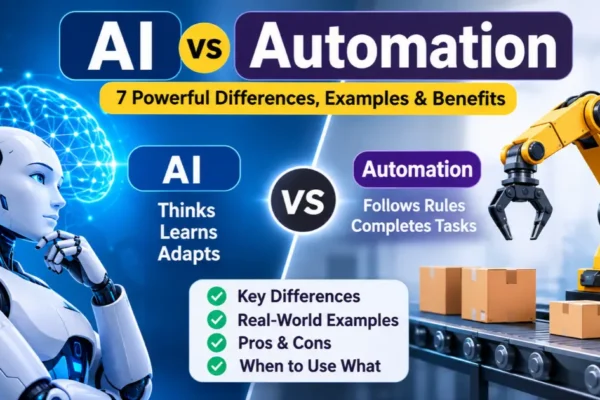
Automation performs tasks automatically using rules, instructions, or programmed systems. AI helps computers analyze data, recognize patterns, generate responses, and perform certain decision-related tasks. AI can be integrated into automation, but not all automation requires AI.
6. Which industries use automation technologies?
Manufacturing, healthcare, banking, logistics, retail, education, agriculture, telecommunications, energy, and information technology all use automation in different ways.
7. Are automation technologies useful for small businesses?
Yes. Small businesses can use automation for email marketing, customer management, invoice processing, scheduling, inventory updates, and other repetitive activities.
8. Will automation replace human workers?
Automation can change job responsibilities and reduce demand for certain repetitive tasks. However, people remain important for supervision, creative work, communication, complex decisions, and managing unexpected situations.
Conclusion
Automation technologies are transforming how individuals and businesses perform everyday tasks. From simple workflow automation and software robots to intelligent AI systems and industrial manufacturing equipment, these technologies offer different ways to improve productivity and manage complex operations.
Understanding the seven major types of automation technologies makes it easier to identify the right solution for a particular task or business requirement.
The best approach is to start with a clear problem, select an appropriate technology, test it carefully, and continuously monitor its performance.
As AI, robotics, cloud computing, and connected systems continue to develop, automation will remain an important part of modern digital and industrial operations.
READ MORE:
AI vs Automation: 7 Powerful Differences, Examples & Benefits