

Have you ever wondered how emails arrive automatically, reminders appear on your phone, or files get backed up without manually doing anything? These are everyday examples of automation.
Basic automation is the simplest practical form of business and digital task automation. It uses predefined instructions or rules to perform repetitive tasks with little or no human intervention. Instead of completing the same activity manually, you configure a system to perform it automatically whenever a particular event occurs or a schedule is reached.
For example, an email application can automatically move promotional messages into a separate folder. A website can send a confirmation email whenever someone submits a contact form.
Basic automation helps beginners, bloggers, developers and businesses save time, reduce repetitive work and improve consistency without necessarily requiring programming skills.
In this guide, you will learn what basic automation means, how it works, seven practical examples, its benefits and the tools you can use to get started.
What Is Basic Automation?
Basic automation is the use of technology, software or predefined rules to perform simple, repetitive tasks automatically.
It generally focuses on individual tasks that have clear instructions and predictable outcomes.
For example, imagine receiving hundreds of emails every week. Instead of manually moving promotional emails into a separate folder, you can create a filter that automatically identifies and sorts them.
This is basic automation because the system follows instructions you define.
According to IBM, basic or task automation handles simple, routine activities, including distributing documents, forwarding approval requests and sending invoices.
Main characteristics of basic automation
Basic automation usually has these characteristics:
- Simple instructions: The system follows predefined rules.
- Repetitive operations: It performs tasks that happen regularly.
- Minimal human involvement: People configure and supervise the automation instead of completing every step manually.
- Predictable outcomes: The same conditions generally produce the same actions.
- Easy implementation: Many basic automations can be created using ordinary software or no-code tools.
The purpose is not to automate every human activity. It is to remove unnecessary repetitive work so people can focus on tasks that require judgment and creativity.
How Does Simple Automation Work?
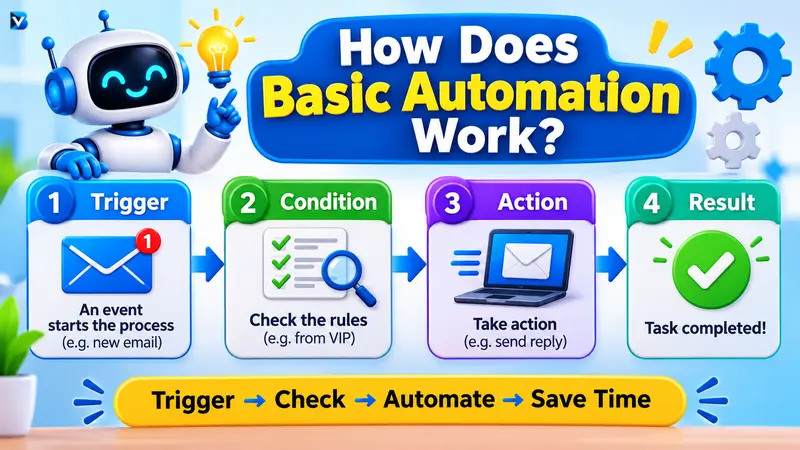
Simple automation works by following a predefined sequence of instructions.
Most digital automations use three fundamental components:
1. Trigger
A trigger is an event that starts an automated process.
Examples include:
- Receiving a new email.
- Submitting an online form.
- Creating a new spreadsheet entry.
- Reaching a scheduled time.
- Publishing a new blog post.
2. Condition
A condition determines whether an automation should continue.
For example, an email automation might check whether the sender belongs to a particular address or whether the subject contains a specific word.
Some basic automations do not require conditions.
3. Action
An action is what the system does after the trigger and any required conditions are satisfied.
Examples include:
- Sending an email.
- Creating a spreadsheet row.
- Moving a file.
- Sending a notification.
- Creating a reminder.
Simple automation example:
When someone submits a contact form, the system adds their information to a spreadsheet and sends a confirmation email.
The process looks like this:
Trigger → Optional condition → Automated action → Result
This is the basic idea behind many no-code automation platforms.
Microsoft Power Automate and IFTTT both explain how triggers and actions connect automated tasks.
7 Examples of Basic Automation
Here are seven practical examples that demonstrate how basic automation works in daily life and business.
1. Automatic Email Replies
Email automation is one of the easiest ways to start.
Businesses can configure an automatic response whenever someone submits a contact form or sends an email to a support address.
For example:
When a customer sends an inquiry, an automated email confirms that the message has been received.
Benefits:
- Reduces repetitive replies.
- Confirms that a message was received.
- Helps maintain consistent communication.
- Saves time for customer support teams.
2. Automatic Email Filtering
Email filtering helps organize incoming messages.
You can create rules that automatically move emails into folders based on their sender, subject or other supported conditions.
For example:
If an email contains the word “invoice” in its subject, move it into the Finance folder.
This reduces the need to manually organize every incoming message.
3. Scheduled Social Media Publishing
Bloggers and marketers frequently publish content across multiple platforms.
Instead of manually publishing each post at a particular time, they can use a scheduling tool.
For example:
- Prepare social media content.
- Select the publishing date and time.
- Schedule the post.
- Let the platform publish it according to the schedule.
This is useful for maintaining a consistent publishing routine.
4. Automatic File Backup
File backup automation protects important digital information.
A backup application can be configured to copy selected folders to another storage location on a schedule.
For example:
Every evening, the backup application copies important project files to designated cloud storage.
Benefits:
- Reduces manual backup work.
- Helps maintain additional copies of files.
- Supports regular backup routines.
Remember that automated backups should be monitored and periodically checked to confirm that files can actually be restored.
5. Automatic Appointment Reminders
Appointment reminders are another common example.
A scheduling application can send a reminder before a meeting or appointment.
For example:
When an appointment is scheduled, the application sends a notification one day before the event.
This helps people remember important commitments and reduces routine reminder work.
6. Form-to-Spreadsheet Automation
This is particularly useful for website owners and small businesses.
Suppose someone fills out a contact form on your website.
Instead of manually copying the submitted information, automation can send the data to a spreadsheet.
The workflow could look like this:
- A visitor submits a form.
- The automation receives the submission.
- The visitor’s details are added to a spreadsheet.
- A confirmation email is sent.
This workflow can help organize leads, registrations and customer inquiries.
7. Automatic Notifications
Notifications can alert users whenever an important event happens.
Examples include:
- Receiving an alert when a new blog post is published.
- Getting a notification when a website form receives a response.
- Receiving a message when a scheduled task fails.
- Getting an alert when a particular file is uploaded.
Notifications help people stay informed without continuously checking applications.
What Are the Benefits of Basic Automation?
Basic automation provides several practical advantages.
1. Saves Time
Automating repetitive tasks reduces the time spent performing the same actions manually.
For example, automatically sorting emails removes the need to organize every message individually.
2. Reduces Manual Errors
Copying information repeatedly between different applications can lead to mistakes.
Automation can improve consistency by following the same instructions every time. However, incorrect rules or input data can still produce errors.
3. Improves Productivity
When people spend less time on repetitive activities, they can focus on more valuable work such as planning, problem-solving and customer relationships.
4. Improves Consistency
An automated process can perform the same predefined steps whenever its conditions are met.
This makes routine activities more predictable.
5. Helps Small Businesses
Small businesses can automate simple administrative activities such as appointment reminders, form notifications and document organization without building complicated software systems.
6. Reduces Routine Work
Automation can handle repetitive activities in the background, reducing the amount of manual effort required.
7. Supports Business Growth
A well-designed automation can handle recurring tasks as activity increases, although the system may need additional capacity, monitoring or adjustments as the workload grows.
Basic Automation vs Other Types of Automation
Not all automation works in the same way.
Here is a simple comparison:
| Type | How it works | Example |
| Basic automation | Automates individual routine tasks using predefined rules | Automatic email sorting |
| Workflow automation | Connects multiple tasks in a sequence | Form submission to spreadsheet and notification |
| Robotic Process Automation (RPA) | Uses software robots to perform repetitive computer-based operations | Copying information between business applications |
| Intelligent automation | Combines automation with AI capabilities | An AI-supported customer query classification system |
Basic automation is generally the easiest starting point because it focuses on well-defined tasks.
As needs become more complex, businesses may introduce workflow automation, RPA or intelligent automation.
One important distinction: industrial automation uses its own classifications. Fixed automation, for example, refers to dedicated production equipment designed for repetitive, high-volume operations. It is not another name for everyday digital task automation.
Which Automation Tools Are Best for Beginners?
You do not need to build a complicated system to start automating tasks.
Several tools offer beginner-friendly ways to connect applications.
1. IFTTT
IFTTT stands for “If This Then That.”
It is designed to connect applications and devices through triggers and actions.
Best for:
- Personal notifications.
- Simple app connections.
- Smart home automations.
- Everyday repetitive activities.
Official website: https://ifttt.com/
2. Zapier
Zapier connects different applications and allows users to create automated workflows.
For example, a form submission can trigger an action in a spreadsheet or another connected application.
Best for:
- Bloggers.
- Marketing teams.
- Small businesses.
- No-code app integrations.
Official website: https://zapier.com/
3. Microsoft Power Automate
Microsoft Power Automate supports cloud and desktop automation.
It is especially useful for people who work with Microsoft applications and services.
Best for:
- Microsoft 365 users.
- Business notifications.
- Document workflows.
- Desktop task automation.
Official website: https://www.microsoft.com/en-us/power-platform/products/power-automate
4. n8n
n8n is a workflow automation platform that offers visual workflow building and more technical customization.
It is useful for developers and users who want greater control over automation workflows.
Best for:
- Developers.
- API integrations.
- Custom workflows.
- More advanced automation projects.
Official website: https://n8n.io/
Beginner recommendation: Start with IFTTT for a very simple personal automation or Zapier for connecting everyday business applications. Choose Power Automate when your work is already based on Microsoft products. Consider n8n when you need greater technical flexibility.
Check each platform’s current pricing, usage limits and available integrations before choosing.
How to Start Basic Automation: Step-by-Step Guide
You can start with a small task instead of trying to automate an entire business process.
Here is a simple five-step approach.
Step 1: Identify a Repetitive Task
Find something you do regularly.
Examples:
- Sending the same confirmation email.
- Copying information into a spreadsheet.
- Organizing incoming files.
- Sending appointment reminders.
Choose a task that has clear rules and predictable results.
Step 2: Select an Automation Tool
Choose a platform that supports the applications you already use.
For example, you might select IFTTT for a simple notification or Power Automate for a Microsoft-based workflow.
Step 3: Define the Trigger and Action
Write down exactly what should happen.
Example:
Trigger: Someone submits your website contact form.
Action: Add the information to a spreadsheet and send a confirmation email.
Keep your first automation as simple as possible.
Step 4: Configure and Test the Automation
Connect the required applications and configure their permissions.
Test the workflow with sample information before relying on it.
Check:
- Does the trigger work?
- Is the correct information transferred?
- Does the action happen only when expected?
- What happens if an application is unavailable?
Step 5: Monitor and Improve
Automation should not be forgotten after setup.
Check whether it works correctly, review failed runs and update the instructions when the process changes.
For important activities, keep human approval or manual intervention where appropriate.
Common Basic Automation Mistakes
Beginners often make avoidable mistakes when building their first automations.
| Mistake | Solution |
| Automating a task that rarely happens | Start with frequent repetitive work |
| Creating too many steps | Begin with one trigger and one action |
| Not testing the workflow | Test with sample data |
| Ignoring failed automation runs | Enable notifications and review logs |
| Giving unnecessary app permissions | Use minimum required permissions |
| Automating sensitive decisions | Keep human review where needed |
| Never updating the workflow | Review rules and integrations regularly |
Automation should make work easier, not create additional problems.
Frequently Asked Questions (FAQs)
1. What is the simplest form of automation?
In everyday business and digital workflows, basic or task automation is generally considered the simplest form. It uses predefined instructions to perform individual repetitive tasks with minimal human involvement.
2. What are examples of basic automation?
Examples include automatic email replies, email filtering, scheduled social media posts, automatic file backups, appointment reminders, form-to-spreadsheet workflows and automated notifications.
3. How does simple automation work?
Simple automation works through predefined triggers and actions. When an event occurs, the automation checks any required conditions and performs the configured action.
4. What is task automation?
Task automation uses software or technology to complete individual repetitive activities automatically. It reduces manual work and helps people focus on more important tasks.
5. What are the easiest tasks to automate?
Tasks with repetitive steps, predictable inputs and clear rules are generally the easiest to automate. Examples include sending reminders, sorting emails, scheduling posts and transferring information between applications.
6. What are the benefits of basic automation?
The main benefits include saving time, reducing repetitive work, improving consistency, reducing certain manual errors and supporting productivity.
7. Which automation tools are best for beginners?
IFTTT, Zapier and Microsoft Power Automate are useful beginner-friendly options. n8n is also worth exploring for developers who want more customization.
8. Can I use automation without coding?
Yes. Many platforms provide visual workflow builders and prebuilt integrations that allow users to automate tasks without writing code.
9. What is the difference between basic automation and AI automation?
Basic automation generally follows predefined instructions and rules. AI automation can use capabilities such as machine learning and language processing to handle tasks that involve interpreting information or more complex decision-making.
10. Is basic automation useful for small businesses?
Yes. Small businesses can use it for routine communication, lead collection, reminders, file management and other repetitive administrative tasks.
Conclusion
Basic automation is a simple and practical way to reduce repetitive work.
It allows individuals, bloggers, developers and businesses to use predefined rules and software tools to complete everyday tasks automatically.
From email filtering to automatic notifications, there are many ways to begin without technical expertise.
The best approach is to start small. Identify one repetitive activity, choose an appropriate tool, configure a trigger and action, and test the result.
Once you understand the fundamentals, you can gradually explore workflow automation, RPA and AI-powered automation.
Want to explore more automation and AI concepts? Visit BlogVibe for practical guides, beginner tutorials and useful technology insights.
READ MORE:
Is AI Automation Worth It? 7 Benefits, Costs and ROI Explained