
Why Small Businesses Are Embracing AI
Running a small business not only means that you have to wear a number of hats but also that there are multiple tasks to juggle and complete on a daily basis. One hour you are responding to customer inquiries and sending out emails, the next – creating social media content, following up on leads, double-checking invoices, and researching the competition. There is always something that requires your immediate attention, and the rest somehow gets neglected.
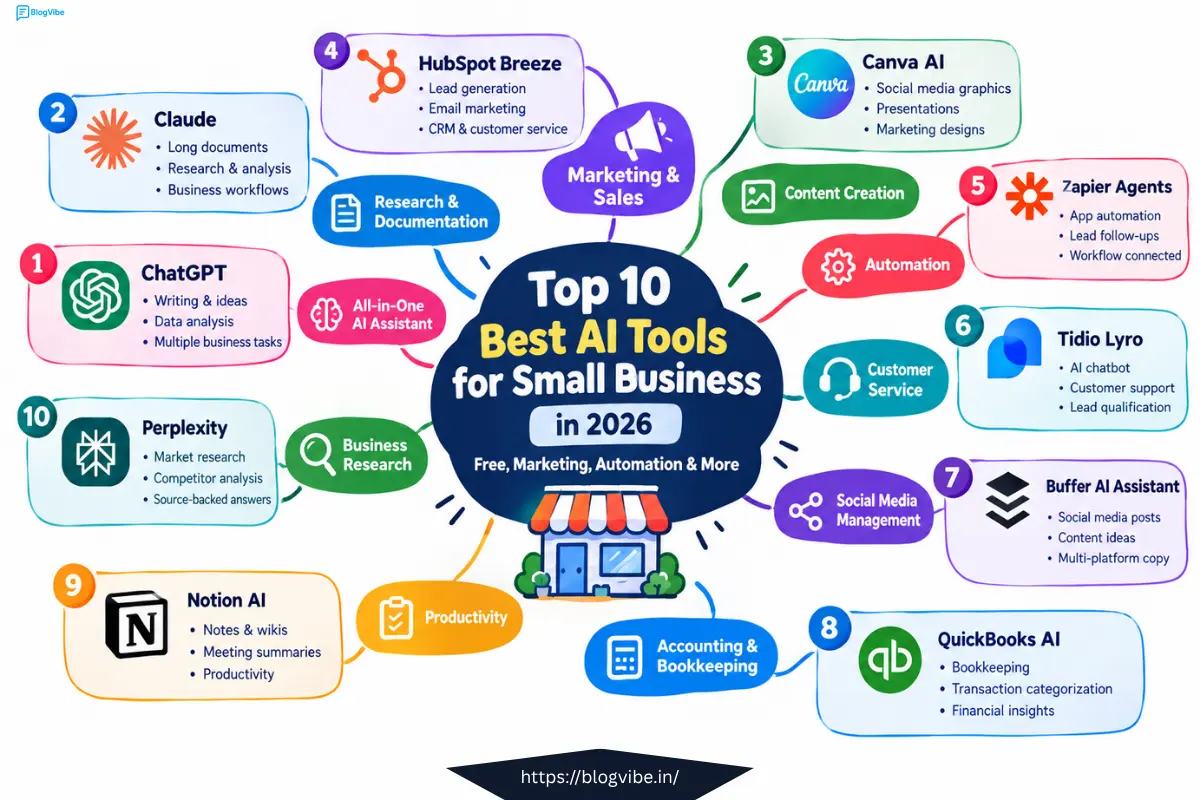
However, with the help of artificial intelligence, you can delegate some of these time-consuming and tedious tasks to a virtual assistant. The key is to prioritize and identify which tools are the most useful and actually help you with your day-to-day operations, and which ones are just a waste of time and money. You do not need to subscribe to a ton of different platforms and try to use their features; a few well-chosen and reliable ones would suffice.
Especially in 2026, many large companies and organizations are going to launch their small business tools and integrations. OpenAI has announced its own program for small businesses that unites various applications and APIs. Anthropic has released Claude for Small Business, an AI assistant equipped with various external app connections, including accounting software QuickBooks and marketing tools like HubSpot or Canva, as well as Google Workspace and Microsoft 365.
Below are ten different artificial intelligence tools that are helpful in solving specific issues faced by small business owners.
Top 10 Best AI Tools for Small Business
| Tool | Best For | Main Use |
| ChatGPT | All-around business work | Writing, research, analysis, planning, automation |
| Claude | Documents & business workflows | Research, writing, connected business tasks |
| Canva AI | Content creation | Graphics, social posts, presentations, images |
| HubSpot Breeze | Marketing & sales | CRM, leads, content, customer service |
| Zapier Agents | Automation | Connecting apps and automating workflows |
| Tidio Lyro | Customer service | AI chatbot and support |
| Buffer AI Assistant | Social media | Content ideas and platform-specific posts |
| QuickBooks AI | Accounting | Bookkeeping, transactions, financial insights |
| Notion AI | Productivity | Notes, knowledge, meetings, research |
| Perplexity | Business research | Market research, competitors, cited information |
1. ChatGPT — Best All-Around AI Tool for Small Business
When a small business owner wants one AI tool that can help with many different tasks, ChatGPT is a logical place to start.
It can help with:
- Writing emails
- Creating blog outlines
- Product descriptions
- Social media ideas
- Customer-response drafts
- Business plans
- Market research
- Data analysis
- Brainstorming
- Creating documents and reports
- Repetitive business workflows
OpenAI‘s current small-business offering includes ChatGPT Business, connected business apps, and workspace agents designed to handle recurring workflows. OpenAI says its workspace agents can perform tasks such as reviewing leads, summarizing support requests, generating reports, and working across connected tools with approval controls.
Example
Instead of spending an hour writing five promotional emails, you could give ChatGPT:
“Create five promotional emails for a local gym targeting people who haven’t visited in 30 days. Keep each email under 120 words.”
You still review the output, but the blank page is gone.
Best for: Solo entrepreneurs, consultants, agencies, ecommerce stores, freelancers and service businesses.
2. Claude — Best for Long Documents and Business Work
Claude is another strong general-purpose AI assistant, particularly useful for documents, research, analysis and structured business tasks.
Anthropic’s Claude for Small Business offering connects Claude with tools including QuickBooks, PayPal, HubSpot, Canva, DocuSign, Google Workspace and Microsoft 365, allowing small businesses to use AI within workflows they already use.
Practical example
Imagine a consulting business has:
- A client proposal
- Meeting notes
- Previous emails
- A spreadsheet
- A project brief
Instead of reading everything manually, you can use AI to summarize the information and create an action plan.
Best use cases
- Proposal writing
- Document analysis
- Meeting summaries
- Research
- Business communication
- Internal knowledge management
Best for: Businesses that work heavily with documents, research and written communication.
3. Canva AI — Best AI Tool for Content Creation
A small business does not always need a professional designer.
Canva’s AI features can help turn basic ideas into marketing assets, social posts, presentations, images and other visual content.
Canva‘s Magic Studio and newer Canva AI tools combine AI-assisted design, writing, image generation, editing and content workflows inside the Canva ecosystem.
You can use Canva AI for:
- Instagram posts
- Facebook graphics
- YouTube thumbnails
- Flyers
- Presentations
- Product images
- Promotional designs
- Blog graphics
- Simple videos
- Branded marketing materials
Example
A local restaurant can create:
One idea → Instagram post → Facebook graphic → promotional flyer → story graphic
instead of creating every design from scratch.
Best for: Small businesses that need professional-looking visuals without hiring a full-time designer.
4. HubSpot Breeze — Best for AI Marketing, Sales and Customer Management
If your biggest problem is getting leads and managing customers, HubSpot Breeze is worth examining.
Breeze is HubSpot’s collection of AI tools for marketing, sales and customer service. It includes AI assistants and agents that can work with CRM information and automate repetitive tasks.
Its sales capabilities include tasks such as researching prospects, identifying buying signals and preparing personalized outreach. Its customer-service tools can also handle routine questions and route support issues.
Example
A software agency receives 50 leads each month.
Instead of manually researching every lead, AI can help:
- Organize the lead
- Analyze available information
- Identify buying signals
- Draft personalized outreach
- Keep CRM information updated
- Prepare follow-ups
That means the sales team spends more time talking to qualified prospects.
Best for: Small businesses that need CRM + marketing + sales + customer service in one ecosystem.
5. Zapier Agents — Best AI Tool for Small Business Automation
Automation becomes powerful when different apps start working together.
Zapier has expanded beyond simple if-this-then-that workflows with Zapier Agents, which let users create AI agents that can perform tasks using connected applications. Zapier says its agents can work with thousands of apps and can perform actions independently or when prompted.
Example automation
A customer fills out a website form.
The workflow could:
New lead → AI reads inquiry → CRM record created → lead categorized → personalized email drafted → salesperson notified
Without automation, someone may need to do several of those steps manually.
Small-business automation ideas
- New lead follow-up
- Email organization
- Customer onboarding
- Invoice notifications
- Appointment workflows
- Data entry
- Weekly reports
- Social content workflows
Best for: Businesses that use multiple software tools and want them to work together.
6. Tidio Lyro — Best AI Chatbot for Small Business
Customer service can consume a surprising amount of time because customers repeatedly ask the same questions.
“What’s the price?”
“When will my order arrive?”
“Do you deliver?”
“What are your opening hours?”
“How do I return this?”
Tidio’s Lyro AI is designed to answer routine customer-service questions using a company’s support information. Tidio currently offers a free way to test Lyro with 50 conversations before moving to higher limits.
Lyro can also support lead qualification and actions such as order updates, depending on the setup.
Example
A small ecommerce store gets customer questions at midnight.
Instead of leaving every visitor waiting until morning, the chatbot can answer routine questions immediately and hand unusual cases to a human.
Best for: Ecommerce stores, service businesses, websites and businesses receiving repetitive customer questions.
7. Buffer AI Assistant — Best AI Tool for Social Media Management
Posting consistently on social media is easy to plan and surprisingly difficult to maintain.
Buffer’s AI Assistant can help with brainstorming, rewriting, shortening, expanding and adapting posts for different social channels. Buffer specifically describes the tool as a social-media-focused AI assistant rather than a general chatbot.
Example
One blog post can become:
- LinkedIn post
- Instagram caption
- Facebook post
- X post
- Short promotional copy
Instead of writing each version manually, AI can create first drafts that you then edit.
Better workflow
Blog article → AI extracts key points → 5 social posts → schedule → review performance
Best for: Small businesses that need consistent social media content without spending hours writing captions.
8. QuickBooks AI — Best AI Accounting and Bookkeeping Tool
Accounting is one area where automation can save time, but accuracy matters more than flashy AI features.
QuickBooks now includes AI-powered accounting capabilities. Intuit’s current tools can help with transaction categorization, financial questions, business insights and other accounting workflows.
QuickBooks says its Accounting AI can provide suggestions around transactions and help automate parts of bookkeeping.
What AI can help with
- Transaction categorization
- Expense organization
- Bank transactions
- Financial questions
- Reports
- Cash-flow insights
- Repetitive bookkeeping tasks
Important
Don’t blindly accept AI-generated accounting decisions.
Financial records are high-stakes business data. Review important transactions and use a qualified accountant for tax, compliance and complex financial decisions.
Best for: Small businesses already using QuickBooks or looking for accounting automation.
9. Notion AI — Best AI Productivity Tool for Small Business
Small businesses accumulate information everywhere:
- Notes
- SOPs
- Meeting records
- Ideas
- Customer feedback
- Project documents
- Content plans
Notion AI brings AI directly into the Notion workspace.
Notion says its AI can search workspace knowledge, work with connected information, generate reports, conduct research and create meeting notes. Free and Plus users can also access a limited amount of AI responses for testing, while broader AI functionality is tied to higher plans.
Example
Imagine you have 300 pages of internal documentation.
Instead of searching through them manually, you can ask:
“What is our process for onboarding a new client?”
AI can find and summarize the relevant information.
Best for: Agencies, startups, consultants, remote teams and businesses with lots of documentation.
10. Perplexity — Best AI Tool for Business Research
Good decisions require good information.
Perplexity is especially useful when you need current research, competitors, market information or source-backed answers.
Perplexity’s business products combine web research, internal files and connected applications, with enterprise features focused on cited information and secure access. Its growing-business offering highlights uses such as competitor research, market research, reporting and recurring business briefs.
Try prompts like:
“Research the top five competitors for my local digital marketing agency.”
“Find three pricing trends in the Indian ecommerce market.”
“Compare customer reviews of these five competitors and identify common complaints.”
The important advantage is that research-oriented AI can help you move from a blank page to a sourced research starting point faster.
Best for: Market research, competitor research, content research and business intelligence.
Free AI Tools for Small Business: Where Should You Start?
You don’t need to pay for 10 tools on day one.
Start with free access or trials where available and validate the workflow before upgrading. Free limits, features and pricing can change, so check the current plan shown by each provider before subscribing.
A simple starting stack could look like this:
| Business Need | Tool to Try |
| General AI | ChatGPT |
| Research | Perplexity |
| Design | Canva |
| Social Media | Buffer |
| Automation | Zapier |
| Customer Support | Tidio |
| CRM & Leads | HubSpot |
| Accounting | QuickBooks |
| Productivity | Notion |
| Long Documents | Claude |
Best AI Tools for Small Business by Use Case
Best AI Marketing Tools for Small Business
For marketing, look at HubSpot Breeze, ChatGPT, Canva and Buffer.
Use them for:
- Content ideas
- Email marketing
- Social posts
- Landing-page copy
- Customer research
- Visual content
- Campaign planning
The trick is to connect your tools into one workflow rather than creating isolated AI-generated content.
Best AI Tools for Small Business Automation
For automation, start with Zapier Agents, then explore AI agents inside platforms you already use.
A simple workflow could be:
Lead form → AI qualification → CRM → follow-up email → sales notification
Automation is most valuable when it removes a repetitive task that happens every day.
Best AI Tools for Customer Service
For customer support, Tidio Lyro and HubSpot Breeze are two useful categories to investigate.
The goal isn’t to eliminate human support.
The goal is to let AI answer repetitive questions while human employees deal with unusual, emotional or complicated cases.
Best AI Tools for Sales and Lead Generation
For sales workflows, HubSpot Breeze + ChatGPT + Zapier can form a useful combination.
For example:
AI research → lead qualification → personalized message → CRM update → follow-up
That can reduce the amount of administrative work surrounding every lead.
Best AI Tools for Content Creation
For content, consider:
ChatGPT + Claude + Canva
Use the AI assistants for research, outlines and copy, then Canva for visual assets.
Don’t publish raw AI output without editing it.
Add:
- Your experience
- Original examples
- Real screenshots
- Customer questions
- Industry-specific insights
- Human editing
That’s what turns generic AI content into useful business content.
AI Agents vs AI Employees: What’s the Difference?
You’ll see the term “AI employee” used more often in 2026.
But an AI employee isn’t literally an employee.
It is better understood as software that can perform a collection of tasks with some degree of autonomy.
An AI agent might:
- Read incoming information
- Decide which workflow to use
- Search connected tools
- Update records
- Draft messages
- Generate reports
- Trigger actions
For example, OpenAI’s workspace agents are designed to run recurring workflows with permissions, approval checkpoints and monitoring. Zapier Agents similarly allow users to create AI agents that interact with connected applications.
So instead of thinking:
“AI will replace my employee.”
Think:
“Which repetitive workflow can AI handle while my employee focuses on customers and decisions?”
That mindset usually leads to a much more practical implementation.
How to Use AI to Grow a Small Business
AI doesn’t automatically grow a business.
It helps you improve the activities that produce growth.
Use this five-step system.
Step 1: Find Your Biggest Time-Waster
Write down everything you do for one week.
Look for repetitive tasks such as:
- Answering the same questions
- Writing similar emails
- Entering data
- Creating social posts
- Researching prospects
- Preparing reports
Step 2: Automate One Workflow
Don’t automate everything at once.
Pick one task that happens frequently.
For example:
New customer inquiry → AI reply draft → human approval → CRM update
Step 3: Measure the Result
Track:
- Hours saved
- Leads generated
- Response time
- Customer inquiries handled
- Cost per task
- Sales opportunities
Step 4: Improve the Workflow
AI output isn’t perfect on the first attempt.
Add better instructions, business information and examples.
Step 5: Scale What Works
Once one workflow works reliably, duplicate the approach for another part of the business.
How Small Businesses Can Save Money With AI
AI can reduce costs in several areas, but savings depend on how the tools are implemented.
1. Reduce repetitive admin work
Automate repetitive emails, data entry and reports.
2. Create more content internally
A business may need fewer outsourced hours for first drafts, social captions and basic marketing assets.
3. Improve customer response time
An AI assistant can answer routine questions outside normal working hours.
4. Reduce software switching
Platforms such as ChatGPT, HubSpot, Canva and Perplexity increasingly combine multiple AI capabilities in one ecosystem.
5. Make better use of existing employees
Instead of asking employees to spend hours on repetitive work, give them AI-assisted workflows and let them focus on tasks requiring judgment and customer relationships.
A Simple AI Stack for a Small Business on a Budget
You don’t need a complicated AI infrastructure.
Start with this:
ChatGPT → thinking & writing
↓
Canva → visuals
↓
Buffer → social distribution
↓
Zapier → automation
↓
Tidio → customer support
↓
HubSpot → leads & CRM
↓
QuickBooks → accounting
This creates a basic AI-powered operating system for a small business without requiring a large technical team.
Common Mistakes Small Businesses Make With AI
Using too many tools
Ten subscriptions don’t automatically create a better business.
Publishing unedited AI content
AI should accelerate your work, not replace your judgment.
Automating sensitive decisions
Financial, legal, HR and customer issues may require human review.
Ignoring customer experience
A chatbot that gives wrong answers can create more problems than it solves.
Measuring tool usage instead of business results
“How many AI prompts did we use?” isn’t a useful business KPI.
Instead ask:
Did we save time?
Did we serve customers faster?
Did we generate more qualified leads?
Did we reduce operating costs?
Frequently Asked Questions
What are the best AI tools for small businesses in 2026?
The most useful options depend on the job. ChatGPT and Claude are broad AI assistants, Canva focuses on content and design, HubSpot Breeze on marketing/sales/service, Zapier Agents on automation, Tidio Lyro on customer support, QuickBooks AI on accounting, Notion AI on productivity, Buffer on social media, and Perplexity on research.
What are the best free AI tools for small businesses?
Good starting points include free or limited-access versions of tools such as ChatGPT, Claude, Canva, Buffer, Perplexity, Notion and other platforms. Free limits change frequently, so check each provider’s current plan before choosing a tool.
What is the best AI tool for small business automation?
Zapier Agents is designed specifically around AI-powered automation across connected applications. ChatGPT and HubSpot also provide agentic workflow capabilities for specific business tasks.
What are the best AI chatbots for small businesses?
Tidio Lyro is designed for automated customer-service conversations, while HubSpot Breeze provides AI customer-service capabilities within a broader CRM platform.
Can AI help a small business generate more leads?
Yes. AI can help with prospect research, lead qualification, personalized outreach, content creation and follow-up. HubSpot’s Breeze platform, for example, includes AI features for identifying buying signals and assisting with prospecting workflows.
Can small businesses use AI for bookkeeping?
Yes. Modern accounting platforms increasingly include AI-assisted categorization, transaction processing and financial insights. QuickBooks’ current Accounting AI and Intuit Intelligence products are designed to automate parts of these workflows.
Are AI agents the same as AI employees?
No. “AI employee” is usually a business-friendly way of describing software that can perform multiple tasks or workflows. AI agents are software systems that can use instructions, connected data and tools to complete defined work. Human oversight is still important, especially for sensitive decisions.
Final Thoughts: Start Small, Then Scale
The biggest mistake is thinking you need to become an “AI-first company” overnight.
You don’t.
Start with one annoying task.
Automate it.
Measure the result.
Then move to the next task.
For one business, the biggest opportunity might be customer support. For another, it could be bookkeeping. For an ecommerce store, it could be content creation and lead follow-up.
The best AI setup is not the one with the most tools.
It is the one that removes the most unnecessary work while helping your business serve customers better.
Start with one workflow this week, measure the result, and build your AI stack from there.
READ MORE:
WayinVideo YouTube Thumbnail Maker: Create AI Thumbnails for Free 2026

