
Imagine waking up to find that your emails have been organized, leads have been added to your CRM, reports have been prepared, and repetitive tasks have been completed automatically. That is the power of AI automation.
The good news? You don’t need to be a programmer or spend hundreds of dollars to get started. The best AI automation tools can connect your favorite apps, automate business workflows, build AI agents, and help you save hours of manual work.
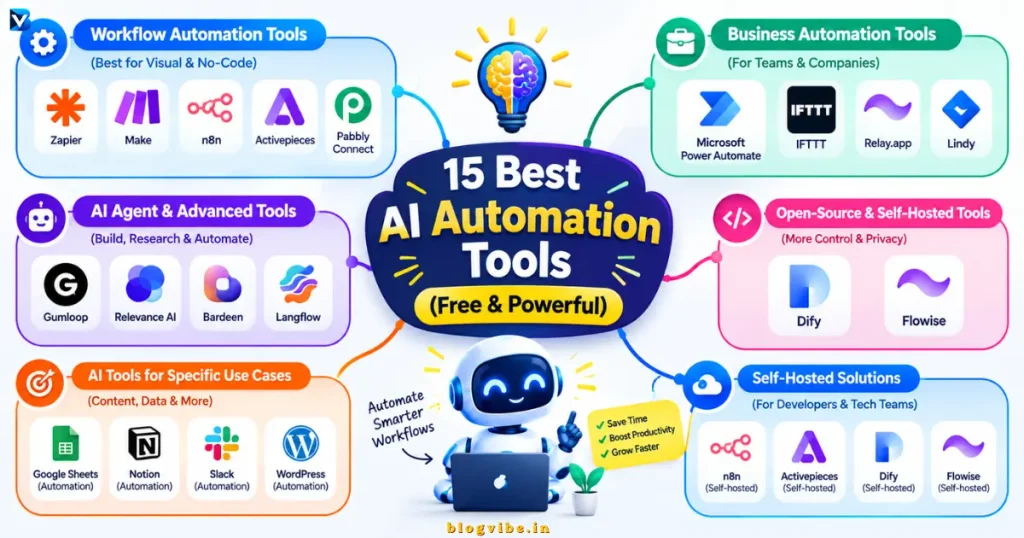
In this guide, we’ll explore the 15 best AI automation tools in 2026, including free plans, open-source alternatives, no-code workflow builders, and advanced AI agent platforms. You’ll also learn which tool is best for beginners, developers, small businesses, and content creators.
Quick Comparison: Best AI Automation Tools in 2026
| Tool | Best For | Free Access |
| Zapier | Connecting business apps | Limited free plan |
| Make | Visual workflow automation | Free plan |
| n8n | Advanced workflows and self-hosting | Free self-hosted edition |
| Activepieces | Open-source automation | Free plan and community edition |
| Microsoft Power Automate | Microsoft 365 and desktop tasks | Limited free access and trial |
| IFTTT | Personal and smart-home automation | Limited free plan |
| Relay.app | AI workflows with human approval | Free plan available; check current limits |
| Gumloop | AI-powered workflow building | Free trial; paid plans available |
| Relevance AI | AI agents and digital workforces | Limited free plan |
| Lindy | Personal AI assistants | Free introductory credits |
| Bardeen | Browser automation and lead research | Limited free credits |
| Pabbly Connect | Business app integrations | Check current plans and offers |
| Dify | Building AI applications and agents | Free cloud sandbox and self-hosted community edition |
| Flowise | Visual LLM workflows | Open-source, self-hostable |
| Langflow | Visual AI agent development | Free getting-started options |
Free-plan availability and limits can change. AI model usage, API calls, hosting, or premium integrations may incur separate costs. Check each vendor’s official pricing page before committing.
What Are AI Automation Tools?
AI automation tools are software platforms that combine automation with artificial intelligence to reduce repetitive work.
Traditional automation typically follows predefined rules. For example, when someone submits a contact form, the system sends an email.
AI-powered automation can also interpret information, classify messages, summarize documents, extract data, and decide which workflow should run next within configured limits.
Common examples include:
- Automatically sorting and summarizing emails.
- Turning incoming leads into organized CRM records.
- Extracting information from invoices and PDFs.
- Creating draft blog posts from research notes.
- Building customer support assistants.
- Sending notifications when important events occur.
- Connecting AI models to Google Sheets, WordPress, Slack, or other apps.
The most useful tool depends on what you want to automate, how much control you need, and your budget.
15 Best AI Automation Tools (Free & Powerful)
1. Zapier — Best AI Automation Tool for Beginners
Best for: Beginners, marketers, freelancers, and small businesses.
Zapier connects different apps through automated workflows called Zaps. You can use it to move information between applications, trigger actions, and incorporate AI into repetitive processes.
For example, imagine a customer submits a form on your website. Zapier can send the information to a spreadsheet, notify your team, and start a follow-up process.
Key features:
- No-code workflow building.
- Extensive app integrations.
- AI-assisted workflow creation.
- Triggers and actions for business processes.
- Connections to AI services and agents.
Free plan: Zapier’s official free-plan documentation currently lists 100 tasks per month and two-step Zaps, meaning one trigger followed by one action. Check the official free-plan details.
Pros: Easy to learn, broad app ecosystem, and useful templates.
Cons: Task limits can become restrictive for complex or high-volume workflows.
Verdict: Choose Zapier if you want to automate tasks quickly without learning technical workflow systems.
2. Make — Best for Visual AI Workflow Automation
Best for: Marketers, operations teams, and users building multi-step workflows.
Make uses a visual canvas where you connect modules to design automated processes. Routers, filters, and conditional paths make it useful for workflows with several possible outcomes.
For example, you could create a workflow that receives a lead, uses an AI model to classify the inquiry, stores the data, and sends it to the appropriate team.
Key features:
- Visual, no-code workflow builder.
- Conditional logic and routers.
- Connections to thousands of apps.
- AI integrations and workflow capabilities.
- Scheduling and data processing.
Free plan: Make lists 1,000 credits per month on its free plan. Each module action generally consumes a credit, and some advanced AI functionality may use more. Its AI Agents feature is available on paid plans according to the official Make pricing page and AI Agents documentation.
Pros: Excellent visual control and flexible branching.
Cons: Large scenarios can become difficult to maintain, and credits can be consumed faster than expected.
Verdict: Make is an excellent option when your workflows have multiple steps and conditions.
3. n8n — Best for Advanced AI Automation and Self-Hosting
Best for: Developers, technical marketers, automation engineers, and privacy-conscious users.
n8n is a workflow automation platform that combines visual workflow building with custom code, API connections, and AI capabilities.
You can build workflows that connect webhooks, databases, AI models, email services, and business applications.
For example, you can build an AI research workflow that collects information, summarizes the results, creates a draft, and saves it for editorial review.
Key features:
- Visual, node-based workflows.
- AI agents and AI integrations.
- API and webhook support.
- JavaScript and custom logic.
- Self-hosting for greater infrastructure control.
Free access: n8n offers a free, self-hosted Community Edition. Its hosted cloud plans are separate paid offerings after the trial. Importantly, n8n describes its licensing as fair-code/source-available rather than OSI-approved open-source software. See the official pricing page and license information.
Pros: Flexible workflows, strong technical control, and self-hosting options.
Cons: Self-hosting requires server maintenance, and advanced workflows take time to learn.
Verdict: n8n is one of the strongest choices for anyone who wants to build customized AI agents and automation systems.
4. Activepieces — Best Open-Source Alternative for No-Code Automation
Best for: Beginners, developers, and teams looking for an alternative to commercial automation platforms.
Activepieces provides visual automation flows and AI-focused capabilities. Its community edition is available under the MIT license, while its hosted service offers plans with usage limits.
You can use it to connect applications, run automated processes, and create AI-powered workflows without building everything from scratch.
Key features:
- Visual workflow builder.
- AI flows and agent capabilities.
- API and MCP support.
- Extensible integrations.
- Self-hosting options.
Free access: Activepieces lists a cloud free plan with 100 credits per day and unlimited flows. Its official pricing page explains the current plan limits.
Pros: Flexible, developer-friendly, and suitable for self-hosted deployments.
Cons: You may need technical knowledge to manage a production self-hosted setup.
Verdict: Choose Activepieces if you value an open-source community edition and want to control your automation environment.
5. Microsoft Power Automate — Best for Office and Desktop Automation
Best for: Businesses that use Microsoft 365, Excel, Outlook, SharePoint, and Windows applications.
Microsoft Power Automate helps users automate cloud workflows and desktop tasks. It is particularly useful for business processes involving Microsoft applications.
For example, you could automate approval notifications, process spreadsheet data, or move files between services.
Key features:
- Cloud-based workflows.
- Desktop automation and robotic process automation.
- Approval processes.
- Integration with Microsoft services.
- AI capabilities through eligible features and licensing.
Free access: Microsoft documents basic free capabilities for eligible work or school accounts, plus a 90-day trial for premium functionality. Connector and feature restrictions apply. Check Power Automate licensing.
Pros: Strong fit for Microsoft-based organizations and desktop processes.
Cons: Licensing and premium connector requirements can be confusing.
Verdict: Start with Power Automate if much of your daily work already happens in Microsoft applications.
6. IFTTT — Best for Simple Personal Automation
Best for: Individuals, creators, and smart-home users.
IFTTT connects online services and connected devices using simple rules called Applets.
You could use it to synchronize supported services, trigger personal notifications, or automate simple tasks involving your devices and accounts.
Key features:
- No-code Applets.
- App and device connections.
- Simple trigger-action automation.
- Personal productivity and smart-home use cases.
Free access: IFTTT offers a limited free tier. The number of available Applets, execution options, and advanced features depends on the current plan. Check IFTTT plans.
Pros: Very approachable for simple tasks.
Cons: Less suitable for complex business workflows and advanced multi-step AI systems.
Verdict: IFTTT works well when your goal is simple everyday automation rather than building a sophisticated AI agent.
7. Relay.app — Best for AI Workflows with Human Approval
Best for: Small teams and businesses that want AI assistance without giving every task unrestricted autonomy.
Relay.app combines workflow automation with AI steps and human-in-the-loop processes.
For example, an AI workflow could draft a customer email, pause for a human to review it, and proceed only after approval.
Key features:
- Visual workflow creation.
- AI-assisted steps.
- Human review and approval.
- Multi-step business processes.
- Integrations with common work applications.
Free access: A free plan has been listed for Relay.app; check the current official website for availability and limits.
Pros: Human review can reduce the risk of incorrect or inappropriate external actions.
Cons: Available features and usage limits depend on the selected plan.
Verdict: Consider Relay.app for workflows where you want a balance between AI speed and human control.
8. Gumloop — Best for AI-First Workflow Building
Best for: Marketing teams, analysts, and businesses building AI-powered data workflows.
Gumloop focuses on building AI agents and workflows that work with business data and connected tools.
Possible use cases include competitor research, lead qualification, content workflows, and analyzing large amounts of information.
Key features:
- Visual workflow and agent building.
- AI-powered data processing.
- Connections to different models and tools.
- Reusable workflows.
- Business-oriented automation use cases.
Free access: Gumloop provides a 14-day free trial and lists its Pro plan from $37 per month on its official pricing page. Trial terms and prices can change.
Pros: Designed around AI-driven processes rather than only simple app connections.
Cons: Credit consumption and paid-plan costs need to be considered before running workflows at scale.
Verdict: Gumloop is worth exploring if your primary goal is AI-driven research, classification, or data processing.
9. Relevance AI — Best for Building AI Agents for Business
Best for: Sales teams, operations teams, researchers, and businesses experimenting with AI agents.
Relevance AI lets users build AI agents and combine tools into workflows that handle different tasks.
For example, a sales research agent could gather company information, summarize relevant details, and prepare a lead brief for a sales representative.
Key features:
- Low-code and no-code agent creation.
- Workflow and tool building.
- Business app integrations.
- Knowledge sources and contextual information.
- Human oversight and approval workflows.
Free access: Relevance AI offers a limited free plan. Its official pricing page lists usage allowances and vendor-credit details.
Pros: Useful for business workflows that require several AI-assisted steps.
Cons: Agent actions and underlying AI model costs can add up as usage grows.
Verdict: Try Relevance AI when you need more than a basic trigger-and-action workflow.
10. Lindy — Best for Personal AI Assistants
Best for: Professionals who want help with email, meeting preparation, follow-ups, and routine knowledge work.
Lindy provides AI assistants that can help perform everyday tasks across connected tools.
For example, an assistant could prepare a meeting brief, summarize relevant messages, or draft a follow-up for your review.
Key features:
- AI assistant and agent workflows.
- Email and meeting-related tasks.
- Connected tools and integrations.
- Configurable automation.
- Human approval for actions with external impact.
Free access: Lindy’s official pricing page currently advertises $50 in introductory credits without a credit card. These credits last seven days; its listed Team plan starts at $49.99 per month. See Lindy pricing.
Pros: Convenient for automating individual knowledge-work tasks.
Cons: Credits have limits, and ongoing usage may require a paid plan.
Verdict: Lindy is useful when you want an assistant to handle repeatable tasks rather than manually build every workflow from scratch.
11. Bardeen — Best for Browser Automation and Lead Research
Best for: Sales professionals, recruiters, marketers, and researchers.
Bardeen focuses on browser-based automation, data collection, research, and lead-related workflows.
For example, you could collect information from supported web pages, enrich a lead list, and organize the results in a spreadsheet.
Key features:
- Browser automation.
- Data collection and extraction.
- Lead sourcing and enrichment.
- AI-powered tasks.
- Connections to productivity and business tools.
Free access: Bardeen provides limited free credits, with additional capabilities available on paid plans. See Bardeen pricing.
Pros: Helpful for repetitive browser and research activities.
Cons: Credit usage, supported websites, and access restrictions can affect particular workflows.
Verdict: Choose Bardeen when your repetitive work mainly happens inside a browser.
12. Pabbly Connect — Best for Budget-Conscious Business Integrations
Best for: Small businesses, freelancers, and creators connecting business applications.
Pabbly Connect is an app-to-app automation platform for building workflows between supported services.
For example, a new order could trigger a record in your spreadsheet, an internal notification, and a follow-up task.
Key features:
- Trigger-action workflows.
- App integrations.
- Multi-step automation.
- Data movement between services.
- Connections to AI services through supported integrations.
Free access: Check Pabbly’s current plans and offers before choosing it. Do not assume every workflow, integration, or usage allowance is free.
Pros: Worth comparing for business-focused app connections and straightforward workflows.
Cons: Verify task allowances, integration availability, and the total cost for your expected usage.
Verdict: Add Pabbly Connect to your shortlist if your main requirement is connecting business applications economically.
13. Dify — Best for Building AI Applications and Agents
Best for: Developers, technical founders, and teams creating AI-powered applications.
Dify helps users build AI applications, knowledge-based assistants, and workflows that combine language models with tools and data.
For example, a business could build a document question-answering assistant that retrieves information from an approved knowledge base.
Key features:
- Visual AI workflow creation.
- AI application development.
- Knowledge-base integration.
- Model integrations and API access.
- Self-hosted community edition.
Free access: Dify offers a free cloud Sandbox with limited resources. Its Community edition is available for self-hosted deployments under its applicable open-source license. See Dify pricing.
Pros: Suitable for building AI applications beyond basic business automation.
Cons: Knowledge-base setup, model selection, and deployment can require technical knowledge.
Verdict: Choose Dify when your goal is to create an AI-powered product, assistant, or knowledge application.
14. Flowise — Best for Visual LLM Workflow Development
Best for: Developers, AI enthusiasts, and users who want to build conversational AI systems visually.
Flowise is an open-source generative AI development platform for building AI agents and large language model workflows.
You can assemble components visually, connect models and data sources, and create assistants or agent-based systems.
Key features:
- Visual AI builders.
- AI agent and LLM workflows.
- Retrieval-augmented generation (RAG).
- API and chatbot deployment options.
- Human-in-the-loop capabilities.
Free access: Flowise can be self-hosted as open-source software. Hosting and external AI model usage may still cost money. Review the official documentation before deployment.
Pros: Flexible for experimenting with AI application architecture.
Cons: It is more focused on building LLM applications than on connecting every ordinary business app.
Verdict: Flowise is a strong option when you want to understand and build the internal structure of AI workflows.
15. Langflow — Best for Visual AI Agent Development
Best for: AI developers, researchers, and technical teams.
Langflow provides a visual way to build and deploy AI agents and MCP servers. Its components connect models, data sources, and tools into reusable workflows.
For example, you can prototype an assistant that retrieves relevant documents, sends information to a language model, and exposes the resulting workflow through an API.
Key features:
- Visual workflow building.
- AI agents and reusable components.
- Model and data-source connections.
- Python customization.
- API-based deployment options.
Free access: Langflow provides free getting-started options and supports self-deployment. The cost of hosting and external model services depends on your setup. Visit the official website for current details.
Pros: Flexible for technical users building custom AI applications.
Cons: Less beginner-friendly than simple tools such as Zapier or IFTTT.
Verdict: Choose Langflow if you want to visually develop and customize AI agents.
Which AI Automation Tool Should You Choose?
The best choice depends on your experience and what you want to accomplish.
| Your Requirement | Recommended Tool |
| Start with simple automations | Zapier |
| Create complex visual workflows | Make |
| Build customizable AI agents | n8n |
| Prefer a self-hosted, open-source option | Activepieces |
| Automate Microsoft 365 and desktop tasks | Power Automate |
| Automate smart-home tasks | IFTTT |
| Build AI agents for business teams | Relevance AI |
| Automate email and personal tasks | Lindy |
| Automate browser research | Bardeen |
| Create AI applications | Dify or Flowise |
| Develop custom visual AI agents | Langflow |
5 Practical AI Automation Examples You Can Try
You don’t need to automate your entire business on day one. Begin with one repetitive task and expand after it works reliably.
1. Automate Email and Lead Management
Workflow: Form submission → AI categorization → Spreadsheet or CRM → Notification.
Use Zapier, Make, n8n, or Activepieces to connect the tools involved.
2. Automate Blog Content Preparation
Workflow: Topic list → Research collection → AI-generated outline → Draft document → Editorial review.
An automation can prepare a draft, but the finished article should still receive fact-checking, editing, and originality review before publication.
3. Create an AI Customer Support Assistant
Workflow: Customer question → Knowledge-base lookup → AI-generated response → Human review when needed.
Dify and Flowise are worth evaluating for the AI application, while a broader workflow tool can connect the assistant to other business systems.
4. Automate Repetitive Spreadsheet Tasks
Workflow: New spreadsheet row → Data validation → AI classification, where useful → Notification or report.
Make, Zapier, n8n, and Microsoft Power Automate may suit different versions of this workflow.
5. Automate Lead Research
Workflow: Lead list → Data enrichment → AI summary → CRM update → Sales review.
Bardeen and Relevance AI are options to investigate for research and agent-based processing.
Practical tip: Always test the workflow with sample data before allowing it to send emails, modify customer records, publish content, or perform other consequential actions automatically.
How to Choose the Best Free AI Automation Tool
Before signing up, ask five questions.
- What do you need to automate? A simple two-app connection has different requirements from an AI agent that searches documents and chooses actions.
- How much usage do you expect? Estimate daily tasks, monthly executions, workflow steps, or credits.
- Do you need AI agents or traditional automation? Use a general workflow tool for predictable steps and an AI agent when flexible interpretation or decision-making is required.
- Do you need self-hosting? Self-hosting can improve control over infrastructure and data, but it also adds maintenance and security responsibilities.
- What will the total cost be? Consider subscription fees, AI model usage, API costs, server hosting, and premium integrations.
Remember that a free workflow platform does not necessarily make every AI operation free. If a workflow calls an external model API, that provider may charge separately.
Conclusion: Start Automating with the Right AI Tool
The best AI automation tool is not necessarily the one with the most features. It is the one that solves your specific problem reliably without adding unnecessary complexity or expense.
Start with Zapier for easy integrations, Make for visual workflows, or n8n for advanced customization and self-hosting. Explore Activepieces if you prefer a community-driven open-source option, and consider Dify, Flowise, or Langflow when your goal is to develop AI applications and agents.
Ready to explore more practical automation tutorials? Visit BlogVibe.in and continue with our guides to self-hosting n8n and n8n vs Make.com pricing.
Choose one repetitive task, build your first workflow, test it carefully, and expand from there.
Frequently Asked Questions
1. What are the best free AI automation tools in 2026?
Good options include Make, Zapier, Activepieces, and IFTTT for general automation, along with the self-hosted versions of n8n, Dify, and Flowise. The best choice depends on free-plan limits, technical skills, and whether you need ordinary workflows or AI agents.
2. Which AI automation tool is best for beginners?
Zapier is a strong starting point for connecting popular applications without coding. Make is another good choice when you want to see and control a workflow visually.
3. What are the best no-code AI automation tools for small businesses?
Zapier, Make, Activepieces, and selected AI-agent platforms are worth comparing. Evaluate the applications you already use, monthly automation volume, available integrations, and whether human approval is needed.
4. Which AI automation tools are open source?
Activepieces has an MIT-licensed community edition, while Dify, Flowise, and Langflow provide open-source options under their respective licenses. n8n is self-hostable and source-available under a fair-code license, but it is not OSI-approved open-source software.
5. Can I automate my WordPress blog with AI?
Yes. You can connect research, document creation, editorial notifications, and WordPress-related tasks using tools such as n8n, Zapier, or Make. Review AI-generated content before publishing and protect your WordPress credentials and publishing permissions.