
n8n vs Make.com:
Trying to choose between n8n and Make.com? The wrong automation tool can quietly increase your monthly costs as your business grows. The right choice depends on how often your workflows run, how many steps they contain, and whether you’re willing to manage your own server.
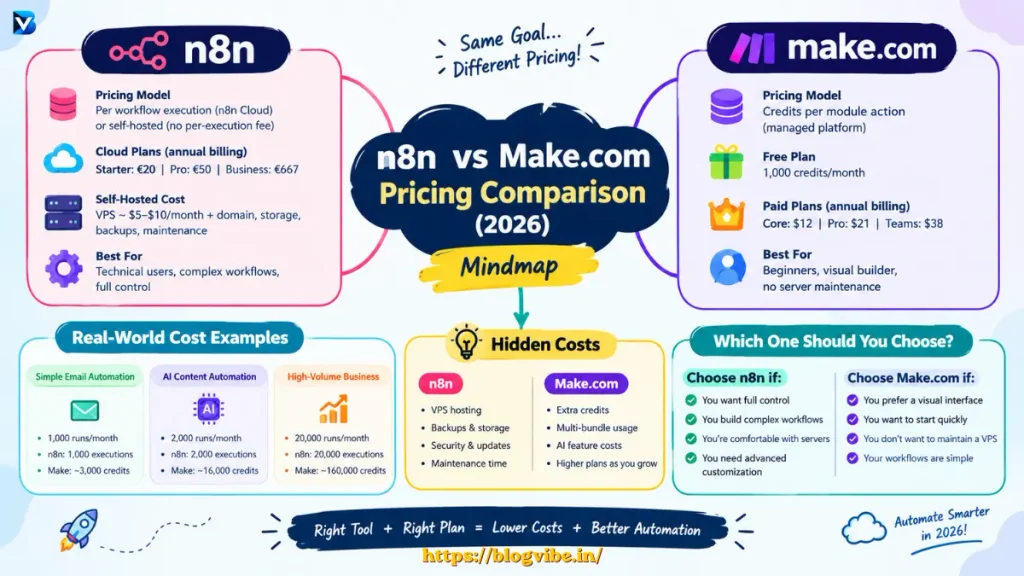
In this guide, we’ll compare n8n vs Make.com pricing, examine real-world automation scenarios, explain hidden costs, and help you choose the most cost-effective option for your needs in 2026.
n8n vs Make.com: Quick Comparison
n8n and Make.com both automate tasks between apps, APIs, databases, and AI services. Their biggest pricing difference is how they measure usage.
| Feature | n8n | Make.com |
| Cloud billing model | Workflow executions | Credits consumed |
| Self-hosting | Yes | No equivalent self-hosted platform |
| Free option | Self-hosted Community Edition | Free cloud plan |
| Complex workflows | Multiple nodes count within one execution | Each module action generally consumes credits |
| Server maintenance | Required when self-hosting | Managed by Make |
| Best for | Technical users and complex workflows | Beginners and visual automation |
| Main cost concern | Hosting and maintenance | Credit consumption |
Official references: n8n pricing and Make pricing.
1. n8n Pricing in 2026
n8n offers hosted cloud plans and a self-hosted Community Edition. Your total cost depends on which option you choose.
n8n Cloud Pricing
The official pricing page lists these annual-billing examples:
| Plan | Published price | Included executions |
| Starter | €20/month | 2,500/month |
| Pro | €50/month | 10,000/month |
| Business | €667/month | 40,000/month |
Business is a self-hosted offering rather than a standard n8n Cloud plan. Prices and available billing options can change, so check the official n8n pricing page before purchasing.
The main advantage is that n8n Cloud counts a complete workflow execution, regardless of how many nodes the workflow contains.
For example, a workflow that receives a form submission, validates the data, calls an API, uses an AI model, and saves the result can count as one workflow execution when it runs once.
This can be cost-effective when individual workflows contain many steps.
n8n Self-Hosted Cost
Self-hosting means running n8n on your own VPS or server instead of paying for n8n Cloud.
Your potential costs include:
- VPS hosting.
- Domain name, if required.
- Backups and storage.
- Server security and software updates.
- Your time spent troubleshooting and maintaining workflows.
A small VPS might cost approximately 5–10 per month, depending on the provider and configuration. This is an illustrative hosting estimate, not a guaranteed price or a complete production budget.
Important: The Community Edition does not charge a per-execution subscription fee, but your server has finite CPU, memory, storage, and throughput. You are responsible for keeping it running reliably.
2. Make.com Pricing in 2026
Make.com uses a visual scenario builder that connects applications through modules. Its billing model is based on credits rather than complete workflow executions.
The official Make pricing page currently displays these annual-billing examples for 10,000 monthly credits:
| Plan | Published price | Monthly credits |
| Free | $0 | 1,000 |
| Core | $12/month | 10,000 |
| Pro | $21/month | 10,000 |
| Teams | $38/month | 10,000 |
| Enterprise | Custom | Depends on agreement |
These are published examples, not a guarantee that every account or region will see identical prices.
How Make.com Credits Work
In Make.com, each module action generally consumes a credit. For example, a scenario could:
- Watch for a new Google Sheets row.
- Retrieve additional information.
- Process the information.
- Send an email.
- Save the result to another application.
If those are five credit-consuming module actions, one successful pass may consume approximately five credits. Actual consumption depends on the modules, bundles processed, and any special AI features.
For 1,000 runs of that five-action scenario, you could use approximately 5,000 credits.
This is why the number of workflow steps matters when estimating Make.com costs.
Check the official Make credits guide for exceptions and AI-related usage.
3. n8n vs Make.com: Real-World Cost Comparison
Let’s compare three typical automation workloads.
These examples illustrate the billing difference rather than claiming that either tool will always be cheaper.
Scenario A: Simple Email Automation
Imagine you want to send an email whenever a new form submission arrives.
Assume:
- 1,000 submissions per month.
- Three credit-consuming actions per submission in Make.
- One n8n workflow execution per submission.
Estimated usage:
| Metric | n8n | Make.com |
| Monthly runs | 1,000 | 1,000 |
| Metered usage | 1,000 executions | About 3,000 credits |
| Self-hosting option | Yes | No |
| Main consideration | Server or cloud plan | Available credits |
Both could fit comfortably within an appropriate entry-level plan. If you only need a few straightforward automations, convenience may matter more than small differences in subscription cost.
Scenario B: AI Content Automation
Suppose your workflow generates a blog outline, creates a draft, saves it to WordPress, and sends a notification.
Assume:
- 2,000 runs per month.
- Eight credit-consuming module actions per run in Make.
- One n8n execution per run.
Estimated usage:
| Metric | n8n | Make.com |
| Monthly runs | 2,000 | 2,000 |
| Metered usage | 2,000 executions | About 16,000 credits |
| Additional costs | Hosting or cloud subscription; AI usage | Subscription; AI usage |
| Key consideration | Execution allowance | Credit allowance |
The Make example exceeds the 10,000-credit allowance shown in the Core pricing example. You would need to select an appropriate credit allowance or adjust the workflow.
For both tools, external AI API charges may be separate from automation-platform costs. Some built-in AI features use their own platform-specific credit rules.
Scenario C: High-Volume Business Automation
Now imagine a business running 20,000 workflow runs per month, with eight credit-consuming actions per Make run.
Estimated monthly usage:
- n8n: 20,000 workflow executions.
- Make.com: Approximately 160,000 credits.
At this scale, the pricing unit becomes especially important. A workflow with many steps may consume credits much faster on Make than the number of complete executions suggests.
However, n8n Cloud would also need an execution allowance suitable for 20,000 runs. Self-hosted n8n may reduce subscription costs, but server capacity, backups, monitoring, and maintenance become more important.
Do not compare the cost of a $5 VPS with a managed subscription without considering the extra time and reliability responsibilities involved.
4. Is n8n Cheaper Than Make.com?
Sometimes, yes—but not in every situation.
n8n can be particularly economical when you have many workflow steps, high execution volume, and the technical ability to self-host it.
Make.com can be a better value when you want managed infrastructure, visual workflow building, and simple integrations without maintaining a server.
Consider these situations:
Choose n8n if:
You want control over your automation infrastructure.
You build complex workflows with many nodes.
You are comfortable with Docker, APIs, and server administration.
You expect high usage and can manage the server efficiently.
You need advanced customization.
Choose Make.com if:
You prefer a visual, no-code interface.
You want to start automating quickly.
You don’t want to maintain a VPS.
Your workflows are relatively simple.
You value a managed platform over infrastructure control.
The cheapest subscription is not necessarily the cheapest solution over the long term. Your time, reliability requirements, and the cost of downtime also matter.
5. Hidden Costs You Should Consider
Hidden Costs of n8n
Self-hosted n8n can have a low cash cost, but it is not completely maintenance-free.
Potential expenses include:
- VPS upgrades as workloads grow.
- Database and backup storage.
- Monitoring and security.
- Recovery from failed deployments.
- Time spent fixing broken integrations.
For production workloads, choose a server based on expected demand rather than assuming that any low-cost VPS will be sufficient.
Hidden Costs of Make.com
Make.com is easier to operate because the platform is managed, but usage can grow faster than expected.
Potential expenses include:
Additional credits for multi-step scenarios.
Extra usage when a scenario processes multiple bundles.
Higher credit consumption for certain AI features.
Larger credit allowances as automation volume increases.
To control costs, remove unnecessary module actions, avoid repeatedly processing unchanged data, and inspect execution histories to identify wasted credits.
6. How to Calculate Your Real Automation Cost
Before selecting a plan, estimate your workload.
For Make.com:
Estimated monthly credits = Monthly runs × Average credits consumed per run
For example:
2,000 runs × 6 credits = 12,000 credits per month.
For n8n Cloud:
Estimated monthly executions = Number of complete workflow runs
For example:
2,000 runs of one workflow = approximately 2,000 executions, assuming each run starts and completes once.
For self-hosted n8n, add your monthly hosting, backup, and other infrastructure expenses. You should also account for the value of the time you spend maintaining the server.
These calculations are estimates. Retries, multiple triggers, branching, data bundles, and AI features can change the final amount.
7. Which Automation Tool Should You Choose in 2026?
There is no universal winner in the n8n vs Make.com comparison.
| Your priority | Suggested option |
| Lowest possible software subscription | Self-hosted n8n |
| Managed, beginner-friendly automation | Make.com |
| Complex, customizable workflows | n8n |
| Minimal server maintenance | Make.com or n8n Cloud |
| High-volume workflows with many steps | Evaluate n8n self-hosting |
| Fast setup without server administration | Make.com |
If you are comfortable managing a server, n8n self-hosting deserves serious consideration. If you want to focus on building automations instead of maintaining infrastructure, Make.com may be worth the extra usage-based cost.
Compare your own expected workflow runs and credit consumption before committing to an annual plan.
Conclusion: n8n vs Make.com Pricing
The real difference between n8n and Make.com is not simply the monthly subscription price. It is how each platform charges for your work.
Make.com generally charges based on credits consumed by scenario actions. n8n Cloud charges based on complete workflow executions, while self-hosted n8n shifts the main costs toward infrastructure and maintenance.
For technical users handling complex or high-volume automation, self-hosted n8n can be an attractive cost-saving option. For beginners and teams that value convenience, Make.com offers a managed visual automation experience.
Want to make a smarter automation decision? Visit BlogVibe.in for more practical tutorials on workflow automation, self-hosting, Docker, and AI tools.
Frequently Asked Questions
1. Is n8n cheaper than Make.com in 2026?
It can be, especially when you self-host n8n and run many multi-step workflows. However, your final costs depend on hosting, maintenance, credit consumption, and workflow volume.
2. What is the difference between n8n and Make.com pricing?
n8n Cloud counts complete workflow executions, regardless of the number of steps. Make.com generally consumes credits for individual module actions, with some AI features using different credit rules.
3. How much does self-hosted n8n cost per month?
The software’s Community Edition is available without a per-execution subscription charge. You still need to budget for hosting, backups, infrastructure, and maintenance. A small VPS might cost around 5–10 monthly, but production requirements can increase that amount.
4. Is Make.com free to use?
Yes. Make.com offers a free plan with 1,000 credits per month according to its published pricing page. Usage limits and included features should be checked before building a business-critical workflow.
5. Which is better for AI automation: n8n or Make.com?
n8n is attractive for technical users who want customization and control over AI workflows. Make.com is useful for people who prefer visual configuration and managed infrastructure. AI model charges and platform-specific credit rules should be included in your budget.
6. Does n8n charge for every node in a workflow?
No. n8n Cloud counts a complete workflow execution rather than charging separately for every node. Other costs, such as external API usage and hosting, may still apply.
7. Which is better for beginners: n8n or Make.com?
Make.com is often easier for beginners because of its visual interface and managed environment. n8n can also be used by beginners, but self-hosting and advanced customization may require additional technical knowledge.
READ MORE:
Setting Up n8n on Hetzner VPS for Under $5? (Pricing and Setup Guide)