
Introduction
Can you tell whether a voice is real or AI-generated just by listening to it?
In 2026, that is becoming increasingly difficult. Modern AI voice generators can create realistic speech with natural pauses, emotions, accents, and different speaking styles. Voice-cloning technology can also reproduce a person’s voice from relatively short samples.
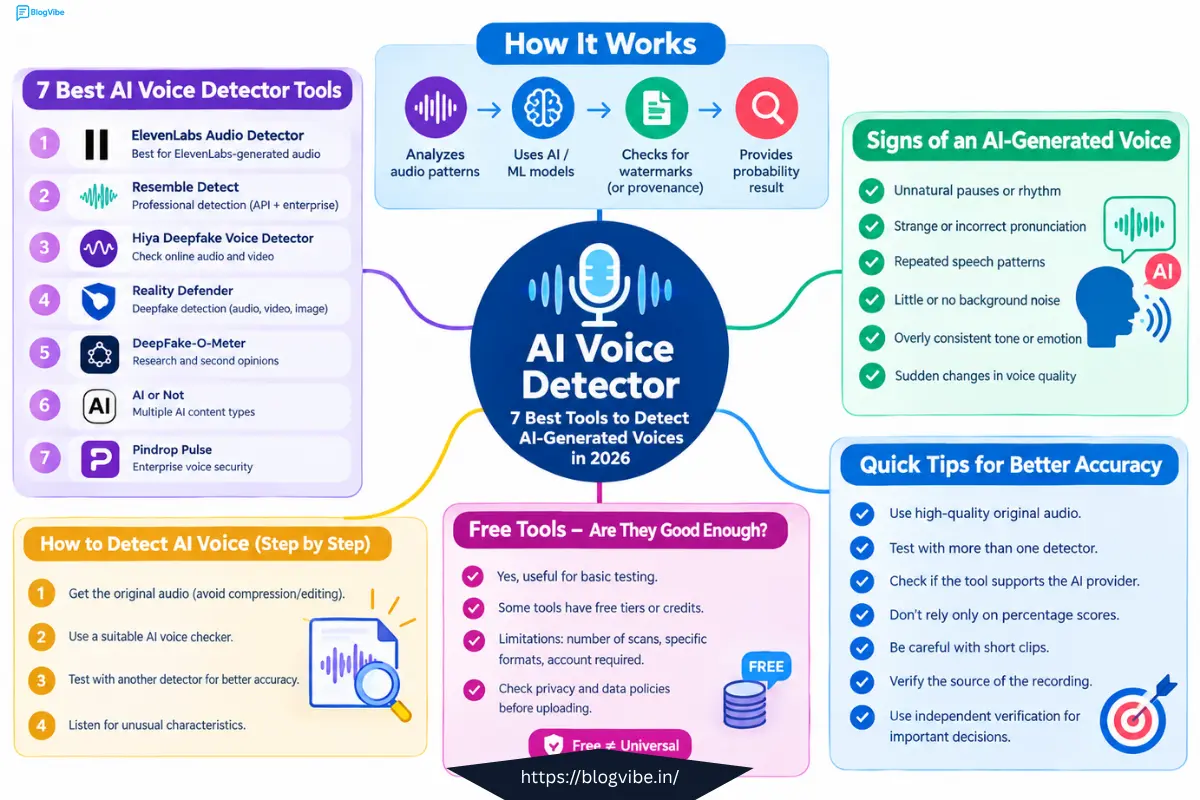
This is where an AI voice detector can help.
AI voice detection tools analyze audio and look for signals associated with synthetic or manipulated speech. Some tools use machine-learning models, while others can check for specific digital watermarks or provenance signals.
In this guide, we will look at 7 AI voice detector tools, including free options, explain how they work, and show you how to check whether a voice may have been generated by AI.
What Is an AI Voice Detector?
An AI voice detector is software designed to analyze speech or audio and estimate whether it was generated or manipulated using artificial intelligence.
Depending on the tool, detection can involve analyzing characteristics of the audio or checking for a watermark associated with a particular AI voice provider.
An AI voice detector may be useful for identifying:
- AI-generated speech
- Synthetic voices
- Voice cloning
- Deepfake audio
- AI voiceovers
- Manipulated recordings
- AI-generated audio
However, not every detector can identify every AI-generated voice. Some tools are designed specifically for particular AI platforms.
For example, ElevenLabs’ Audio Detector checks for its own watermark and can use its AI Speech Classifier when a watermark is not found.
7 Best AI Voice Detector Tools in 2026
Here are seven tools you can consider when you need to detect AI-generated voices.
| Tool | Best For | Free Option |
| ElevenLabs Audio Detector | ElevenLabs-generated audio | Yes |
| Resemble Detect | Professional detection | Limited/free options |
| Hiya Deepfake Voice Detector | Online audio and video | Yes |
| Reality Defender | Deepfake detection | Free tier |
| DeepFake-O-Meter | Research and second opinions | Yes |
| AI or Not | Multiple AI content types | Free credits |
| Pindrop Pulse | Enterprise voice security | Mainly business-focused |
1. ElevenLabs Audio Detector
ElevenLabs is one of the major AI voice-generation platforms, and it also provides an Audio Detector.
The tool can check for imperceptible watermarks in supported ElevenLabs-generated audio. ElevenLabs says the detector is available free to signed-in users.
Key Features
- Audio analysis
- ElevenLabs watermark detection
- AI speech classification
- Free access for signed-in users
- Designed specifically around ElevenLabs-generated audio
Important Limitation
The tool is not a universal AI voice detector.
ElevenLabs states that its Audio Detector cannot detect watermarks from other AI platforms. Its older Speech Classifier also has limitations with newer ElevenLabs models.
Best for: Checking whether suspicious audio may have been generated using ElevenLabs.
2. Resemble Detect
Resemble Detect is designed for professional AI detection and deepfake analysis.
The platform can analyze audio, video, and images and is aimed at developers, organizations, and security teams.
Key Features
- Audio deepfake detection
- Video detection
- Image detection
- API access
- Real-time detection capabilities
- Enterprise options
- Multiple language support
Resemble is more suitable for businesses and developers than someone who simply wants to check one short audio clip.
Best for: Developers, companies, security teams, and professional AI detection workflows.
3. Hiya Deepfake Voice Detector
Hiya provides a browser-based solution for detecting potentially AI-generated voices.
Its Deepfake Voice Detector is available as a Chrome extension and can be used to analyze voices in online audio and video.
How to Use It
- Install the Chrome extension.
- Open the audio or video you want to check.
- Run the detector.
- Review the detection result.
This can be particularly convenient when the suspicious voice is already inside an online video.
Best for: People who want to check voices while browsing online content.
4. Reality Defender
Reality Defender is a deepfake detection platform that supports multiple types of media, including audio, video, and images.
Its RealScan platform allows users to submit media for analysis and receive detection results.
The company also provides API access for developers, including a free tier.
Features
- AI voice detection
- Audio deepfake detection
- Video detection
- Image detection
- API access
- Real-time detection products
- Developer options
Best for: Developers, businesses, and users who need broader deepfake detection.
5. DeepFake-O-Meter
DeepFake-O-Meter is a research-focused platform developed by the University at Buffalo’s Media Forensics Lab.
It uses multiple research-based detection methods to analyze media.
One advantage of using multiple models is that you can compare their results instead of relying on one detection system.
For example:
| Detector | Result |
| Model A | Likely AI |
| Model B | Uncertain |
| Model C | Likely AI |
If different systems disagree, that uncertainty is important to consider.
Best for: Researchers, journalists, students, and users who want another opinion.
6. AI or Not
AI or Not is a multi-purpose AI detection platform that supports different types of content, including audio.
It can be useful when you want to investigate more than just a voice recording.
Features
- AI voice detection
- AI image detection
- AI video detection
- AI text detection
- API access
- Free starting credits
The platform uses a credit-based system, so users should check its current limits before processing large amounts of audio.
Best for: Users who want one platform for multiple types of AI-generated content.
7. Pindrop Pulse
Pindrop approaches AI voice detection from a security and fraud-prevention perspective.
Its technology is particularly relevant to organizations dealing with voice communications, authentication, and contact-center security.
Common Use Cases
- Call centers
- Financial institutions
- Voice authentication
- Fraud prevention
- Enterprise security
- Synthetic voice detection
Best for: Businesses and organizations dealing with high-risk voice communications.
AI Voice Detector Comparison
Different tools are designed for different situations.
| Situation | Tool to Consider |
| Suspected ElevenLabs audio | ElevenLabs Audio Detector |
| Online video or audio | Hiya |
| Professional API detection | Resemble Detect |
| General deepfake investigation | Reality Defender |
| Research and second opinion | DeepFake-O-Meter |
| Multiple types of AI content | AI or Not |
| Enterprise voice security | Pindrop Pulse |
There is no single detector that is perfect for every type of AI-generated voice. The appropriate tool depends on the audio source and what you are trying to verify.
How to Detect AI Voice
You can follow a simple process when investigating suspicious audio.
Step 1: Get the Original Audio
Try to use the original audio file whenever possible.
Avoid using a recording that has already been compressed, edited, or recorded again through another device.
Audio quality can affect detection results.
Step 2: Use an AI Voice Checker
Choose a detector that matches the situation.
For example:
- ElevenLabs audio: ElevenLabs Audio Detector
- Online video: Hiya
- General deepfake analysis: Reality Defender
- Research-based analysis: DeepFake-O-Meter
Step 3: Check the Audio With Another Tool
If the result is important, use a second detector.
For example, if the first tool says the recording is probably AI-generated, test the same original file with another service.
This can provide additional context.
Step 4: Listen for Unusual Characteristics
You can also listen carefully for possible clues.
Pay attention to:
- Unnatural pauses
- Strange pronunciation
- Unusual breathing
- Repeated speech patterns
- Unnatural emotional delivery
- Sudden changes in voice quality
- Unusual background sounds
- Inconsistent pronunciation
These are only clues and should not be considered conclusive evidence.
Can AI Voice Detectors Be Wrong?
Yes.
An AI voice detector can produce both false positives and false negatives.
A false positive happens when real human speech is incorrectly classified as AI-generated.
A false negative happens when AI-generated speech is incorrectly classified as human.
Results can be affected by:
- Background noise
- Audio compression
- Short recordings
- Different languages
- Accents
- Voice generators
- Audio editing
- Telephone recordings
- Re-recorded audio
For this reason, you should not treat one detector’s result as absolute proof.
If an audio recording is important, compare multiple sources of evidence.
How to Check If a Voice Is AI-Generated Without a Detector
You can perform some basic checks manually.
Listen for Breathing
Human speech normally contains natural variations in breathing.
Some synthetic voices may have unusual or overly consistent breathing patterns.
Check Emotional Delivery
Human speakers naturally change their pitch, speed, volume, and emphasis.
Synthetic speech can sometimes sound unusually consistent.
Listen to Difficult Words
Pay special attention to:
- Names
- Technical terms
- Foreign words
- Numbers
- Abbreviations
AI voices can sometimes pronounce unusual words differently from a real speaker.
Pay Attention to Pauses
Natural human speech contains irregular pauses and changes in rhythm.
Unusual timing can sometimes provide a clue that audio is synthetic.
However, modern AI voices can sound extremely realistic, so manual listening alone is not a reliable detection method.
AI Voice Detector Free: Are Free Tools Good Enough?
Free AI voice detectors can be useful for basic testing.
Some tools provide free access, free scans, or free credits. For example, ElevenLabs provides its Audio Detector to signed-in users, while Reality Defender provides a free developer tier.
However, free tools can have limitations.
A free detector may:
- Limit the number of scans
- Support only certain audio formats
- Require an account
- Detect only specific AI providers
- Provide limited analysis
- Restrict API usage
Before uploading sensitive audio, check the service’s privacy and data-handling policies.
AI Voice Detector vs AI Voice Checker
You may see both terms while researching AI audio detection.
An AI voice detector generally refers to software that attempts to determine whether speech is AI-generated.
An AI voice checker is a broader phrase that can refer to tools used to analyze or verify synthetic speech.
For SEO purposes, both phrases are useful because people may use different search terms when looking for the same type of tool.
Tips for Better AI Voice Detection
Follow these tips when checking suspicious audio:
- Use the highest-quality original recording available.
- Test the audio with more than one detector when possible.
- Check whether the detector supports the suspected AI provider.
- Do not treat a percentage score as absolute proof.
- Be cautious with very short audio clips.
- Avoid relying only on manual listening.
- Check the source of the recording.
- Verify important claims through another trusted source.
- Review the privacy policy before uploading sensitive recordings.
Frequently Asked Questions
What is the best AI voice detector in 2026?
There is no single detector that works best for every situation. ElevenLabs is particularly relevant for checking supported ElevenLabs-generated audio, while Resemble Detect and Reality Defender are designed for broader professional detection workflows.
Is there a free AI voice detector?
Yes. Several services provide free access or free tiers. Examples include ElevenLabs Audio Detector, Hiya’s browser-based detector, and Reality Defender’s developer offering.
How can I detect an AI voice for free?
Start with a free AI voice detector and upload the original audio when supported. If the result is important, check the recording with another detector and compare the results.
Can an AI voice detector detect every AI-generated voice?
No. Different detectors have different capabilities. Some are designed for particular AI voice platforms, while others attempt to detect a broader range of synthetic audio.
How accurate are AI voice detectors?
Accuracy varies depending on the tool, audio quality, AI generator, language, recording conditions, and other factors. A detector result should therefore be treated as an indication rather than guaranteed proof.
How do I detect AI voice without software?
You can listen for unusual pauses, pronunciation, breathing, emotional delivery, and speech patterns. However, modern AI voices can be very realistic, so manual detection alone is not reliable.
What should I do if an AI detector says a real voice is AI?
Do not immediately assume that the recording is fake. Test the original recording with another detector, check its source, and independently verify the speaker or event.
Conclusion
AI-generated voices are becoming increasingly realistic, making it harder to identify synthetic speech by listening alone.
An AI voice detector can provide useful information when you need to investigate suspicious audio, but no single tool should automatically be treated as definitive proof.
For ElevenLabs-related audio, ElevenLabs’ own detector can be useful. For broader detection, tools such as Resemble Detect and Reality Defender offer more advanced options. Research-focused platforms such as DeepFake-O-Meter can also provide another perspective.
The best approach is to combine detector results with the original audio, source information, and independent verification.
If you want to check suspicious audio, start with a suitable AI voice detector free option, compare the result with another tool, and investigate the source before making an important decision.
READ MORE:
10 Best AI Photo Editing Tools in 2026: Free AI Photo Editors Compared

