
Want to edit photos like a professional without spending hours learning complicated software? AI photo editing tools can now remove objects, change backgrounds, improve blurry images, retouch portraits, expand images, and make product photos look professional in just a few clicks.
In 2026, the biggest challenge isn’t finding an AI photo editor—it’s choosing the right one for your specific job.
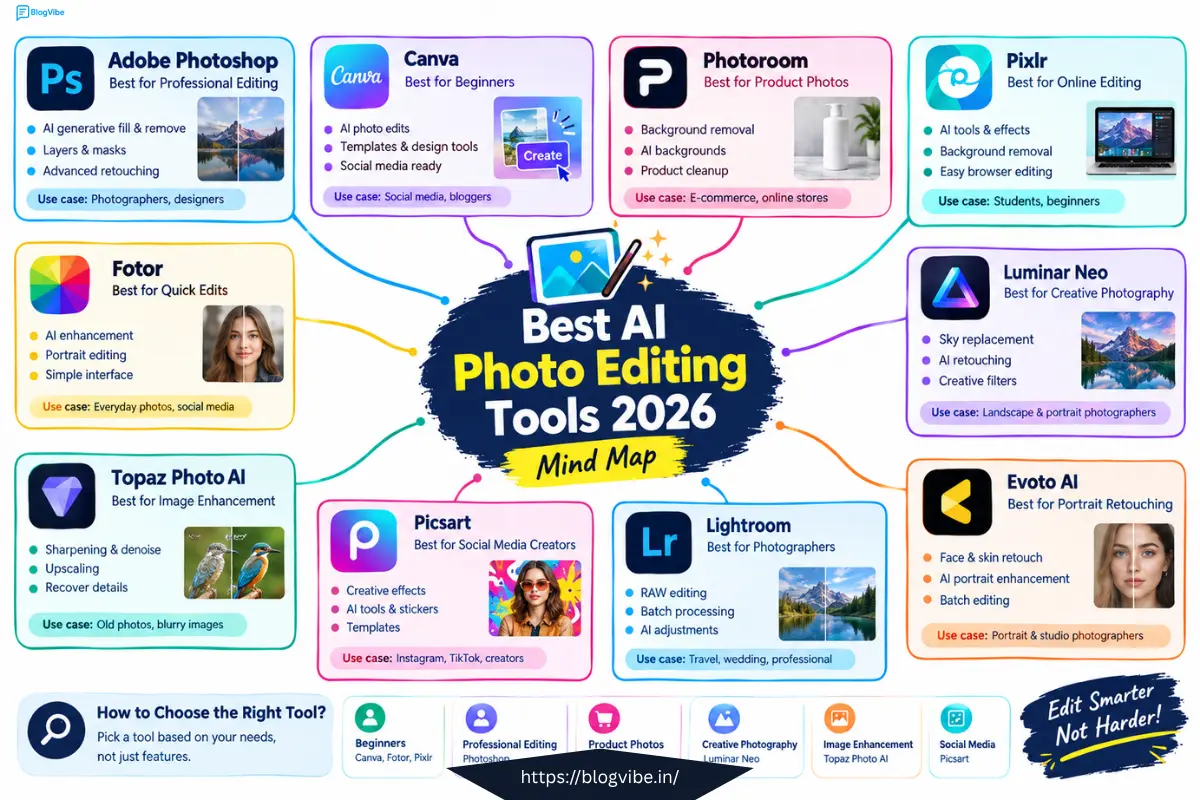
Some tools are designed for professional editing, while others are better for social media, e-commerce, portraits, image enhancement, or quick edits.
In this guide, we’ll compare the 10 best AI photo editing tools in 2026, their key features, ideal use cases, and free options.
What Is an AI Photo Editor?
An AI photo editor uses artificial intelligence to automate or simplify common photo-editing tasks.
Instead of manually selecting an object, adjusting dozens of settings, or creating complicated masks, you can often tell the tool what you want and let AI handle the difficult part.
Common AI photo-editing features include:
- Background removal
- Object removal
- Generative fill
- Image expansion
- Portrait retouching
- AI upscaling
- Noise reduction
- Lighting correction
- Background replacement
- Product photo enhancement
- Automatic image adjustments
Modern AI editors have moved far beyond simple filters. Current 2026 comparisons show that tools now target different workflows, from professional retouching and RAW photography to e-commerce and quick browser-based editing.
10 Best AI Photo Editing Tools in 2026
Here are the tools we’ll cover:
| AI Photo Editor | Best For | Free Option |
| Adobe Photoshop | Professional editing | Limited |
| Canva | Beginners & social media | Yes |
| Photoroom | Product photos | Yes |
| Pixlr | Online editing | Yes |
| Fotor | Quick AI editing | Yes |
| Luminar Neo | Creative photography | Limited |
| Topaz Photo AI | Image enhancement | Trial/paid |
| Picsart | Social media & creative edits | Yes |
| Adobe Lightroom | Photographers & RAW editing | Limited |
| Evoto AI | Portrait & professional retouching | Limited |
1. Adobe Photoshop – Best for Professional AI Photo Editing
Adobe Photoshop remains one of the most powerful choices if you need detailed control over your images.
Its AI-powered features can help with tasks such as adding or removing content, extending images, and making generative edits while still giving you access to Photoshop’s traditional layers, selections, masks, and editing tools.
Recent 2026 comparisons continue to highlight Photoshop’s combination of AI capabilities and professional editing controls.
Best for
- Professional photographers
- Graphic designers
- Digital artists
- Agencies
- Advanced photo retouching
Pros
- Powerful professional editing tools
- AI-assisted editing
- Layers and masks
- Advanced retouching
- Suitable for complex projects
Cons
- Learning curve
- Subscription required for many users
- Can be overwhelming for beginners
Best choice if: You want maximum control over your photos.
2. Canva – Best AI Photo Editor for Beginners
Canva is a great option if you don’t want to learn complicated photo-editing software.
Its AI-powered features can help users make quick edits while also creating social posts, thumbnails, presentations, advertisements, and other designs.
That makes Canva particularly useful for content creators and small businesses.
Best for
- Beginners
- Instagram posts
- YouTube thumbnails
- Blog images
- Marketing graphics
Pros
- Easy interface
- Browser-based
- Templates
- AI-powered editing features
- Useful for complete designs
Cons
- Advanced photo editing is more limited than Photoshop
- Some features require a paid plan
Recent 2026 comparisons consistently identify Canva as a beginner-friendly option for fast AI-assisted editing.
Best choice if: You want to edit a photo and immediately turn it into social media content.
3. Photoroom – Best AI Photo Editor for Product Photos
If you sell products online, Photoroom deserves special attention.
The platform is built around product photography workflows, including background removal, image cleanup, AI backgrounds, shadows, and product presentation.
This makes it particularly useful for e-commerce sellers.
Best for
- Amazon sellers
- Shopify stores
- Dropshipping
- Product catalogs
- Marketplace listings
Example
Imagine you photograph a product on your bedroom table.
Instead of manually removing the table and creating a clean background, an AI photo editor can help isolate the product and create a more professional-looking image.
Pros
- Product-focused tools
- Background removal
- AI backgrounds
- Useful for e-commerce
Cons
- Not designed to replace a full professional editor
2026 reviews specifically highlight Photoroom for e-commerce and product-photo workflows.
4. Pixlr – Best Online AI Photo Editor
Pixlr is a browser-based photo editor that gives users access to both traditional editing and AI-assisted features.
It’s useful when you want to edit images without installing large desktop software.
Best for
- Students
- Beginners
- Bloggers
- Casual photo editing
- Quick online edits
Features
- AI image editing
- Background removal
- Object-related editing
- Filters
- Image adjustments
- Browser-based editing
Why use Pixlr?
If Photoshop feels too complicated but you still want more editing control than a basic design tool, Pixlr can be a useful middle ground.
Current 2026 comparisons continue to include Pixlr among the more accessible browser-based AI photo editors.
5. Fotor – Best for Quick AI Photo Editing
Fotor combines traditional photo editing with AI-powered features.
It can be useful for people who want quick improvements without spending a lot of time manually adjusting every part of an image.
Best for
- Quick photo enhancement
- Portrait editing
- Social media images
- Creative edits
- Beginners
Pros
- Simple interface
- AI editing features
- Online access
- Useful for everyday edits
Cons
- Advanced users may want more control
Best choice if: You want quick edits without a complicated workflow.
6. Luminar Neo – Best for Creative Photography
Luminar Neo focuses heavily on AI-assisted photography.
It’s particularly interesting for photographers who want to make significant improvements to landscapes, portraits, lighting, skies, and other creative elements.
Best for
- Landscape photographers
- Portrait photographers
- Creative photography
- Sky replacement
- AI-assisted retouching
Recent 2026 comparisons highlight Luminar Neo for photographers who want AI assistance without relying entirely on Adobe’s ecosystem.
7. Topaz Photo AI – Best for Enhancing Low-Quality Photos
Sometimes you don’t need to completely redesign a photo.
You simply need to make a blurry, noisy, or low-resolution image look better.
That’s where dedicated AI enhancement tools can be useful.
Topaz Photo AI focuses on tasks such as:
- Sharpening
- Noise reduction
- Upscaling
- Recovering image detail
- Improving low-quality images
2026 comparisons frequently identify Topaz as a specialist option for image enhancement rather than general-purpose editing.
Example
You have an old family photo that looks blurry.
Instead of adding filters, an AI enhancement tool can attempt to improve its sharpness and resolution.
Best choice if: Your main problem is image quality rather than creative editing.
8. Picsart – Best for Social Media Creators
Picsart is popular among users who create visually creative content for social platforms.
It combines photo editing, effects, templates, AI features, and creative tools.
Best for
- Instagram creators
- TikTok creators
- Social media posts
- Creative portraits
- Trend-based edits
Pros
- Mobile-friendly workflow
- Creative effects
- AI features
- Social-media-focused tools
Cons
- Some advanced features require payment
9. Adobe Lightroom – Best for Photographers
Lightroom is different from Photoshop.
While Photoshop is excellent for detailed image manipulation, Lightroom is particularly useful for photographers who need to organize and edit large collections of photos.
AI-assisted features can help with tasks such as masking and automatic adjustments.
Best for
- Wedding photographers
- Travel photographers
- Professional photographers
- RAW image workflows
- Batch editing
Current 2026 comparisons distinguish Lightroom from Photoshop by emphasizing photography organization, RAW workflows, and batch editing.
10. Evoto AI – Best for AI Portrait Retouching
Evoto AI focuses heavily on portrait and professional photography workflows.
It’s useful when you need to retouch large numbers of portraits more efficiently.
Best for
- Portrait photographers
- Wedding photography
- Studio photography
- Professional retouching
If you regularly edit hundreds of portraits, specialized AI retouching software can save considerable manual work.
Best AI Photo Editing Tools Compared
| Tool | Best Use | Beginner Friendly | Main Strength |
| Photoshop | Professional editing | ⭐⭐⭐ | Advanced AI + control |
| Canva | Social media | ⭐⭐⭐⭐⭐ | Simplicity |
| Photoroom | Product photos | ⭐⭐⭐⭐⭐ | E-commerce |
| Pixlr | Online editing | ⭐⭐⭐⭐ | Browser editing |
| Fotor | Quick edits | ⭐⭐⭐⭐⭐ | Easy AI tools |
| Luminar Neo | Photography | ⭐⭐⭐⭐ | Creative AI |
| Topaz Photo AI | Image enhancement | ⭐⭐⭐⭐ | Upscaling & repair |
| Picsart | Social content | ⭐⭐⭐⭐⭐ | Creative editing |
| Lightroom | Photography | ⭐⭐⭐ | Photo workflow |
| Evoto AI | Portraits | ⭐⭐⭐⭐ | AI retouching |
How to Choose the Best AI Photo Editor
Don’t choose an AI photo editor simply because it has the most features.
Choose it based on what you actually need.
For beginners
Try:
Canva, Fotor or Pixlr
These are easier starting points for everyday editing.
For professional editing
Consider:
Adobe Photoshop
It’s more suitable when you need layers, masks, detailed selections, and advanced control.
For product photos
Try:
Photoroom
It’s designed around product-image workflows.
For blurry photos
Try:
Topaz Photo AI
Dedicated enhancement tools can be more appropriate when your main goal is improving image quality.
For photographers
Consider:
Lightroom or Luminar Neo
Both target photography workflows but approach editing differently.
Are Free AI Photo Editors Good Enough in 2026?
Yes, for many everyday tasks.
Free AI photo editors can be useful for:
- Removing backgrounds
- Making social media graphics
- Basic retouching
- Resizing images
- Simple enhancements
- Creating thumbnails
However, free plans often have limitations such as credits, watermarks, export restrictions, or limited AI features.
Several 2026 comparisons report that tools such as Canva, Pixlr, Fotor and Picsart offer usable free options, although the exact limits can change.
Tip: Always check the current free-plan limits before choosing a tool for regular commercial work.
AI Photo Editing vs Traditional Photo Editing
The biggest difference is automation.
Traditional editing
You may need to:
- Select an object manually
- Create a mask
- Adjust colors
- Remove unwanted areas
- Fix lighting
- Export the final image
AI editing
You may simply:
- Upload the image
- Select an AI feature
- Describe or choose the desired edit
- Review the result
- Export
AI doesn’t completely replace traditional editing. Instead, it can remove many repetitive steps and speed up the workflow.
5 Practical AI Photo Editing Tips
1. Start with a high-quality original
AI can improve an image, but a good original usually gives you more useful results.
2. Be specific with AI prompts
Instead of:
“Make this photo better.”
Try:
“Remove the person in the background and naturally reconstruct the wall behind them.”
Specific instructions usually give the AI a clearer editing goal.
3. Don’t over-edit faces
Heavy AI retouching can make skin look unnatural.
Keep important facial details and use moderate adjustments.
4. Check the background
AI-generated backgrounds can sometimes contain strange objects or unrealistic shadows.
Always inspect the final image before publishing.
5. Compare before and after
Don’t assume the AI version is automatically better.
Compare:
- Sharpness
- Skin texture
- Colors
- Background
- Lighting
- Object edges
Which AI Photo Editor Should You Try First?
There isn’t one tool that is perfect for everyone.
Your choice should depend on your workflow:
- Professional editing: Adobe Photoshop
- Beginners: Canva
- Product photography: Photoroom
- Online editing: Pixlr
- Quick edits: Fotor
- Creative photography: Luminar Neo
- Image enhancement: Topaz Photo AI
- Social media: Picsart
- Photography workflow: Lightroom
- Portrait retouching: Evoto AI
The AI photo-editing market is increasingly divided into specialized workflows rather than one tool doing everything equally well.
Frequently Asked Questions
What is the best AI photo editor in 2026?
The right AI photo editor depends on your requirements. Photoshop is designed for advanced professional editing, while Canva is easier for beginners and Photoroom is focused on product photography.
What is the best free AI photo editor online?
Several tools provide free AI editing options, including Canva, Pixlr, Fotor and Picsart. However, free features and usage limits can change, so check the current plan before relying on a tool.
What is the best AI photo editor for beginners?
Canva is a practical starting point for beginners because its interface combines simple design tools with AI-assisted editing features.
Which AI photo editor is best for product photos?
Photoroom is specifically designed around product-photo workflows such as background removal, product cleanup, AI backgrounds and catalog creation.
What is the best AI tool to enhance blurry photos?
Dedicated enhancement software such as Topaz Photo AI is designed for tasks including sharpening, denoising and upscaling low-quality images.
Can AI edit photos from text prompts?
Yes. Modern AI editing tools increasingly support prompt-based editing, allowing users to describe changes such as removing an object, changing part of an image or expanding the canvas.
Are AI photo editors safe for private photos?
Privacy policies and processing methods differ between tools. Before uploading sensitive photos, check whether images are processed locally or uploaded to cloud servers and how long they are retained.
Final Verdict: Which AI Photo Editing Tool Is Right for You?
AI photo editing has become much more accessible in 2026.
You no longer need to spend hours learning complicated editing techniques just to remove a background, improve an image, or create a professional product photo.
The important thing is to choose a tool based on your actual requirement.
Need professional control? Try Photoshop.
Need something simple? Start with Canva.
Selling products online? Try Photoroom.
Need to improve blurry images? Look at Topaz Photo AI.
Want browser-based editing? Try Pixlr.
Start with the tool that matches your workflow, test it on a few real images, and then decide whether you need a paid plan.
Ready to make your photos better with AI? Pick one tool from this list and edit your first image today.

