
Creating a good YouTube thumbnail used to mean spending hours in Photoshop or hiring a designer. Today, an AI thumbnail maker can help you create eye-catching thumbnail concepts much faster.
Whether you run a gaming channel, education channel, AI channel, kids channel, vlog, or Shorts channel, you can use AI to generate ideas, create visuals, improve layouts, and build thumbnails without advanced design skills.
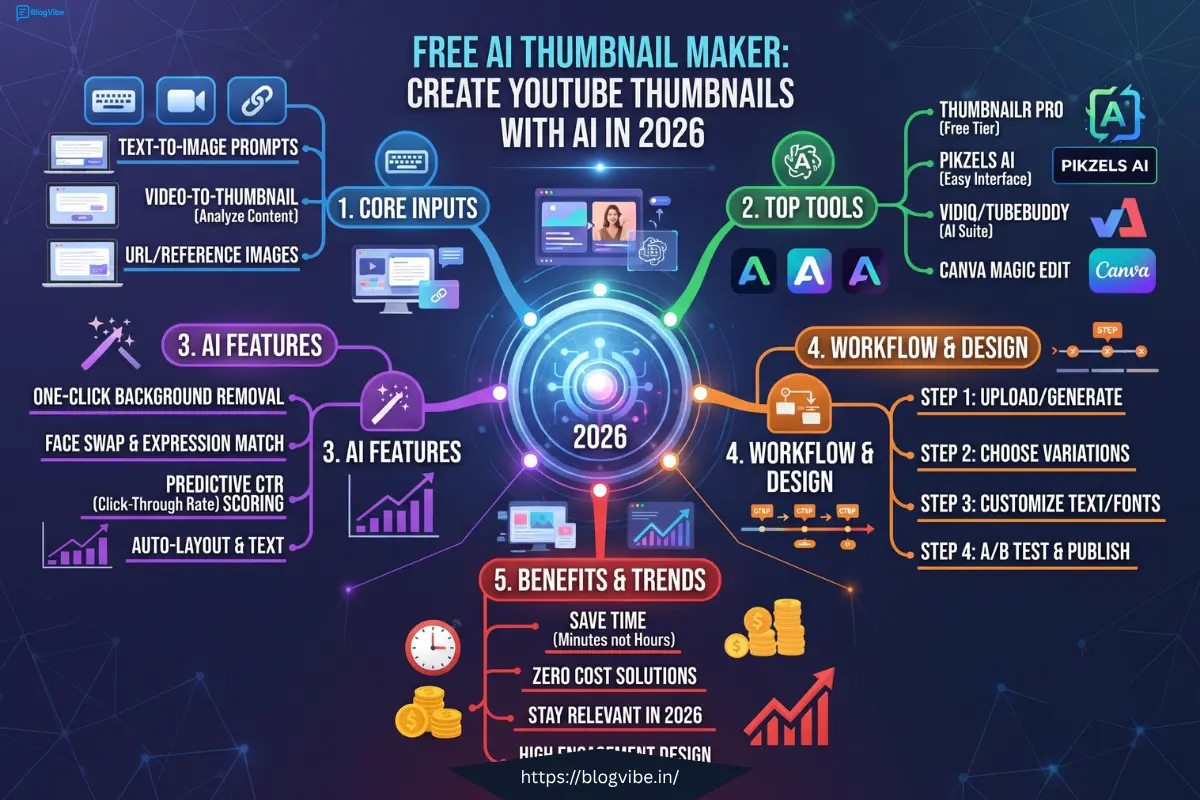
In this guide, you’ll learn how to make YouTube thumbnails with AI, which keywords to target, what makes a good thumbnail, and how to create a professional-looking thumbnail for free.
What Is a Free AI Thumbnail Maker?
A free AI thumbnail maker is an online tool that uses artificial intelligence to help create YouTube thumbnail designs.
Instead of manually designing everything from scratch, you can give the AI a description such as:
“Create a dramatic YouTube thumbnail about the 10 best AI tools for small businesses.”
The tool can then help generate the visual concept, background, subject placement, colors, and other design elements.
Some tools also provide templates and drag-and-drop editing, while AI-powered features can help generate images and other media.
This makes AI thumbnail tools especially useful for beginners and creators who publish videos frequently.
Why Use an AI Thumbnail Maker for YouTube?
Your thumbnail is one of the first things viewers see when they discover your video.
YouTube recommends making thumbnails easy to understand, visually clear, and representative of the video’s actual content. It also recommends avoiding overly complicated designs and using readable text when text is included.
Here are some practical benefits of using AI.
1. Create Thumbnails Faster
Traditional thumbnail design can take considerable time.
With AI, you can start with a simple prompt and quickly develop a thumbnail concept.
2. No Advanced Design Skills Required
You don’t need to be a professional Photoshop user.
Many AI and online thumbnail tools provide templates, automated design features, or simple editors.
3. Generate New Ideas
Sometimes the biggest problem isn’t designing the thumbnail—it’s knowing what the thumbnail should look like.
AI can help brainstorm:
- Thumbnail concepts
- Visual styles
- Background ideas
- Text ideas
- Character or subject placement
- Color combinations
- Different compositions
4. Create Multiple Versions
Instead of creating one thumbnail and immediately publishing it, create several concepts.
YouTube now provides creators with tools for testing multiple title and thumbnail combinations on eligible long-form videos. Its current A/B testing feature can compare up to three combinations and evaluates them using watch-time share.
How to Make YouTube Thumbnails with AI
Creating a thumbnail with AI doesn’t have to be complicated.
Follow this simple workflow.
Step 1: Choose Your Video Topic
Start with the actual topic of your video.
For example:
Video topic:
“10 Best AI Tools for Small Business”
Don’t create a thumbnail that promises something completely different.
YouTube specifically advises creators to make titles and thumbnails accurately represent the content rather than using misleading or clickbait designs.
Step 2: Write an AI Thumbnail Prompt
Your prompt should explain the subject, mood, composition, and visual style.
Example Prompt
Create a professional YouTube thumbnail for a video about the 10 best AI tools for small businesses. Show a modern business owner using AI tools on a laptop, futuristic AI interface in the background, strong facial expression, clean composition, high contrast, professional technology style, 16:9 layout.
The more clearly you describe the desired visual, the easier it becomes to get a useful starting point.
Step 3: Generate the Thumbnail
Enter your prompt into your preferred AI image or thumbnail tool.
Generate several versions instead of stopping at the first result.
For example:
- Version 1: Person-focused
- Version 2: Product-focused
- Version 3: Text-focused
- Version 4: Minimal design
You can then choose the concept that best matches your video.
Step 4: Add Short Thumbnail Text
AI-generated images may look impressive, but your thumbnail still needs to communicate the video’s idea quickly.
Instead of writing:
“10 Best Artificial Intelligence Tools That Every Small Business Owner Should Know About in 2026”
use something shorter:
“10 AI TOOLS”
or:
“BEST AI TOOLS”
Keep the important words easy to read.
Step 5: Check the Thumbnail on Mobile
A thumbnail that looks great on a large computer screen may become difficult to understand on a phone.
YouTube recommends making thumbnails large enough and notes that thumbnails appear differently across devices.
Before publishing, check:
- Is the main subject obvious?
- Can you read the text?
- Is the background too busy?
- Does the thumbnail match the video?
- Does it still look good when displayed small?
What Size Should a YouTube Thumbnail Be?
For standard YouTube videos, YouTube currently recommends a 16:9 aspect ratio and supports high-resolution custom thumbnails. Its current guidance recommends 3840 × 2160 pixels for videos, with a minimum width of 640 pixels.
| Content | Recommended Ratio |
| YouTube Video | 16:9 |
| YouTube Shorts | 9:16 |
| Standard YouTube Thumbnail | 16:9 |
| Shorts Thumbnail | 9:16 |
For a regular YouTube video, 1280 × 720 pixels is also a practical working size because it maintains the 16:9 ratio.
What Makes a Good AI YouTube Thumbnail?
Generating an image is only the first step.
A useful thumbnail should communicate the video’s idea quickly.
Keep the Main Subject Clear
Don’t put 10 different objects into one thumbnail.
Focus on one main idea.
For example:
AI Tools Video
Use:
- One person
- One laptop
- AI visual elements
- Short text
Instead of filling the entire image with unrelated objects.
Use Strong Visual Contrast
The subject should stand out from the background.
You can experiment with:
- Light vs dark
- Large vs small
- Simple vs detailed
- Close-up vs wide shot
Keep Text Short
Your thumbnail isn’t the place for a paragraph.
Try phrases such as:
- “BEST AI TOOLS”
- “AI TRICKS”
- “FREE AI”
- “NEW AI TOOL”
- “AI FOR BUSINESS”
Create Curiosity Without Misleading Viewers
A thumbnail can create curiosity, but it should still represent the actual video.
Misleading thumbnails can hurt the viewer experience, and YouTube advises creators to avoid deceptive or sensational thumbnails.
Free AI Thumbnail Maker vs Traditional Design
| Feature | AI Thumbnail Maker | Traditional Design |
| Speed | Fast | Usually slower |
| Design experience | Beginner-friendly | Often requires skills |
| Ideas | AI can generate concepts | You create concepts manually |
| Templates | Often available | Depends on software |
| Multiple versions | Easy to create | More time-consuming |
| Customization | Depends on tool | Usually extensive |
| Cost | Some tools have free options | Can require paid software |
The best approach can also be a combination: use AI to generate the visual concept and then manually refine the final thumbnail.
Best AI Tool for YouTube Thumbnails
There isn’t one tool that is perfect for every creator.
Your choice depends on what you need.
AI Image Generators
Useful when you want to create an original visual from a text prompt.
Online Thumbnail Editors
Useful when you want templates, text, layouts, and quick editing.
For example, Canva offers YouTube thumbnail templates, a drag-and-drop editor, and AI-powered content and media generation features.
YouTube’s Own AI Features
YouTube itself has introduced AI-assisted thumbnail suggestions through features such as Ask Studio and its Inspiration tools. These can generate thumbnail suggestions based on your video’s transcript, themes, or topic.
This means creators can now use AI both outside and inside the YouTube ecosystem.
5 AI Thumbnail Prompts You Can Copy
Here are some ready-to-use prompts.
1. AI Tools Thumbnail
Create a modern YouTube thumbnail about the best AI tools in 2026, futuristic AI interface, professional creator, laptop, dramatic lighting, clean composition, high contrast, 16:9.
2. Technology Video
Create a cinematic YouTube thumbnail about the future of artificial intelligence, glowing AI technology, futuristic city, dramatic lighting, strong visual contrast, professional YouTube thumbnail style, 16:9.
3. Tutorial Video
Create a clean YouTube thumbnail for an AI tutorial, laptop screen showing an AI interface, surprised creator, simple background, bold visual elements, professional design, 16:9.
4. Money/Business Video
Create a professional YouTube thumbnail about using AI for business, entrepreneurs working on laptop, AI graphics, modern office, energetic composition, high contrast, 16:9.
5. AI News Video
Create a breaking AI news YouTube thumbnail, futuristic artificial intelligence technology, dramatic background, shocked creator, large central subject, modern technology aesthetic, 16:9.
Common AI Thumbnail Mistakes to Avoid
Even the best AI thumbnail maker can’t fix a bad concept automatically.
Avoid these mistakes:
Too Much Text
Viewers should understand the idea quickly.
Overcrowded Design
Too many people, objects, icons, and words can make the thumbnail confusing.
Misleading Image
Don’t show something that isn’t actually covered in your video.
Tiny Text
Always check how your thumbnail looks at a small size.
Generic AI Images
If every thumbnail on your channel looks identical, your videos may become difficult to distinguish.
Create a consistent visual identity while changing the main concept for each video.
Ignoring YouTube Policies
YouTube’s thumbnail policies prohibit certain content, including sexually explicit material, hate speech, violence, and harmful or dangerous content. The platform also prohibits deceptive impersonation through thumbnails.
How to Improve Your Thumbnail After Publishing
Don’t assume your first thumbnail is automatically your final thumbnail.
Look at your YouTube Analytics and evaluate how viewers respond.
YouTube recommends examining click-through rate for relevant surfaces such as Home and Suggested, particularly during the first 24 hours for videos with sufficient impressions.
If your thumbnail isn’t performing as expected, you can test a different design.
For eligible videos, YouTube’s current A/B testing feature lets creators compare up to three title and thumbnail combinations.
Try changing one major visual idea at a time so you can learn what works for your audience.
Free AI Thumbnail Maker: Is It Worth Using?
If you’re a beginner YouTube creator, an AI thumbnail maker can significantly simplify the design process.
You don’t need to spend hours creating every element manually.
A simple workflow is:
Video idea → AI prompt → Generate → Edit → Check on mobile → Upload → Analyze
The important thing is to remember that AI is a design assistant, not a replacement for understanding your audience.
Your thumbnail should always support the actual video.
Final Thoughts
A free AI thumbnail maker can make YouTube thumbnail creation faster and easier, especially if you’re not a professional designer.
Start with a clear video idea, create several AI concepts, keep your design simple, use short readable text, and make sure the thumbnail accurately represents your content.
YouTube also gives creators increasingly useful AI-assisted thumbnail and testing features, so there are more ways to experiment with your packaging than before.
Ready to create your next thumbnail? Pick one of the prompts above, generate 3–5 concepts, customize your favorite design, and test how your audience responds.
Frequently Asked Questions
1. What is the best free AI thumbnail maker for YouTube?
The right tool depends on your workflow. Some tools focus on AI image generation, while others combine AI features with templates and editing. Canva, for example, provides YouTube thumbnail templates and AI-powered design features.
2. How can I create a YouTube thumbnail with AI?
Start by writing a prompt describing your video topic, subject, visual style, background, and composition. Generate several versions, select the strongest concept, add short readable text, and check the final design on mobile.
3. Can I use an AI thumbnail maker online for free?
Yes. Several online design platforms provide free thumbnail creation features, although some advanced AI features may require a paid plan. Always check the current tool’s pricing and usage limits before relying on it.
4. What size should an AI YouTube thumbnail be?
For standard YouTube videos, use a 16:9 layout. YouTube currently recommends high-resolution thumbnails and lists 3840 × 2160 pixels as its recommended video-thumbnail resolution.
5. How do I generate YouTube thumbnails using AI?
Write a detailed prompt, generate multiple designs, choose the most relevant concept, add or edit text, and make sure the final thumbnail accurately represents your video.
6. Can AI thumbnails increase YouTube views?
A thumbnail can affect how viewers respond when they see your video, but there is no guaranteed number of views from using AI. YouTube recommends analyzing metrics such as click-through rate and experimenting with titles and thumbnails.
7. Can I use AI-generated thumbnails on YouTube?
Yes, provided the thumbnail follows YouTube’s applicable policies and doesn’t contain prohibited or deceptive material. YouTube’s thumbnail policies apply to custom thumbnail images.
READ MORE:
WayinVideo YouTube Thumbnail Maker: Create AI Thumbnails for Free 2026

