
Want to turn a written script into a realistic voice without recording yourself?
The ElevenLabs AI Voice Generator makes it possible to convert text into natural-sounding speech in just a few steps. You can choose an existing AI voice, create a voice with Voice Design, generate narration for videos, and use text-to-speech for different types of content.
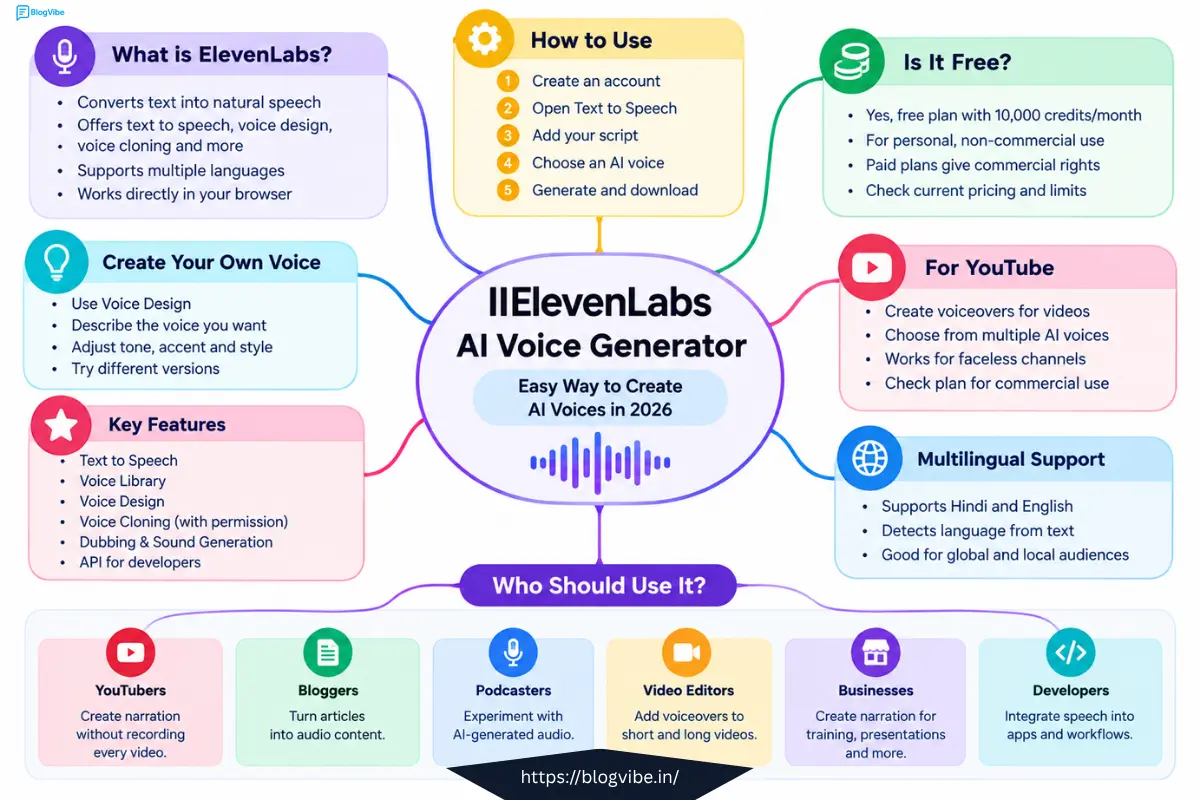
Whether you are a YouTuber, blogger, podcaster, video editor, student, or business owner, ElevenLabs can help you create professional-sounding voiceovers without traditional recording equipment.
In this guide, you will learn how to use ElevenLabs AI Voice Generator, what you can do with the free plan, how ElevenLabs text to speech works, and how to create better AI voiceovers in 2026.
Click hare:
Try ElevenLabs AI Voice Generator
What Is ElevenLabs AI Voice Generator?
ElevenLabs AI Voice Generator is an AI-powered voice platform that converts written text into spoken audio.
Instead of recording your own voice, you can write a script, select an AI voice, generate the audio, and use the result in your content according to the terms of your plan.
The platform includes several audio-related tools, including:
- Text to speech
- AI voice generation
- Voice Library
- Voice Design
- Voice cloning
- Dubbing
- Sound generation
- API access
- Multilingual speech generation
The main feature for beginners is Text to Speech.
For example, if you have this script:
Artificial intelligence is changing the way we create content. Today, anyone can turn a simple script into a professional voiceover.
You can enter the text into ElevenLabs and generate an AI narration.
How to Use ElevenLabs AI Voice Generator
Using ElevenLabs for text-to-speech is relatively simple.
Step 1: Create an ElevenLabs Account
First, create an account on ElevenLabs.
You can start with the free plan without immediately purchasing a subscription.
After logging in, you can access the available creative and voice-generation tools from your account.
Step 2: Open Text to Speech
Open the Text to Speech tool.
This is where you can enter your written script and convert it into spoken audio.
If you are creating a YouTube video, you could prepare your script first and then paste it into the Text to Speech editor.
Step 3: Add Your Script
Paste your script into the text box.
For example:
AI voice generators are changing video production. Instead of spending hours recording narration, creators can now generate voiceovers from a written script.
For better results, write your script in a conversational style.
Avoid making every sentence extremely long.
Instead of:
Artificial intelligence technology has significantly transformed the modern digital content production ecosystem.
Try:
AI is changing the way we create digital content.
The second version sounds more natural when spoken.
Step 4: Choose an AI Voice
Next, select a voice that matches your content.
The right voice depends on your audience and the type of video you are creating.
| Content Type | Suitable Voice Style |
| YouTube documentary | Calm and professional |
| Educational video | Clear and conversational |
| News-style content | Confident and serious |
| Storytelling | Expressive and emotional |
| Kids content | Friendly and energetic |
| Product video | Clear and persuasive |
| Podcast | Natural and conversational |
Do not choose a voice simply because it is popular.
Think about how your audience should feel when listening to your content.
How to Create an AI Voice With ElevenLabs
ElevenLabs also provides Voice Design, which can be useful when you want a voice that matches a specific description.
Instead of choosing an existing voice, you can describe the type of voice you want.
For example:
A friendly male narrator in his early 30s with a clear American English accent, medium-low pitch, conversational delivery, and an energetic but professional tone.
A detailed description gives you more control over the characteristics you want.
You can experiment with different descriptions until you find a voice suitable for your project.
ElevenLabs Text to Speech: How Does It Work?
ElevenLabs text to speech uses AI models to transform written text into spoken audio.
The basic process looks like this:
Written Script → Select Voice → Generate Speech → Review Audio → Use Audio
For example, a YouTube creator could write a 60-second script and convert it into a voiceover without recording their own voice.
The quality of the final result depends on several factors, including:
- The selected voice
- The writing style
- Punctuation
- Sentence length
- Pronunciation
- Voice settings
- The AI model being used
This is why simply copying a large article into a text-to-speech tool may not always produce the best result.
Is ElevenLabs AI Voice Generator Free?
Yes, ElevenLabs offers a free plan.
The current free plan provides 10,000 credits per month. However, free access does not mean that every type of usage is commercially licensed.
This distinction is important for creators.
The free plan is intended for personal, non-commercial use with attribution, while paid plans provide commercial usage rights according to the applicable plan terms.
If you are creating monetized YouTube videos, advertisements, client projects, or other commercial content, check the current licensing terms for your plan before publishing the generated audio.
ElevenLabs AI Voice Generator Free: What Can You Do?
The free plan can be useful for beginners who want to test AI voice generation before paying for a subscription.
You can use the available free credits to experiment with:
- Text to speech
- Different AI voices
- Voice generation
- Voice Design
- Short voiceovers
- Personal projects
The free allowance is limited, so it is better to test short scripts before generating a long project.
For example, if you are making a YouTube video, generate a short section first and listen to the result.
If the voice sounds good, continue with the rest of your script.
ElevenLabs Free vs Paid Plans
The main difference between free and paid plans is not simply the number of credits.
Commercial usage rights and higher limits are also important.
| Feature | Free Plan | Paid Plans |
| Text to Speech | Available | Available |
| Monthly credits | Limited | Higher limits |
| AI voices | Available | More options depending on plan |
| Voice Design | Available | Available |
| Commercial usage | Not included | Available according to plan |
| Higher usage limits | Limited | Available |
| Advanced features | Limited | More features |
| API access | Plan dependent | Higher limits depending on plan |
ElevenLabs pricing and features can change, so always check the current plan details before purchasing.
Click hare:
How to Get Better Results From ElevenLabs Text to Speech
Generating an AI voice is easy.
Generating a voiceover that sounds natural requires better scripting.
1. Write Conversational Scripts
Write your script the way you would actually speak.
Instead of:
In today’s article, we shall investigate the various advantages associated with artificial intelligence.
Try:
Today, we’re going to look at how AI can make your work easier.
The second version is easier for an AI voice to deliver naturally.
2. Use Punctuation Properly
Punctuation can help create natural pauses.
For example:
Today, we’re going to learn how AI voice generators work.
is easier to deliver naturally than:
Today we’re going to learn how AI voice generators work
Use commas, periods, question marks, and paragraph breaks where a human speaker would naturally pause.
3. Keep Sentences Reasonably Short
Long sentences can sometimes sound unnatural when converted to speech.
Instead of writing one sentence containing several ideas, divide it into two or three sentences.
This also makes your video script easier to edit.
4. Test Different Voices
Do not immediately generate your entire script.
Take a short paragraph and test it with two or three suitable voices.
Compare:
- Pronunciation
- Tone
- Speed
- Emotion
- Clarity
- Overall feel
Then choose the voice that works best for your audience.
How Many Characters Can ElevenLabs Generate?
The character limit depends on the plan and tool being used.
ElevenLabs documentation states that website Text to Speech generation supports up to 2,500 characters per generation on free plans and up to 5,000 characters on paid plans.
The monthly credit allowance is a separate limitation.
This means you should distinguish between:
Characters per generation
and
Total monthly credits.
For longer projects, ElevenLabs provides tools designed for working with longer-form content.
Can You Use ElevenLabs AI Voices on YouTube?
Yes, ElevenLabs voices can be used for YouTube content, but your plan’s licensing terms matter.
Paid plans provide commercial usage rights under their applicable terms.
The free plan is intended for personal, non-commercial use with attribution.
Therefore, if your YouTube channel is monetized or you are producing content for commercial purposes, check your current ElevenLabs plan before using the generated voice commercially.
This is especially important if you are creating:
- Monetized YouTube videos
- Client videos
- Advertisements
- Commercial podcasts
- Paid courses
- Promotional videos
ElevenLabs AI Voice Generator for YouTube
You can build a simple workflow around ElevenLabs for YouTube videos.
Step 1
Write your video script.
Step 2
Edit the script so it sounds conversational.
Step 3
Paste the script into ElevenLabs.
Step 4
Choose a suitable AI voice.
Step 5
Generate a short sample.
Step 6
Check pronunciation and pacing.
Step 7
Generate the complete narration.
Step 8
Import the audio into your video editor.
Step 9
Add visuals, background music, captions, and other elements.
Step 10
Review the complete video before publishing.
This can be particularly useful for faceless YouTube channels and educational videos.
ElevenLabs AI Voice Generator Online: Do You Need to Download Software?
For basic voice generation, you can use ElevenLabs through your web browser.
You do not need complicated audio software just to convert text into speech.
The browser-based workflow is useful for beginners because you can:
- Write your script
- Select a voice
- Generate audio
- Preview the result
- Manage your projects
Developers can also use ElevenLabs APIs when they want to integrate AI voice generation into applications or automated workflows.
Can ElevenLabs Clone a Voice?
ElevenLabs provides voice cloning technology.
However, voice cloning should only be used when you have the necessary permission to clone the voice.
You should never clone someone’s voice to impersonate them without authorization.
For legitimate use cases, voice cloning can be useful for creators who want to create content using their own voice or have appropriate permission from another speaker.
Does ElevenLabs Support Hindi?
Yes, ElevenLabs supports Hindi among its supported languages.
This can be useful if your audience is in India or if you create multilingual content.
However, voice quality can vary depending on the selected voice, language, pronunciation, and model.
For Hindi content, test a short paragraph before generating a complete video.
Pay particular attention to:
- Hindi pronunciation
- English words inside Hindi sentences
- Names
- Numbers
- Technical terms
If something sounds incorrect, rewrite the sentence or test another voice.
ElevenLabs AI Voice Generator Features
Here are some of the main features worth knowing about.
Text to Speech
Convert written scripts into AI-generated speech.
Voice Library
Browse and select from available AI voices for different types of content.
Voice Design
Describe the type of voice you want and generate voice options based on your description.
Voice Cloning
Create a digital version of a voice when you have the necessary permission and the feature is available under your plan.
Multilingual Speech
Generate speech in multiple supported languages, including Hindi and English.
API
Developers can integrate ElevenLabs technology into their own applications and workflows.
Who Should Use ElevenLabs AI Voice Generator?
ElevenLabs can be useful for many types of creators.
YouTubers
Create narration without recording every video manually.
Bloggers
Turn written articles into audio content.
Podcasters
Experiment with AI-generated narration and audio production.
Video Editors
Create voiceovers for short-form and long-form videos.
Businesses
Create narration for presentations, tutorials, training materials, and other projects subject to the applicable license.
Developers
Integrate AI speech into applications using available developer tools.
Pros and Limitations of ElevenLabs
Advantages
- Easy browser-based workflow
- Realistic AI voice generation
- Multiple voice options
- Voice Design
- Voice cloning capabilities
- Multilingual support
- Text-to-speech functionality
- Developer API options
- Useful for YouTube and other content workflows
Limitations
- Free credits are limited
- Commercial rights depend on your plan
- Some advanced features require paid plans
- AI pronunciation may occasionally require correction
- Voice quality can vary between voices and languages
- Pricing and feature limits can change
For the best results, always test your specific script before generating a large project.
Frequently Asked Questions
Is ElevenLabs AI Voice Generator free?
Yes. ElevenLabs has a free plan that currently provides 10,000 credits per month. The free plan is intended for personal, non-commercial use with attribution, while commercial usage rights are available with applicable paid plans.
How do I use ElevenLabs AI Voice Generator?
Create an account, open Text to Speech, enter your script, select an AI voice, generate the audio, and review the result. You can then use the audio according to the terms of your plan.
Is ElevenLabs text to speech free?
Yes. ElevenLabs provides Text to Speech access on its free plan with a limited monthly credit allowance.
Can I use ElevenLabs AI voice on YouTube?
Yes, but the applicable usage rights depend on your plan. Paid plans provide commercial usage rights according to their terms, while the free plan is intended for personal, non-commercial use with attribution.
Can I create my own AI voice with ElevenLabs?
Yes. ElevenLabs provides Voice Design for creating a voice from a description and also offers voice cloning capabilities subject to its requirements and applicable plan.
How many characters can ElevenLabs generate for free?
The current website Text to Speech limit is up to 2,500 characters per generation on the free plan. Your total monthly generation is also limited by your available credits.
Does ElevenLabs support Hindi?
Yes. Hindi is among the supported languages. However, pronunciation and voice quality can vary depending on the selected voice, model, and text, so testing a sample before generating a complete project is recommended.
Final Thoughts
The ElevenLabs AI Voice Generator makes it much easier to turn written scripts into natural-sounding AI voiceovers.
For beginners, the easiest way to start is with Text to Speech. Write a short script, select a suitable voice, generate a sample, and listen carefully to the pronunciation and pacing.
If you are creating YouTube videos, podcasts, tutorials, or other content, ElevenLabs can become part of a much faster production workflow.
However, always check your current plan’s credit limits and commercial usage rights before using generated audio for monetized or commercial projects.
If you are new to AI voice generation, start with a short 30–60 second script. Test different voices, improve your script, and then move on to longer projects.
The best way to understand ElevenLabs is to start creating and testing the voice with your own content.
READ MORE:
Free AI Thumbnail Maker: Create YouTube Thumbnails with AI in 2026

